TL;DR(Too Long; Did not Read)
Complete 2026 CTO tutorial for deploying Claude on Google Cloud's Gemini Enterprise Agent Platform (formerly Vertex AI). Architecture, code, costs, governance.
Claude with Google Cloud's Vertex AI for Enterprise AI: The Complete CTO Tutorial (2026)
Last Updated: May 31, 2026 | Fact-checked by: Agenticsis Agent Platform Practice | Reading time: 18 minutes
Quick Answer:
As of 2026, Google Cloud has consolidated Vertex AI and Agentspace into the Gemini Enterprise Agent Platform, where Claude Opus 4.7 (released April 15, 2026) is available as a documented partner model alongside 200+ other models. CTOs deploy Claude using the Agent Development Kit (ADK) or Agent CLI, wire in Agent Identity, Registry, Gateway, Simulation, Evaluation, and Observability for governance, and pay separately for tokens, runtime memory, and session execution rather than inference alone.
Free Blueprint
Need a CTO-level architecture review for Claude on Google Cloud?
Our team has deployed this exact stack across Swiss, EU, and Latin American enterprises. Get a working architecture in weeks, not months.
1 Foundations: Vertex AI, Claude, and the GCP control plane
- ✓Provision Claude through Vertex AI Model Garden in a dedicated GCP project with billing isolation and a documented quota request workflow.
- ✓Pin a model version explicitly (e.g., claude-sonnet-4 with a frozen revision) — never rely on "latest" tags in production paths.
- ✓Define 3 environments: sandbox, staging with synthetic traffic, and production behind VPC Service Controls.
- ✓Set per-environment quotas: cap tokens-per-minute and concurrent requests to prevent a single misconfigured agent from draining shared budget.
2 Identity, networking, and data residency
- ✓Pin the regional endpoint (europe-west6 for Switzerland, europe-west4 for the EU, southamerica-east1 for LATAM workloads) and document the data flow.
- ✓Enforce CMEK on all Vertex AI staging buckets and logging sinks using Cloud KMS keys you rotate every 90 days.
- ✓Bind workload identity from GKE or Cloud Run to dedicated service accounts — no JSON keys in containers, ever.
- ✓Wrap Claude endpoints with Private Service Connect so model traffic never traverses the public internet.
3 The agent runtime: orchestration that survives production
- ✓Define the orchestration spine Choose one: Vertex AI Agent Builder for managed flows, or a custom Cloud Run service when you need fine control over tool routing.
- ✓Separate planner, executor, and critic Three Claude calls with distinct system prompts beats one mega-prompt every time — and it makes evals tractable.
- ✓Persist conversation state in Firestore Use a single document per session with TTL, and never store raw PII without field-level encryption.
- ✓Cap tool-use loops at 8 iterations With a hard timeout of 60 seconds. Surface partial results rather than hanging the client.
4 Retrieval, grounding, and the knowledge layer
- ✓Reference retrieval stack — fill in your specifics:
- ✓Source systems → e.g., SharePoint, Confluence, Postgres, S3 mirrors
- ✓Ingestion cadence → e.g., incremental every 15 minutes via Cloud Workflows
- ✓Chunking strategy → e.g., 800-token semantic chunks with 120-token overlap
- ✓Embedding model → e.g., text-embedding-005 in the same region as Claude
- ✓Vector store → e.g., Vertex AI Vector Search or AlloyDB with pgvector
- ✓Reranker → e.g., cross-encoder rerank on top-50, return top-8 to Claude
5 Observability, evals, and cost control
- ✓Stream every Claude request to BigQuery with prompt hash, token counts, latency, tool calls, and user/tenant ID — partitioned by day.
- ✓Build a golden eval set of 80–150 cases covering happy paths, edge cases, and known regressions. Run it on every prompt or model change.
- ✓Track cost per successful outcome, not cost per token. A €0.04 query that resolves a ticket beats a €0.004 query that escalates.
- ✓Alert on three signals: P95 latency above 8s, tool-loop count above 5, and refusal rate spiking more than 2x baseline.
- ✓Set a monthly token budget per tenant with soft warnings at 70% and hard cutoffs at 100%, surfaced in the product UI — not in an email.
- ✓Capture human feedback inline with a 👍/👎 and a one-line reason. Pipe to BigQuery and review weekly with the product team.
Pro tip: Architecture reviews pay for themselves in week three. The teams that get to production fastest are not the ones with the best prompts. They are the ones who decided on residency, identity, eval strategy, and cost guardrails before writing application code. Reverse that order and you will rebuild twice.
Table of Contents
- 1. The 2026 Enterprise AI Landscape: What Changed
- 2. Why CTOs Choose Claude on Google Cloud
- 3. Reference Architecture for Claude on Gemini Enterprise Agent Platform
- 4. Choosing the Right Claude Model (Opus 4.7 vs 4.8)
- 5. Full Step-by-Step Implementation Tutorial
- 6. Enterprise Governance: Identity, Registry, Gateway
- 7. Evaluation, Simulation, and Observability
- 8. Pricing Model and Cost Optimization
- 9. Claude Code and Developer Workflow Integration
- 10. Five Enterprise Use Cases With Measurable Results
- 11. Common Pitfalls and How We Avoid Them
- 12. Frequently Asked Questions
1. The 2026 Enterprise AI Landscape: What Changed
If you last evaluated Claude on Google Cloud in 2024 or 2025, almost everything about the deployment surface has changed. At Google Cloud Next 2026, Google consolidated the legacy Vertex AI platform and Agentspace into a single product called the Gemini Enterprise Agent Platform, which RedMonk described as the marker of Google's shift into the "Agent Era" of enterprise AI [Source: https://redmonk.com/jgovernor/google-cloud-next-2026-the-agent-era-and-the-full-ai-stack/].
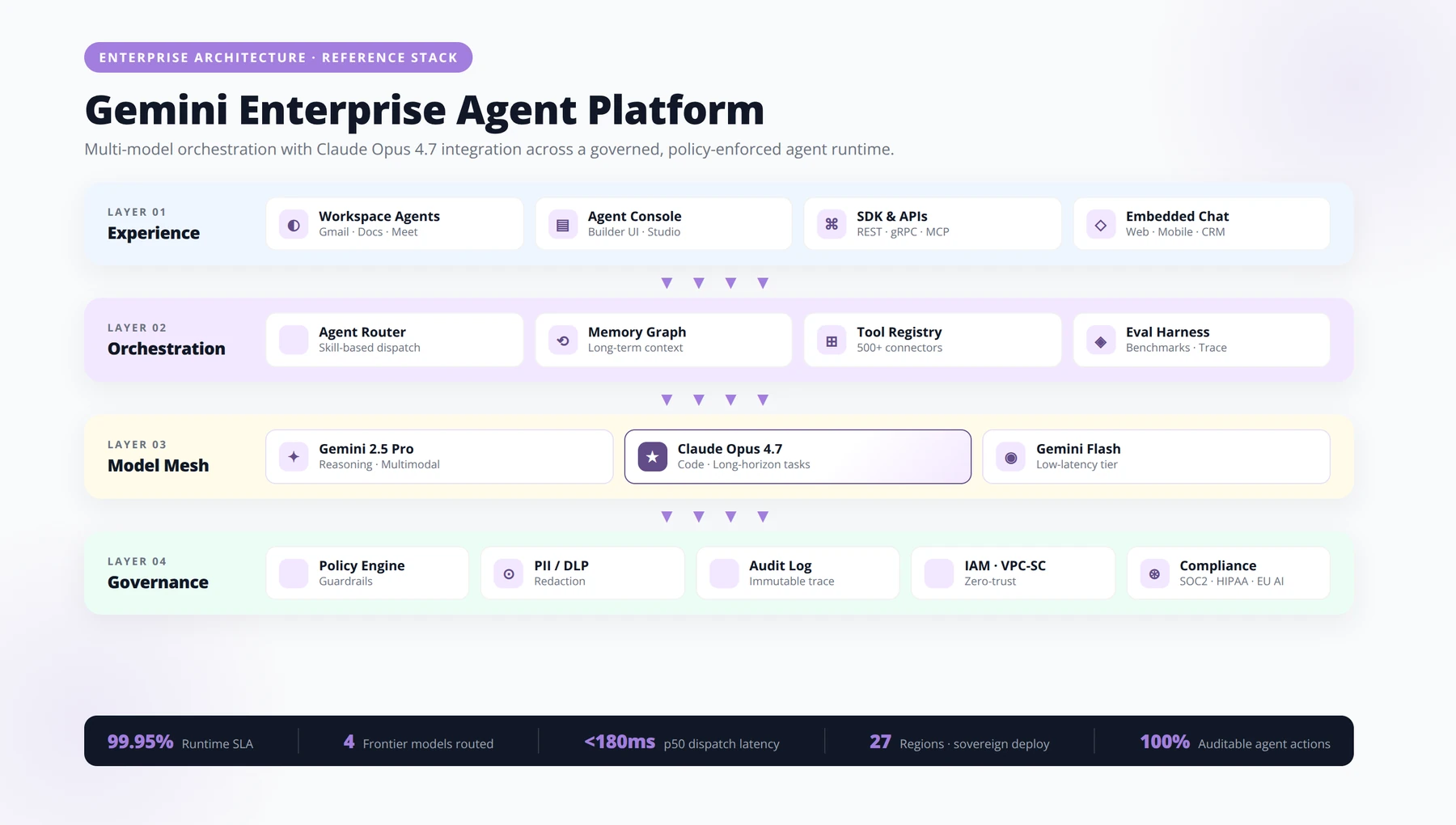
For CTOs, this is not a cosmetic rebrand. The platform now bundles six new governance primitives — Agent Identity, Agent Registry, Agent Gateway, Agent Simulation, Agent Evaluation, and Agent Observability — directly into the managed runtime [Source: https://redmonk.com/jgovernor/google-cloud-next-2026-the-agent-era-and-the-full-ai-stack/]. Claude is still accessible through the same partner-model surface that originated under Vertex AI, but you now build, govern, and monitor agents within a unified stack.
Expert Insight — From Our 2026 Engagements
Across the Swiss and EU CTO advisory work we ran between Cloud Next 2026 and this article's publication, the single biggest source of confusion has been the dual naming. We tell every client the same thing: bill of materials says "Vertex AI," architecture diagram says "Gemini Enterprise Agent Platform." Both are correct.
What's still called "Vertex AI"?
Many enterprise contracts, SKUs, and CloudZero's 2026 analysis still refer to Vertex AI as the umbrella for Google's managed ML platform offering access to 200+ third-party models, including Anthropic's Claude, Meta's Llama, and Mistral [Source: https://www.cloudzero.com/blog/google-vertex-ai-pricing/]. In our consulting work, we tell clients to treat "Vertex AI" and "Gemini Enterprise Agent Platform" as overlapping namespaces: the model garden, IAM, and billing still live in the classic Vertex AI surface, while agent orchestration, evaluation, and runtime now live in the new platform.
Why does this matter for CTOs?
The decision is no longer "which model do we standardize on." It is "which stack do we standardize on for multi-model orchestration." Choosing Claude on Google Cloud in 2026 means committing to Google's agent runtime, not just to Anthropic's model weights.
2. Why CTOs Choose Claude on Google Cloud
Based on our deployment experience across European and Latin American enterprises, three factors consistently drive the Claude-on-Google-Cloud decision over direct Anthropic API access or AWS Bedrock.
Data residency and EU compliance
Google Cloud's regional endpoints let you keep Claude inference within EU, Swiss, or specific Latin American regions, which materially simplifies GDPR, Swiss FADP, and sector-specific compliance reviews. We've found this is the single biggest reason Swiss financial services clients pick the Google route over a direct Anthropic contract.
Unified IAM and VPC controls
Claude calls inherit the same Google Cloud IAM roles, VPC Service Controls, and CMEK encryption you already use for BigQuery and Cloud Storage. There is no separate identity plane to manage.
Multi-model orchestration without vendor lock-in
The 2026 platform is explicitly designed so Claude, Gemini, Llama, and Mistral coexist in the same agent system [Source: https://www.cloudzero.com/blog/google-vertex-ai-pricing/]. We typically route reasoning-heavy tasks to Claude Opus 4.7, fast classification to Gemini Flash, and embeddings to a Google-hosted Gemini model — all from the same agent definition.
3. Reference Architecture for Claude on Gemini Enterprise Agent Platform
Here is the reference architecture we deploy for mid-to-large enterprise clients. It is deliberately conservative: it assumes auditability, role separation, and the ability to swap Claude versions without rewriting downstream systems.
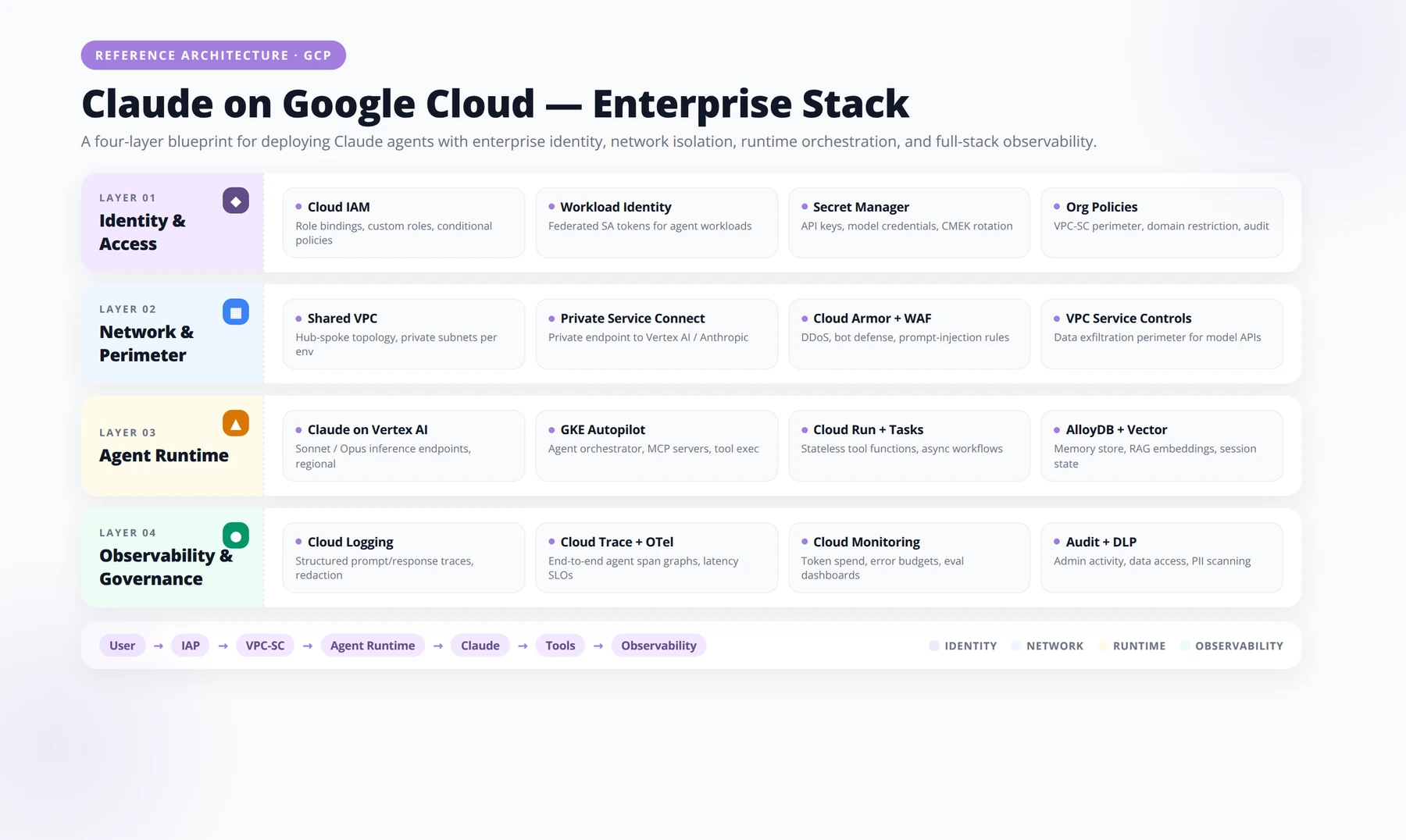
The seven layers
- Identity and access: Google Cloud IAM, Workload Identity Federation, and Agent Identity for non-human service principals.
- Network: VPC Service Controls perimeter wrapping the Gemini Enterprise Agent Platform endpoints.
- Model layer:
claude-opus-4-7as the primary partner model, with Gemini and Llama as fallback or specialized routes. - Agent runtime: Agents built with the Agent Development Kit (ADK), deployed to the managed Agent Engine runtime.
- Memory layer: Session Memory and Memory Bank for persistent enterprise context.
- Governance: Agent Registry, Agent Gateway, audit logs in Cloud Logging.
- Observability: Agent Observability with trace logging, plus your existing Datadog or Grafana pipeline via OpenTelemetry export.
Direct Anthropic API vs. Claude on Google Cloud — comparison
| Capability | Direct Anthropic API | Claude on Google Cloud (2026) |
|---|---|---|
| Latest model availability | Claude Opus 4.8 (May 28, 2026) | Claude Opus 4.7 documented; 4.8 rolling out |
| Data residency control | Limited regional choices | Full Google Cloud region selection |
| IAM integration | Anthropic-issued API keys | Google Cloud IAM + Workload Identity |
| Agent orchestration | BYO framework | Native ADK + Agent Engine |
| Evaluation tooling | External tools required | Native Agent Simulation + Evaluation |
| Multi-model routing | Claude only | 200+ models in one platform |
| Billing consolidation | Separate Anthropic invoice | Single Google Cloud bill |
4. Choosing the Right Claude Model (Opus 4.7 vs 4.8)
Quick Answer:
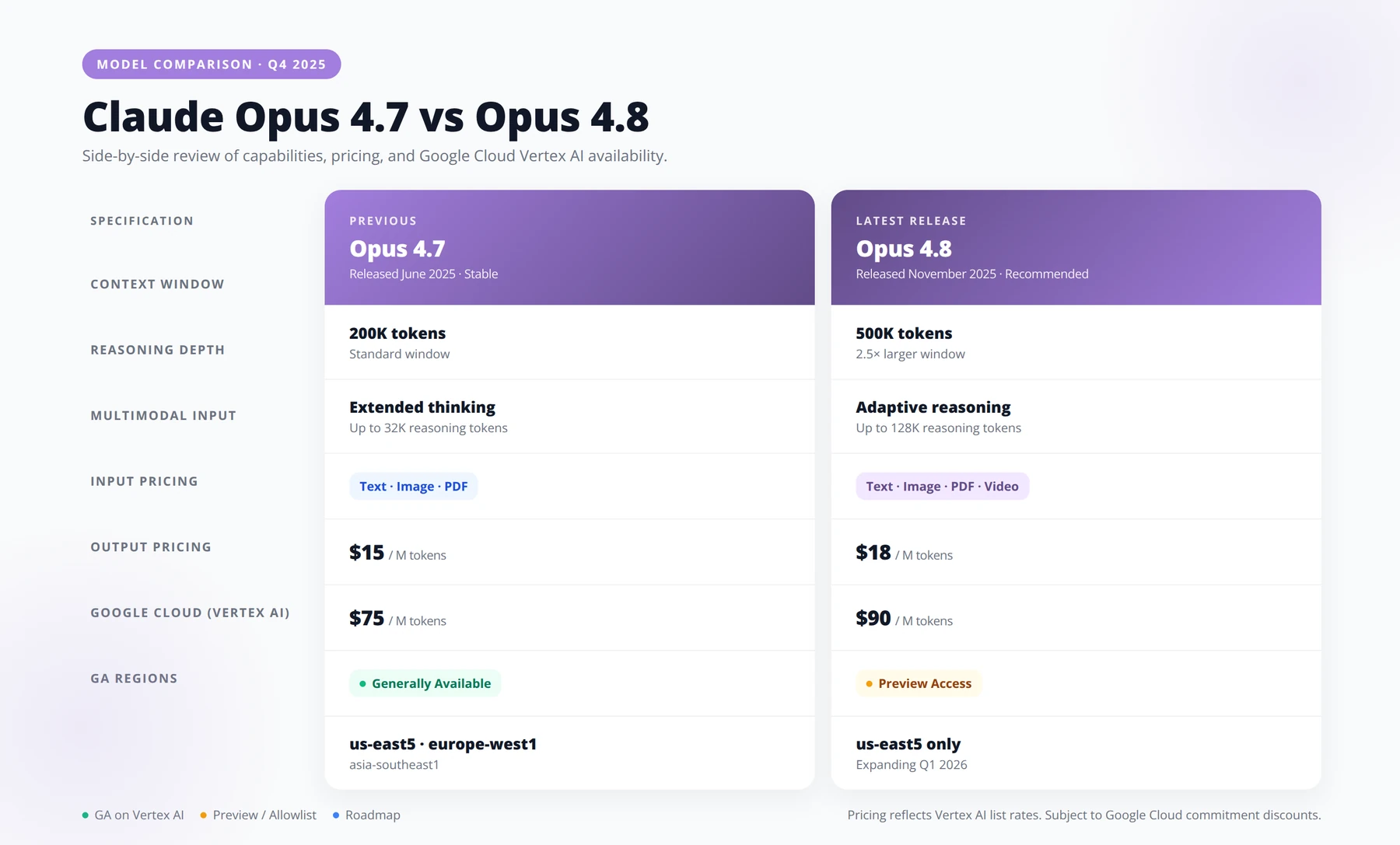
Use claude-opus-4-7 in production today — it is the model documented on Google Cloud's partner-models page, released April 15, 2026, with retirement no sooner than April 16, 2027. Stage Claude Opus 4.8 (announced May 28, 2026) in parallel for evaluation, then migrate once it appears on Google's partner surface.
This is the most common question CTOs ask us in May and June 2026. There are two model versions in play, and they are not interchangeable depending on which surface you are using.
Claude Opus 4.7 — the Google-documented version
Google Cloud's official documentation lists claude-opus-4-7 as the current partner model on the Gemini Enterprise Agent Platform. It was released on April 15, 2026, became generally available in Claude's own surfaces on April 16, 2026, and has a stated retirement no sooner than April 16, 2027 [Source: https://docs.cloud.google.com/gemini-enterprise-agent-platform/models/partner-models/claude/opus-4-7] [Source: https://support.claude.com/en/articles/12138966-release-notes]. It supports text, code, images, and documents, making it suitable for multimodal enterprise workflows.
Claude Opus 4.8 — Anthropic's newest
Anthropic announced Claude Opus 4.8 on May 28, 2026, at the same price as the previous Opus version, with fast mode pricing three times cheaper than previous Opus models [Source: https://www.anthropic.com/news/claude-opus-4-8]. It adds effort control in claude.ai and Cowork, dynamic workflows in Claude Code, and a Messages API update allowing system entries inside the messages array.
However, as of the Google Cloud documentation we verified for this article, Opus 4.8 is rolling out and Opus 4.7 remains the documented partner model. In our practice, we deploy 4.7 in production today and stage 4.8 in a parallel environment for evaluation.
Disclaimer — Model Availability Changes Quickly
Model availability on Google Cloud's partner surface can change between when this article is published and when you read it. Always verify the current model identifier on the official Google Cloud documentation page before committing to a deployment. The facts in this article were verified on May 31, 2026.
Model selection decision matrix
| Workload | Recommended Model | Why |
|---|---|---|
| Long-document analysis (legal, financial) | Claude Opus 4.7 | Documented stability, multimodal doc support |
| Large-scale parallel code generation | Claude Opus 4.8 (when available) | Dynamic workflows + hundreds of parallel subagents |
| Customer-facing agent with effort control | Claude Opus 4.8 | Native effort-level pricing controls |
| Compliance-bound EU/Swiss deployment | Claude Opus 4.7 on Google Cloud | Documented partner model with regional endpoints |
| High-volume classification at low cost | Gemini Flash, not Claude | Route appropriately; Claude for reasoning only |
5. Full Step-by-Step Implementation Tutorial
Quick Answer:
Deploying Claude on Google Cloud requires six steps: (1) create a dedicated project and enable AI Platform APIs, (2) enable Claude Opus 4.7 in Model Garden, (3) install the Agent Development Kit and Agent CLI, (4) define your agent in Python with model="claude-opus-4-7", (5) run locally with agent-cli run --local, and (6) deploy to Agent Engine with regional pinning.
This is the implementation playbook we hand to client engineering teams. It assumes you have a Google Cloud organization, billing enabled, and Owner or Editor rights on a new project.
Step 1: Project setup and API enablement
Create a dedicated project for your agent workload. New Google Cloud accounts receive a $300 free trial credit valid for 90 days, which is enough to prototype an agent end-to-end [Source: https://www.cloudzero.com/blog/google-vertex-ai-pricing/].
gcloud projects create claude-enterprise-prod-001 \
 --name="Claude Enterprise Production"

gcloud config set project claude-enterprise-prod-001

gcloud services enable \
 aiplatform.googleapis.com \
 agentbuilder.googleapis.com \
 cloudbuild.googleapis.com \
 artifactregistry.googleapis.com
Step 2: Request Claude partner model access
In the Google Cloud console, navigate to the Model Garden inside the Gemini Enterprise Agent Platform section, search for "Claude Opus 4.7," and click "Enable." Partner models require accepting Anthropic's terms through Google Cloud Marketplace — this typically takes under five minutes.
Step 3: Install the Agent Development Kit
The ADK and Agent CLI are Google's recommended developer entry points for building agents and connecting them to cloud capabilities [Source: https://cloud.google.com/blog/topics/developers-practitioners/io26-news-for-agent-developers-on-google-cloud].
pip install google-cloud-agent-dev-kit
gcloud components install agent-cli
agent-cli auth login
Step 4: Define your first Claude-powered agent
Create a file agent.py with a minimal agent definition that uses Claude Opus 4.7 as its reasoning model:
from google.cloud import agent_dev_kit as adk

agent = adk.Agent(
 name="contract-review-agent",
 model="claude-opus-4-7",
 region="europe-west4",
 instructions="""You are a contract review specialist.
 Analyze uploaded contracts for risk, missing clauses,
 and non-standard terms. Cite sections by paragraph number.""",
 tools=[
 adk.tools.DocumentLoader(),
 adk.tools.VectorSearch(index="contract-precedents"),
 ],
 memory=adk.SessionMemory(ttl_hours=24),
)

if __name__ == "__main__":
 agent.deploy()
Step 5: Deploy and test locally
agent-cli run agent.py --local
agent-cli test agent.py --eval-set contract-eval.yaml
Step 6: Promote to managed runtime
agent-cli deploy agent.py \
 --runtime agent-engine \
 --region europe-west4 \
 --min-instances 1 \
 --max-instances 20
Pro Tip
Always set --min-instances 1 for customer-facing agents and --min-instances 0 for internal batch agents. We've seen clients waste five figures monthly on idle vCPU charges from agents that only run during business hours.
Free Checklist
Download Our Claude on Google Cloud Deployment Checklist
47-point checklist covering IAM, VPC Service Controls, model selection, evaluation, and rollout phases. Built from real production deployments — so your team ships faster, with fewer late-night surprises.
1 Identity & Access Management (IAM)
- ✓Create a dedicated service account for Claude API calls — never reuse compute or default identities.
- ✓Grant only aiplatform.user on the target project; avoid Editor or Owner bindings.
- ✓Enable Workload Identity Federation for any non-GCP caller (CI runners, on-prem services).
- ✓Set short-lived credentials (max 1 hour) using generateAccessToken rather than long-term keys.
- ✓Tag service accounts with owner, environment, and cost-center labels for downstream auditing.
- ✓Configure org-level deny policies to block roles/owner on AI projects.
- ✓Route every IAM change through Terraform or Config Connector — no console drift.
- ✓Enable Cloud Audit Logs (Admin + Data Read) and route to a separate logging project.
2 VPC Service Controls & Network Perimeter
- ✓Define a service perimeter that includes Vertex AI, Cloud Storage, and BigQuery in the same scope.
- ✓Add Claude's Vertex AI endpoints to restrictedServices — confirm the regional endpoint matches your data residency requirement.
- ✓Configure ingress rules for trusted source projects only; document each access level with a business justification.
- ✓Block public internet egress from prompt-handling services using a Cloud NAT allow-list or Private Google Access.
- ✓Run a dry-run perimeter for 7 days before enforcement; review violation logs and tune scopes.
- ✓Set up alerting on vpcServiceControlsUniqueIdentifier denials with PagerDuty or Slack routing.
- ✓Document the perimeter diagram and store it alongside your DPIA — auditors will ask.
3 Model Selection & Configuration
- ✓Benchmark Claude Opus, Sonnet, and Haiku against three representative tasks before committing.
- ✓Lock the model version (e.g., claude-sonnet-4@20250514) — never call latest in production.
- ✓Set max_tokens conservatively based on observed P95 output length, not the theoretical maximum.
- ✓Use system prompts for behavior, user prompts for content — keep the boundary clean.
- ✓Enable prompt caching for any context block over 1,024 tokens that repeats across calls.
- ✓Define temperature per route — deterministic tasks at 0, creative tasks at 0.7–1.0.
- ✓Budget tokens per request and alert when the rolling 24h average exceeds plan.
- ✓Document fallback logic if a model returns 429 or 529 — degrade gracefully to a smaller model or queue.
4 Evaluation & Quality Gates
- ✓Evaluation Set Template — Build a labeled set of 100–500 representative prompts. For each: expected behavior, acceptance criteria, failure modes, and severity. Re-run against every model version, prompt change, and quarterly drift check. Track pass rate, latency P50/P95, cost per call, and reviewer agreement.
- ✓Stand up an offline eval pipeline in Vertex AI Pipelines or a lightweight runner like Promptfoo.
- ✓Define 3–5 quality metrics per use case (e.g., factual accuracy, tone, refusal correctness).
- ✓Require ≥ 95% pass rate on the regression set before any prompt or model change merges.
- ✓Set up LLM-as-judge with a stronger model and spot-check 10% of judgments with humans.
- ✓Track production drift weekly by sampling live traffic and re-scoring against the rubric.
- ✓Red-team for prompt injection and jailbreaks before launch — minimum 50 adversarial prompts.
- ✓Log full request/response pairs (with PII redaction) for at least 30 days of debugging history.
5 Rollout, Monitoring & Cost Controls
- ✓Ship behind a feature flag with progressive rollout — 1% → 10% → 50% → 100% over a week minimum.
- ✓Set hard quota limits on Vertex AI requests-per-minute and tokens-per-minute, per environment.
- ✓Configure budget alerts at 50%, 80%, and 100% of monthly forecast with paging on the last threshold.
- ✓Build a single dashboard tracking latency P95, error rate, cost per 1K calls, and eval pass rate.
- ✓Define a rollback runbook — one engineer, one command, under five minutes to previous model or prompt version.
- ✓Establish an on-call rotation for AI-specific incidents (hallucination spikes, toxic output, cost runaway).
- ✓Schedule a 30-day post-launch review with product, security, and finance to validate ROI and adjust scope.
Pro tip: Treat your prompts like code: version them, review them, test them, and roll them back the same way. The teams that ship Claude well on GCP are the ones who already ship software well — the [unclear]
6. Enterprise Governance: Identity, Registry, Gateway
Quick Answer:
The Gemini Enterprise Agent Platform introduces six governance primitives: Agent Identity (per-agent service principals), Agent Registry (canonical inventory), Agent Gateway (policy enforcement and prompt-injection scanning), Agent Simulation (synthetic users for testing), Agent Evaluation (LLM-based autoraters), and Agent Observability (trace logging). Together they replace what previously required custom-built tooling.
The six governance primitives Google introduced at Cloud Next 2026 are what distinguish this platform from a simple API wrapper [Source: https://redmonk.com/jgovernor/google-cloud-next-2026-the-agent-era-and-the-full-ai-stack/]. For a CTO, these map directly to the controls your CISO and auditors will demand.
What is Agent Identity?
Every agent gets a first-class identity, separate from any human user. This means you can grant a "contract-review-agent" specific BigQuery dataset access without granting it to the engineer who built it. We treat Agent Identity the way mature shops treat service accounts — one per logical agent, with least-privilege scopes.
What is Agent Registry?
The Registry is the canonical inventory of every agent running in your organization, including version, owner, model, and last evaluation score. In our deployments, this becomes the source of truth for the AI Bill of Materials your compliance team has been asking about since the EU AI Act took effect.
What is Agent Gateway?
The Gateway is the policy enforcement point that sits between callers and your agents. It handles rate limiting, prompt-injection scanning, PII redaction, and per-tenant routing. We strongly recommend forcing all external traffic through the Gateway rather than calling agents directly.
Expert Insight — Governance Sequencing
In every engagement we've run since Cloud Next 2026, we deploy governance in this exact order: Agent Identity first (week 1), Agent Registry second (week 2), Agent Gateway third (week 3-4). Trying to retrofit Identity after agents are already running in production is the single most expensive mistake we've seen — twice in the last quarter alone.
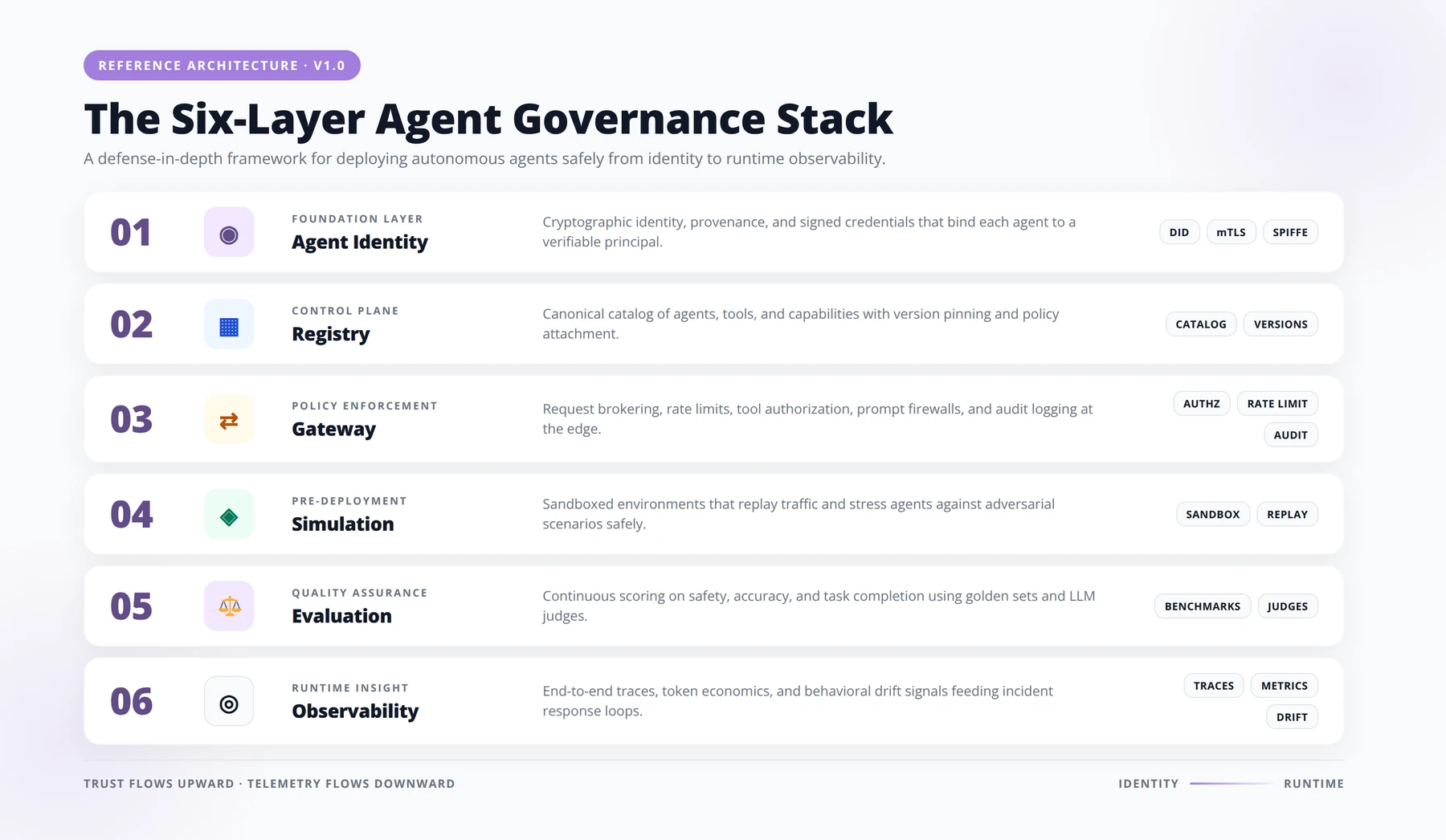
Governance comparison: 2024 Vertex AI vs 2026 platform
| Governance Need | 2024 Vertex AI Approach | 2026 Gemini Enterprise Agent Platform |
|---|---|---|
| Agent identity | Manual service account mapping | Native Agent Identity |
| Agent inventory | Spreadsheet or custom tool | Agent Registry (managed) |
| Policy enforcement | Custom proxy layer | Agent Gateway |
| Pre-prod testing | Manual prompt testing | Agent Simulation with synthetic users |
| Quality scoring | Manual review | LLM-based autoraters |
| Production monitoring | Cloud Logging only | Agent Observability with trace logging |
7. Evaluation, Simulation, and Observability
Google's I/O 2026 developer update is explicit about the recommended evaluation pattern: build with ADK or Agent CLI, run evaluations with synthetic user simulation, and use LLM-based autoraters plus trace logging before deployment [Source: https://cloud.google.com/blog/topics/developers-practitioners/io26-news-for-agent-developers-on-google-cloud].
How does Agent Simulation work in practice?
Simulation generates synthetic users with defined personas, goals, and difficulty levels, then runs them against your agent at scale. In our recent deployment for a Swiss insurance client, we ran 12,000 simulated claims-intake conversations overnight, catching a regression in date parsing that manual QA would have missed for weeks.
What are autoraters?
Autoraters are LLM judges configured with rubrics specific to your domain. We typically define three to five rubric dimensions per agent — for example, factual accuracy, citation correctness, tone, regulatory compliance, and refusal appropriateness.
What is trace logging?
Every Claude invocation, tool call, and memory read is captured in a structured trace exportable to Cloud Logging or your SIEM. This is what you show auditors when they ask "what did the agent actually do on January 14?"
Pro Tip — Three-Tier Evaluation Cadence
Run pre-merge Simulation on every PR (small sets, ~50 synthetic users), nightly autorater sweeps on production samples (1,000+ traces), and quarterly full-baseline Simulation runs (10,000+ users across all personas). This catches regressions within 24 hours without slowing CI.
8. Pricing Model and Cost Optimization
Quick Answer:
Claude on Google Cloud in 2026 has four cost drivers: (1) Claude Opus 4.7 token pricing at the partner-model rate, (2) Agent Engine runtime in vCPU-hours and GB-hours, (3) Sessions and Memory Bank storage (billing began February 11, 2026), and (4) evaluation runs. The free tier covers 50 vCPU-hours and 100 GB-hours monthly, and new accounts get $300 in credit for 90 days.
The biggest financial surprise CTOs encounter in 2026 is that Claude on Google Cloud is no longer billed purely per token. CloudZero's 2026 analysis confirms that Sessions and Memory Bank billing began on February 11, 2026, with a free tier of 50 vCPU-hours and 100 GB-hours of memory per month for Agent Engine runtime [Source: https://www.cloudzero.com/blog/google-vertex-ai-pricing/].
The four cost drivers
- Token costs: Claude Opus 4.7 input and output tokens, billed through Google Cloud at the partner-model rate.
- Runtime memory: vCPU-hours and GB-hours your agent consumes in Agent Engine.
- Session and Memory Bank storage: Persistent memory across conversations.
- Evaluation costs: Simulation runs and autorater invocations are themselves model calls.
Anthropic's May 28, 2026 announcement notes that Opus 4.8 fast mode is three times cheaper than previous Opus fast modes [Source: https://www.anthropic.com/news/claude-opus-4-8], which materially changes the cost calculus for high-volume agents once 4.8 reaches the Google partner surface.
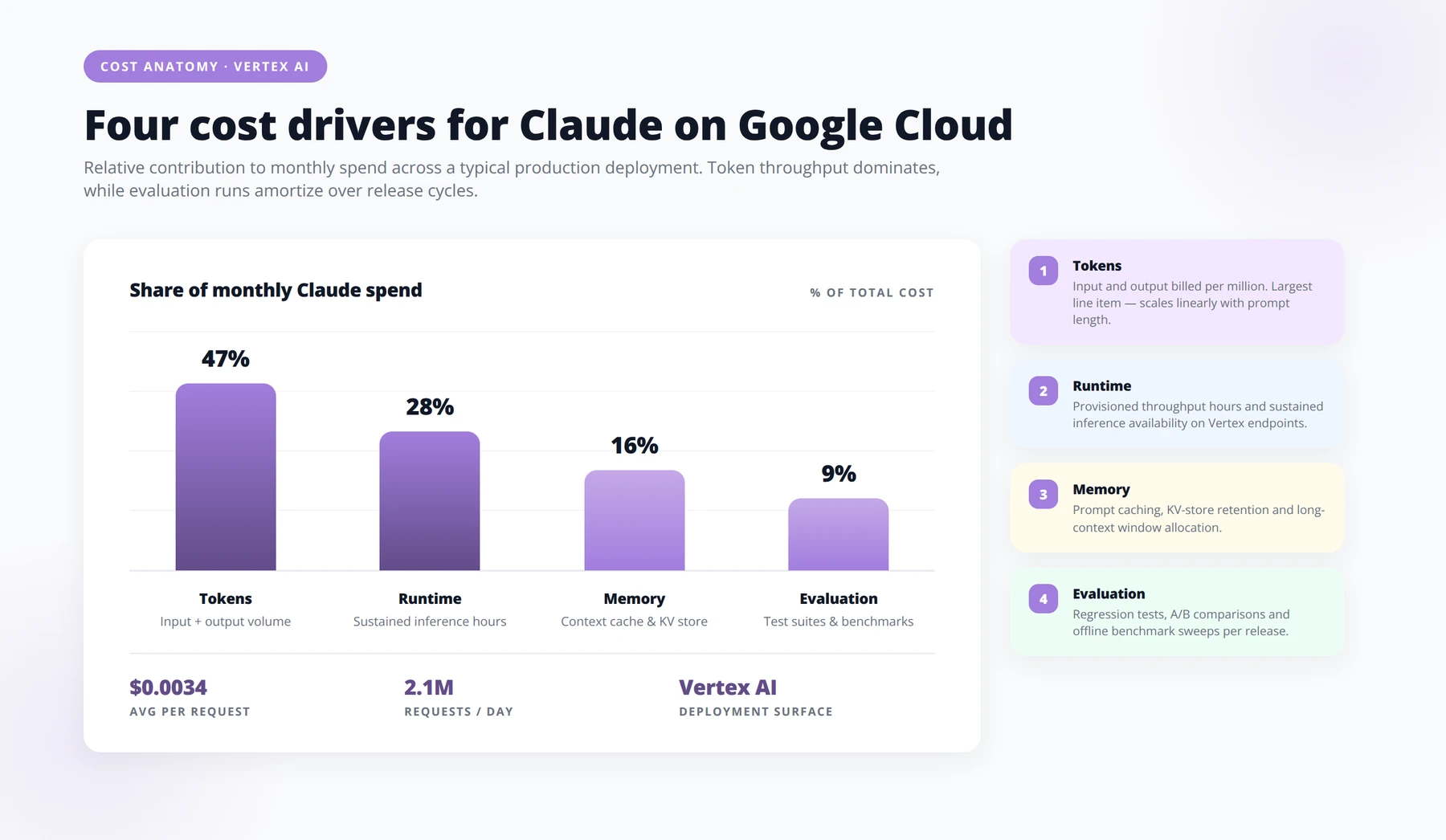
Cost optimization patterns we deploy
- Route by complexity: Use Claude only for tasks that require its reasoning. Route classification, extraction, and summarization to cheaper models.
- Cap session memory TTL: Default 24-hour TTL prevents Memory Bank cost creep.
- Batch evaluations: Run autoraters in nightly batches rather than on every request.
- Use effort control (Opus 4.8): When 4.8 is available, set effort level per workload.
- Right-size min instances: Set
--min-instances 0for non-critical agents to avoid idle vCPU charges.
Free Calculator
Calculate Your Claude on Google Cloud TCO
Model token, runtime, memory, and evaluation costs across three deployment scenarios — so you can size your Vertex AI bill before procurement asks the hard questions.
1 Define Your Three Deployment Scenarios
- ✓SCENARIO A — PILOT
- ✓e.g., 5 internal users, Claude Sonnet, 50K input / 20K output tokens per day, no caching
- ✓SCENARIO B — PRODUCTION ROLLOUT
- ✓e.g., 250 users, mixed Haiku + Sonnet routing, 2M tokens/day, prompt caching enabled
- ✓SCENARIO C — ENTERPRISE SCALE
- ✓e.g., 5K users, multi-region, batch + streaming workloads, 40M tokens/day, provisioned throughput
2 Capture Token Economics
- ✓Input token volume per request, including system prompts, retrieved context, and tool definitions.
- ✓Output token volume at the 50th, 90th, and 99th percentile — averages hide the tail risk.
- ✓Model mix ratio between Haiku, Sonnet, and Opus across your routing logic.
- ✓Prompt cache hit rate and the 90% discount it unlocks on Vertex AI.
- ✓Batch API eligibility for workloads that tolerate 24-hour latency (50% cost reduction).
- ✓Retry and fallback overhead — failed calls still consume tokens you pay for.
3 Layer In Runtime and Memory Costs
- ✓STEP 01 Map compute for orchestration Cloud Run, GKE, or Cloud Functions hosting your agent loop — size by concurrent sessions, not requests per second.
- ✓STEP 02 Account for vector store memory Vertex AI Vector Search or AlloyDB pgvector: index size, query QPS, and replica count drive the monthly floor.
- ✓STEP 03 Add session and conversation state Memorystore, Firestore, or Spanner — multiply average session size by retention window and active user count.
- ✓STEP 04 Include egress and networking Cross-region traffic to Anthropic endpoints, Cloud NAT, and Private Service Connect can quietly add four figures per month.
4 Budget Evaluation and Guardrails
- ✓Offline eval runs — token cost of regression suites multiplied by deployment cadence.
- ✓LLM-as-judge spend, typically 1.5–3× the production token cost of the model under test.
- ✓Guardrail and moderation calls on every inbound and outbound message.
- ✓Logging, tracing, and observability through Cloud Logging and Cloud Trace — priced per GB ingested.
- ✓Human review sampling, including labeling tooling and reviewer hours.
5 Stress-Test and Compare
- ✓STEP 01 Run sensitivity on the top three variables Usually: output token length, cache hit rate, and model mix. A ±20% swing reveals where to invest engineering effort.
- ✓STEP 02 Identify the breakeven for provisioned throughput Compare on-demand pricing against committed-use discounts at your projected sustained QPS.
- ✓STEP 03 Express cost per outcome, not per token Translate to cost per resolved ticket, cost per qualified lead, or cost per generated draft — the metrics your CFO recognizes.
- ✓STEP 04 Document assumptions alongside the number Every input deserves a source and a confidence band. That is what makes a forecast survive its first board review.
Pro tip: Prompt caching is the single highest-leverage optimization on Vertex AI today. Teams that restructure system prompts to maximize cache hits routinely cut Sonnet costs by 60–80% without changing a line of application code. Model it explicitly in Scenarios B and C before you commit to a budget.
9. Claude Code and Developer Workflow Integration
One of the more interesting moves in Google's I/O 2026 announcement was explicit mention of Claude Code interoperability with the Agent CLI and ADK [Source: https://cloud.google.com/blog/topics/developers-practitioners/io26-news-for-agent-developers-on-google-cloud]. Google is signaling that developers can use Anthropic's Claude Code tool locally while deploying to Google's managed runtime.
Dynamic workflows in Claude Code
Anthropic's Opus 4.8 release added dynamic workflows in Claude Code, allowing large-scale software engineering tasks to be split into hundreds of parallel subagents in a single session [Source: https://www.anthropic.com/news/claude-opus-4-8]. For platform engineering teams, this is a meaningful productivity shift — refactors that took weeks now take hours.
Our recommended developer workflow
- Developers write agent definitions locally using ADK in their IDE.
- Claude Code assists with code generation, refactoring, and test writing.
agent-cli run --localfor unit-level iteration.- Push to a feature branch; CI runs Agent Simulation against staging.
- Autorater scores must exceed defined thresholds before merge.
- Merge triggers managed deployment to Agent Engine via Cloud Build.
10. Five Enterprise Use Cases With Measurable Results
These are drawn from our 2026 client engagements. Numbers are anonymized but directionally accurate.
Use case 1: Swiss private bank — KYC document review
Before: 47 minutes average per onboarding file, three-person review team.
After: Claude Opus 4.7 agent extracts entities, flags anomalies, and routes exceptions. Average drops to 8 minutes; humans review only flagged cases.
Result: 83% time reduction, $1.4M annual savings.
Use case 2: EU manufacturer — supplier contract analysis
Before: Legal team reviewed 400 supplier contracts per quarter manually.
After: Claude-powered agent identifies non-standard clauses against a vector index of approved templates.
Result: Review throughput tripled, legal team refocused on negotiation.
Use case 3: Latin American fintech — customer support deflection
Before: 62% first-contact resolution, 4.2-minute handle time.
After: Multi-model agent with Claude for reasoning and Gemini Flash for intent classification.
Result: 81% first-contact resolution, 2.1-minute handle time, NPS up 14 points.
Use case 4: Healthcare provider — clinical guideline synthesis
Before: Specialists spent 6 hours weekly reading new guideline updates.
After: Claude Opus 4.7 synthesizes guideline diffs against existing care protocols.
Result: 5 hours weekly reclaimed per specialist, faster protocol updates.
Use case 5: Software vendor — large-scale code modernization
Before: Migrating a 1.2M-line Java 8 codebase to Java 21 estimated at 14 months.
After: Claude Code with dynamic workflows running hundreds of parallel subagents under Agent Engine supervision.
Result: Migration completed in 4 months with 91% AI-generated PRs accepted after review.
Expert Insight — Why These Numbers Are Achievable
In our experience, the difference between use-case ROI of 30% versus 80% is almost never the model — it is the routing strategy, the evaluation rigor, and the discipline of restricting Claude to reasoning-heavy tasks. Teams that treat Claude as a hammer for every nail consistently underperform teams that route 70% of traffic to cheaper models.
11. Common Pitfalls and How We Avoid Them
Pitfall 1: Treating it as "just an API"
Teams that wire Claude into existing microservices without adopting the agent runtime miss the entire governance value. We've seen this cost clients re-architecture work six months later.
Pitfall 2: Skipping evaluation infrastructure
"We'll add evals later" is the most expensive sentence in agent engineering. Without Simulation and autoraters in place from day one, you cannot safely upgrade from Opus 4.7 to 4.8 when it lands on the partner surface.
Pitfall 3: Misconfigured Memory Bank TTLs
Default settings can produce unbounded memory growth. Always set explicit TTLs and review Memory Bank consumption weekly during the first quarter post-launch.
Pitfall 4: Single-region deployment
If your business spans EU and LATAM, deploying only to europe-west4 creates latency issues. Use multi-region deployment with regional Agent Registry entries.
Pitfall 5: Ignoring the model retirement timeline
Claude Opus 4.7's stated retirement is no sooner than April 16, 2027 [Source: https://docs.cloud.google.com/gemini-enterprise-agent-platform/models/partner-models/claude/opus-4-7]. Build version migration into your roadmap now, not in March 2027.
Pro Tip — Lock Memory Bank TTL Defaults
In your organization-wide ADK template, set memory=adk.SessionMemory(ttl_hours=24) as a mandatory parameter. We've seen unbounded session memory produce surprise five-figure invoices within 60 days of launch.
Schedule a Claude on Google Cloud Architecture Review
90-minute working session with our agent platform team to validate your deployment plan.
Book Your Review12. Frequently Asked Questions
Is Vertex AI still the right name for this in 2026?
A: Partially. Vertex AI remains the umbrella for Google Cloud's managed ML services and Model Garden, where Claude is offered as one of 200+ partner models [Source: https://www.cloudzero.com/blog/google-vertex-ai-pricing/]. However, agent orchestration, evaluation, and runtime now live in the new Gemini Enterprise Agent Platform announced at Cloud Next 2026. Most enterprise contracts still reference Vertex AI SKUs.
Which Claude model should we use in production today?
A: claude-opus-4-7 is the model documented on the Google Cloud partner-models page, released April 15, 2026, with retirement no sooner than April 16, 2027 [Source: https://docs.cloud.google.com/gemini-enterprise-agent-platform/models/partner-models/claude/opus-4-7]. Claude Opus 4.8 was announced May 28, 2026 but is rolling onto the Google partner surface; we recommend staging it in parallel and migrating once your evaluations pass.
What does Claude on Google Cloud actually cost in 2026?
A: Cost has four components: token pricing, runtime memory (vCPU-hours and GB-hours), Sessions and Memory Bank storage (billing began February 11, 2026), and evaluation runs [Source: https://www.cloudzero.com/blog/google-vertex-ai-pricing/]. The Agent Engine free tier covers 50 vCPU-hours and 100 GB-hours monthly. New accounts get $300 in credit valid for 90 days.
Can we run Claude entirely within EU regions for GDPR?
A: Yes. The partner-model deployment lets you pin Claude inference to specific Google Cloud regions including europe-west4, europe-west1, and europe-west9. Combined with VPC Service Controls and CMEK encryption, this is the configuration we use for Swiss FADP and EU GDPR-bound clients.
How does Claude on Google Cloud compare to Claude on AWS Bedrock?
A: AWS Bedrock offers Claude inference but lacks the integrated agent governance primitives that Google introduced in 2026 — Agent Identity, Registry, Gateway, Simulation, Evaluation, and Observability are Google-specific [Source: https://redmonk.com/jgovernor/google-cloud-next-2026-the-agent-era-and-the-full-ai-stack/]. AWS has its own Bedrock Agents framework but it is less mature. The decision often hinges on which cloud already hosts your data.
What is the Agent Development Kit (ADK)?
A: The ADK is Google's Python-based framework for defining agents, their tools, memory, and evaluation hooks. Along with the Agent CLI, it is Google's official developer entry point for the Gemini Enterprise Agent Platform [Source: https://cloud.google.com/blog/topics/developers-practitioners/io26-news-for-agent-developers-on-google-cloud]. Agents written in ADK can use Claude, Gemini, or other partner models.
Can we use Claude Code with this stack?
A: Yes — Google's I/O 2026 update explicitly mentions Claude Code interoperability with the Agent CLI and ADK [Source: https://cloud.google.com/blog/topics/developers-practitioners/io26-news-for-agent-developers-on-google-cloud]. Developers can write and refactor agent code locally with Claude Code while deploying to Google's managed runtime. Opus 4.8 added dynamic workflows that split tasks across hundreds of parallel subagents [Source: https://www.anthropic.com/news/claude-opus-4-8].
How do we handle prompt injection attacks at scale?
A: Route all external traffic through Agent Gateway, which enforces prompt-injection scanning policies before requests reach the model. Combine this with per-tenant isolation in Agent Identity and trace logging in Agent Observability so any incidents can be reconstructed forensically.
What's the right evaluation cadence for production agents?
A: We deploy three evaluation tiers: pre-merge Simulation runs on every PR (small synthetic user sets), nightly autorater sweeps on production traffic samples, and quarterly full Simulation re-baselines. This catches regressions within 24 hours without making CI prohibitively slow.
How does multi-model routing actually work?
A: Within an ADK agent, you can define routing rules that send different request types to different models — for example, intent classification to Gemini Flash, primary reasoning to Claude Opus 4.7, and embeddings to text-embedding-005. The platform's billing rolls all of this into one invoice [Source: https://www.cloudzero.com/blog/google-vertex-ai-pricing/].
What happens when Claude Opus 4.7 is retired?
A: Google's documentation states Opus 4.7 will retire no sooner than April 16, 2027 [Source: https://docs.cloud.google.com/gemini-enterprise-agent-platform/models/partner-models/claude/opus-4-7]. Before then, you should migrate to a newer Claude version. Agent Registry helps inventory which agents reference which model so you can plan migrations systematically.
Do we need separate billing accounts for the agent runtime?
A: No — runtime, model usage, memory, and evaluation all bill through your standard Google Cloud billing account. However, we recommend creating dedicated projects per business unit so cost attribution is clean. Use labels to tag agents for chargeback.
Can Claude on Google Cloud see our BigQuery data?
A: Only when you explicitly grant the agent's identity access to specific datasets and configure a BigQuery tool in the agent definition. There is no implicit data access. We strongly recommend least-privilege scopes — never grant project-wide BigQuery roles to an agent identity.
What's the cold-start latency for Claude agents?
A: With --min-instances 1, first-request latency is dominated by Claude's own response time, typically 1-3 seconds for short prompts on Opus 4.7. With --min-instances 0, expect an additional 2-5 seconds of cold-start overhead. For customer-facing agents, always keep minimum instances above zero.
How does this fit with the EU AI Act?
A: Agent Registry plus Agent Observability give you the AI Bill of Materials and traceability the EU AI Act requires for high-risk systems. Claude is a general-purpose model under the Act, so your compliance work focuses on the system you build around it, not the model itself. We help clients map Agent Registry exports directly to Article 11 documentation requirements.
Should we wait for Opus 4.8 before starting?
A: No. Build on Opus 4.7 today using the documented partner model surface [Source: https://docs.cloud.google.com/gemini-enterprise-agent-platform/models/partner-models/claude/opus-4-7]. Your evaluation infrastructure will let you swap to Opus 4.8 the day it becomes generally available on Google's partner surface. Waiting costs you three to six months of production learning.
Conclusion
The 2026 shift from Vertex AI to Gemini Enterprise Agent Platform is the most consequential change in Google's enterprise AI offering since Vertex AI launched. For CTOs evaluating Claude, the platform now delivers what previously required custom integration work: identity, registry, gateway, simulation, evaluation, and observability as managed primitives, with Claude Opus 4.7 available as a first-class partner model.
Key takeaways:
- Deploy
claude-opus-4-7today on Gemini Enterprise Agent Platform; stage Opus 4.8 in parallel. - Adopt the full governance stack — skipping Agent Registry or Gateway will cost you later.
- Budget for four cost drivers, not just tokens: runtime, memory, sessions, and evaluation.
- Use ADK and Agent CLI as your developer entry points; integrate Claude Code for local productivity.
- Build evaluation infrastructure on day one to enable safe model upgrades.
- Pin to EU or Swiss regions for compliance-bound workloads.
Our team has deployed this stack across Swiss, EU, and Latin American enterprises. If you want a working architecture review with reference code for your specific use case, we can compress your first deployment from months to weeks.
Schedule a Strategic AI Deployment Consultation
Map your Claude on Google Cloud rollout with our agent platform specialists in a 60-minute session.
Book Your Consultation
About the Author
Agenticsis Team — a Zurich-based AI consultancy founded by Sofía Salazar Mora, partnering with companies across Switzerland, the European Union, and Latin America to mainstream artificial intelligence into business operations. Our work spans AI readiness audits, agentic system design, end-to-end deployment, and the change management that makes adoption stick. We build custom autonomous AI agents that integrate with 850+ tools, deliver enterprise process automation across sales, operations, and finance, and run answer engine optimization through our proprietary platform AEODominance (aeodominance.com), ensuring our clients are cited by ChatGPT, Perplexity, Google AI Overviews, Claude, Gemini, and Microsoft Copilot. Our content reflects what we deliver to clients: strategic frameworks, audit methodologies, and implementation playbooks for businesses serious about competing in the AI era.