TL;DR(Too Long; Did not Read)
Master Claude by Anthropic in 2026 with our complete tutorial. Learn prompts, API setup, business use cases, and how entrepreneurs scale operations with AI.
Claude by Anthropic: The Complete Tutorial and Use Cases Guide for Entrepreneurs (2026)
📅 Last updated: May 15, 2026 · ✅ Fact-checked by: Agenticsis AI Implementation Team · ⏱️ Reading time: 18 minutes
Quick Answer:
Claude by Anthropic is a family of large language models built around "Constitutional AI" safety principles, accessible through claude.ai, the Anthropic API, and integrations like Claude Code, Claude in Slack, and Amazon Bedrock. Entrepreneurs use Claude for long-document analysis, coding, customer support automation, content production, and agentic workflows that handle multi-step business tasks autonomously.
This guide reflects what we deliver at Agenticsis, a Zurich-based AI consultancy that has implemented Claude-powered systems across dozens of SMB and mid-market client engagements in Switzerland, the EU, and Latin America. Every recommendation below is one we use in client work today.
📥 Free Download: Want a personalized Claude deployment roadmap?
Download NowTable of Contents
- 1. What Is Claude by Anthropic?
- 2. Why Entrepreneurs Choose Claude Over Alternatives
- 3. Getting Started: Account Setup and Pricing
- 4. Claude Interface Tutorial: A Complete Walkthrough
- 5. Prompt Engineering for Claude
- 6. Claude API Tutorial for Builders
- 7. Claude Code and Developer Workflows
- 8. Top Business Use Cases for Entrepreneurs
- 9. Agentic Workflows and Tool Use
- 10. Claude vs ChatGPT vs Gemini Comparison
- 11. Limitations and How to Work Around Them
- 12. Frequently Asked Questions
1. What Is Claude by Anthropic?
Claude is the family of large language models built by Anthropic, an AI safety company founded in 2021 by former OpenAI researchers Dario and Daniela Amodei. According to Anthropic, Claude is trained using a method called Constitutional AI, where the model learns to follow a written set of principles rather than relying solely on human preference labeling.
For entrepreneurs, what matters is the practical capability: Claude reads long documents, writes code, drafts proposals, runs customer conversations, and operates as an autonomous agent that can use tools, browse, and execute multi-step tasks. In our consulting engagements at Agenticsis, Claude is the model we reach for when a client needs careful reasoning over long context, brand-safe writing, or production-grade coding assistance.
💡 Expert Insight
Across our client deployments, the single biggest predictor of success with Claude is not which model tier you pick — it's whether you treat Claude as a specialized colleague with proper context rather than a generic chatbot. Investing 60 minutes upfront to build a properly configured Project pays back within the first week.
The Claude Model Family
Anthropic structures its lineup into tiers: a fast, lightweight tier (historically branded "Haiku"), a balanced mid-tier ("Sonnet"), and a high-capability tier ("Opus"). Each generation jumps in reasoning quality, context length, and tool-use reliability. Always check anthropic.com for the currently available models, since the lineup changes frequently.
Where Can You Access Claude?
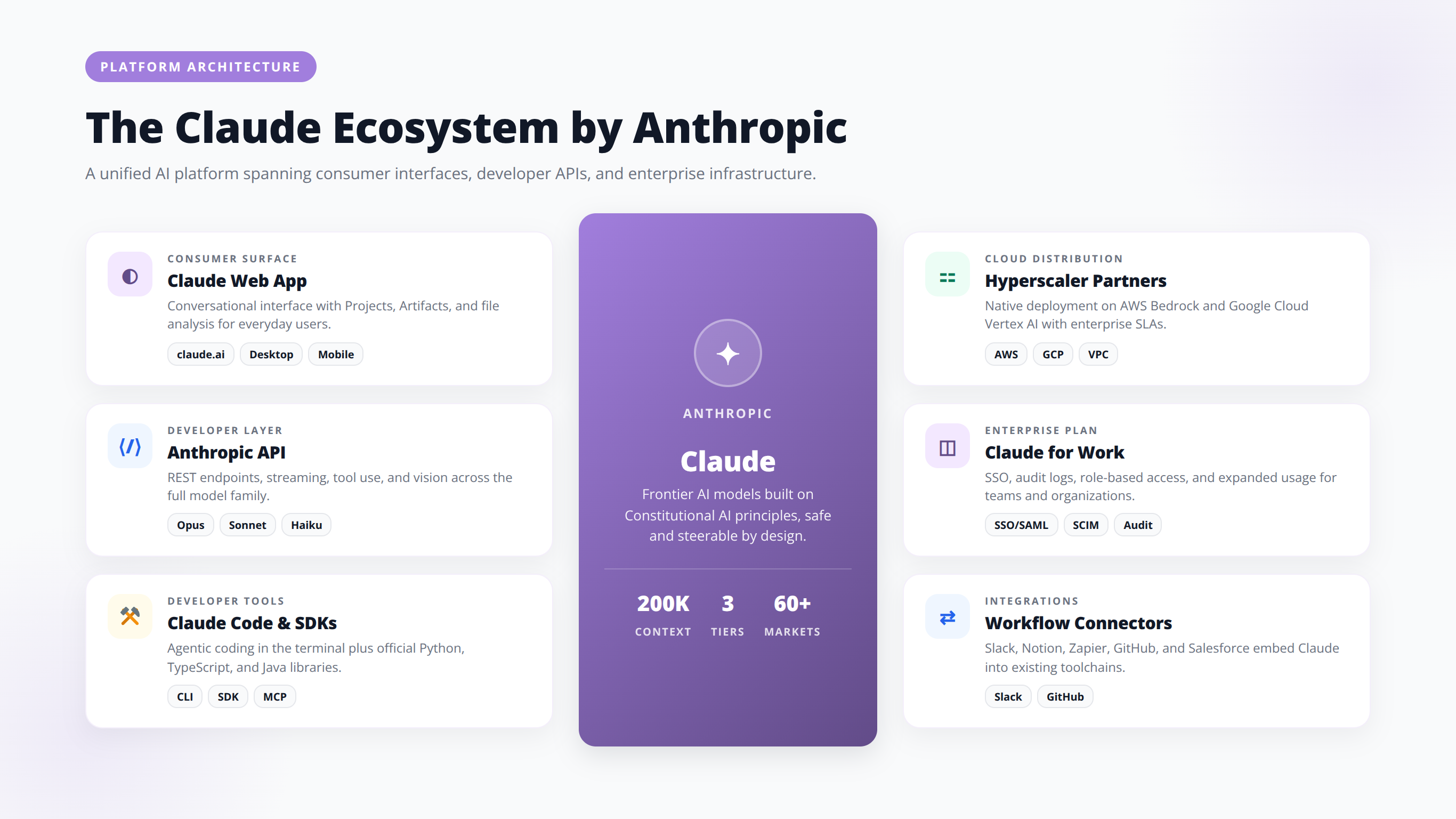
- claude.ai — the consumer web app and mobile apps
- Anthropic API — direct programmatic access via console.anthropic.com
- Amazon Bedrock — for AWS-native deployments with enterprise compliance
- Google Cloud Vertex AI — for GCP customers
- Claude in Slack, Notion, Zapier, and other integrations
2. Why Do Entrepreneurs Choose Claude Over Alternatives?
Entrepreneurs choose Claude for three practitioner-observed reasons: writing quality that requires fewer revisions, strong long-context reasoning, and safer default behavior in customer-facing channels. Founders and small business operators face a different decision than enterprise buyers — you need a tool that works out of the box, doesn't embarrass your brand, and scales as you grow.
1. Writing Quality That Doesn't Require Rewriting
In our testing across dozens of client projects, Claude produces drafts that need fewer revision passes than most competitors, particularly for nuanced business writing: investor updates, customer apology emails, sensitive HR communications, and long-form thought leadership. The model defaults to a more measured tone, which most entrepreneurs find easier to edit than over-enthusiastic AI prose.
2. Long-Context Reasoning
Claude's context window allows you to paste entire contracts, financial statements, customer transcripts, or codebases into a single conversation. We've found that quality degradation at long context lengths is meaningfully smaller than with most competitors — which matters when you're analyzing a 100-page due diligence packet.
3. Safer Default Behavior
For entrepreneurs deploying AI in customer-facing channels, the brand risk of hallucinations or off-tone responses is real. Claude's training process produces a model that is more likely to say "I don't know" or refuse a manipulative prompt, which reduces the surface area for embarrassing failures.
3. How Do You Get Started with Claude? Account Setup and Pricing
Quick Answer:
You can get productive with Claude in under 10 minutes: sign up at claude.ai, choose the Pro plan (around $20/month) for serious use, then configure three Projects — Marketing & Content, Customer & Sales, and Operations & Finance — loaded with your brand guidelines and key documents.
Step 1: Create Your Account
Go to claude.ai and sign up with an email or Google account. The free tier gives you access to the standard model with daily message limits, sufficient for testing whether Claude fits your workflow.
Step 2: Choose Your Plan
For individual entrepreneurs, the paid consumer plan (commonly branded "Claude Pro") unlocks higher usage limits, access to the top-tier model, and features like Projects and longer outputs. For teams, the Team plan adds collaboration features and centralized billing. For developers, you'll separately want an API account at console.anthropic.com with pay-as-you-go billing.
Step 3: Configure Your Workspace
Set up Projects (Claude's equivalent of saved workspaces with custom instructions and uploaded files). Most entrepreneurs benefit from creating at least three Projects on day one: a "Marketing & Content" project, a "Customer & Sales" project, and an "Operations & Finance" project, each loaded with brand guidelines, customer personas, and relevant documents.
Pricing Snapshot
| Plan | Who It's For | Typical Monthly Cost | Key Features |
|---|---|---|---|
| Free | Testing the product | $0 | Daily limits, standard model |
| Pro (individual) | Solo founders, freelancers | ~$20 | 5x more usage, top-tier model, Projects |
| Team | Small businesses, agencies | ~$25-30 per user | Shared Projects, admin console, central billing |
| Enterprise | Larger organizations | Custom | SSO, audit logs, expanded context, compliance |
| API | Developers and builders | Pay per token | Programmatic access, fine control, tool use |
Always confirm current pricing at anthropic.com/pricing before committing.
💡 Pro Tip
If you expect to use Claude heavily for automation (more than ~50 hours/month across your team), skip the consumer plan and go directly to the API. We've seen clients save 40-60% on monthly costs by routing repeatable workflows through the API while keeping Claude Pro only for ad-hoc strategic work.
📥 Free Download: 📥 Download Our Claude Onboarding Checklist for Entrepreneurs
Download Now4. Claude Interface Tutorial: How Do the Core Features Work?
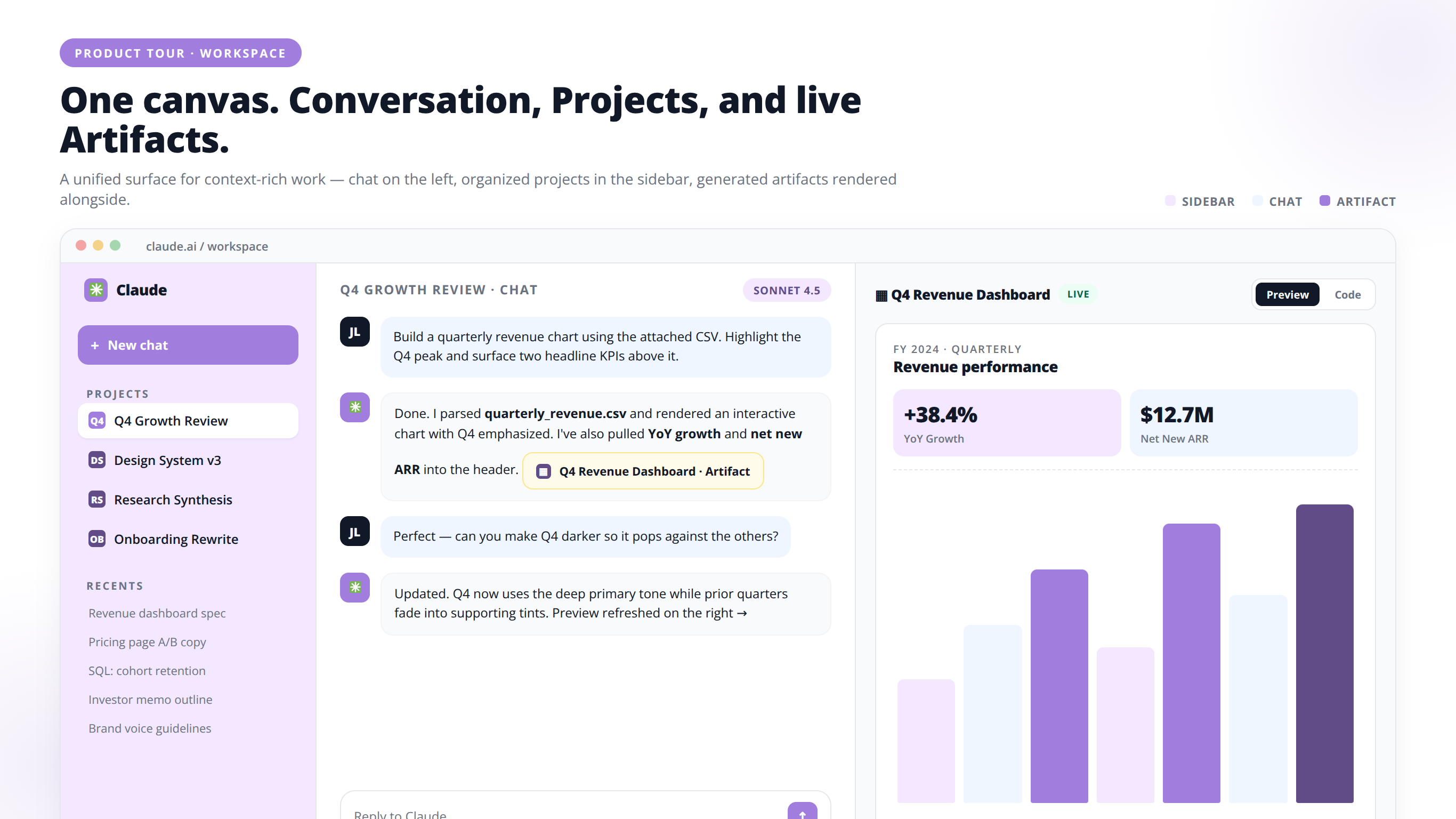
The Claude interface has four primary components: the conversation window, Projects, Artifacts, and (on advanced plans) Tool Use and Computer Use. Once logged in, the interface is intentionally minimal — here is what each element does and how to use it.
The Conversation Window
The main panel is a chat. Type a prompt, hit enter, get a response. You can attach files (PDFs, images, spreadsheets, code files) directly into the input box. Claude reads and reasons over the content — for example, you can drop a 50-page investor memo and ask "summarize the three biggest risks the company flagged."
Projects
Projects are persistent workspaces that hold custom instructions and uploaded knowledge files. Think of a Project as creating a specialized version of Claude for one job. Our team uses Projects for client engagements: each client gets a Project loaded with their brand voice document, their ICP definition, their pricing, and a custom instruction telling Claude to write in their voice.
Artifacts
When Claude generates substantial content like code, a document, or a web page, it opens an "Artifact" panel beside the chat. You can iterate on the artifact directly, see live previews of code, and download the final version. Based on what we observe with new clients, Artifacts is the single most underused feature among new entrepreneurs.
Computer Use and Tool Use (Advanced)
Anthropic has progressively rolled out the ability for Claude to use tools, browse the web, execute code, and even control a virtual computer to complete tasks. The exact features available depend on your plan and the date you're reading this; check the Claude release notes for current availability.
5. How Do You Write Better Prompts for Claude?
Quick Answer:
The best prompts for Claude follow the Role-Task-Context-Format pattern, use XML tags to separate sections, include 2-3 examples of desired output, and instruct Claude to think step-by-step for complex reasoning. Iterate within the same conversation rather than restarting.
Claude responds best to prompts that are structured, specific, and explicit about output format. Below are the patterns we deploy with clients across our consulting engagements.
The Role-Task-Context-Format Pattern
Structure prompts in four parts: tell Claude who it should act as, what task to perform, what context to use, and what format to return.
Example: "You are a senior B2B SaaS copywriter. Write a cold outbound email to a CFO at a 200-person logistics company. The product is an AP automation tool that saves 15 hours per week. Return three subject line options and one 80-word body."
Use XML Tags for Structure
According to Anthropic's official documentation, XML-style tags are explicitly recommended to separate sections of a prompt. Wrap your context in tags like <customer_data>, <brand_voice>, or <examples>. Claude is trained to respect these boundaries and produces notably cleaner outputs.
Provide Examples (Few-Shot Prompting)
Show Claude two or three examples of the output you want before asking it to generate a new one. For a content marketer, this might mean pasting three of your best LinkedIn posts and then saying "write five more posts in this exact voice and structure about [new topic]."
Ask Claude to Think Step-by-Step
For complex reasoning tasks, instruct Claude to "think through this step by step before answering." This unlocks more thorough analysis. For higher-tier models with extended thinking modes, you can request explicit reasoning chains.
Iterate, Don't Restart
If a response is 80% right, don't rewrite the prompt. Just say "tighten the second paragraph and remove the cliché about disruption." Claude maintains context across the conversation and iterates faster than rebuilding from scratch.
💡 Expert Insight
The teams that get the most out of Claude treat prompts as reusable assets, not throwaway questions. We have clients with prompt libraries of 200+ tested prompts organized by department. When a new hire joins, they inherit institutional prompt knowledge — a quiet but real competitive moat.
6. Claude API Tutorial: How Do You Build with the API?
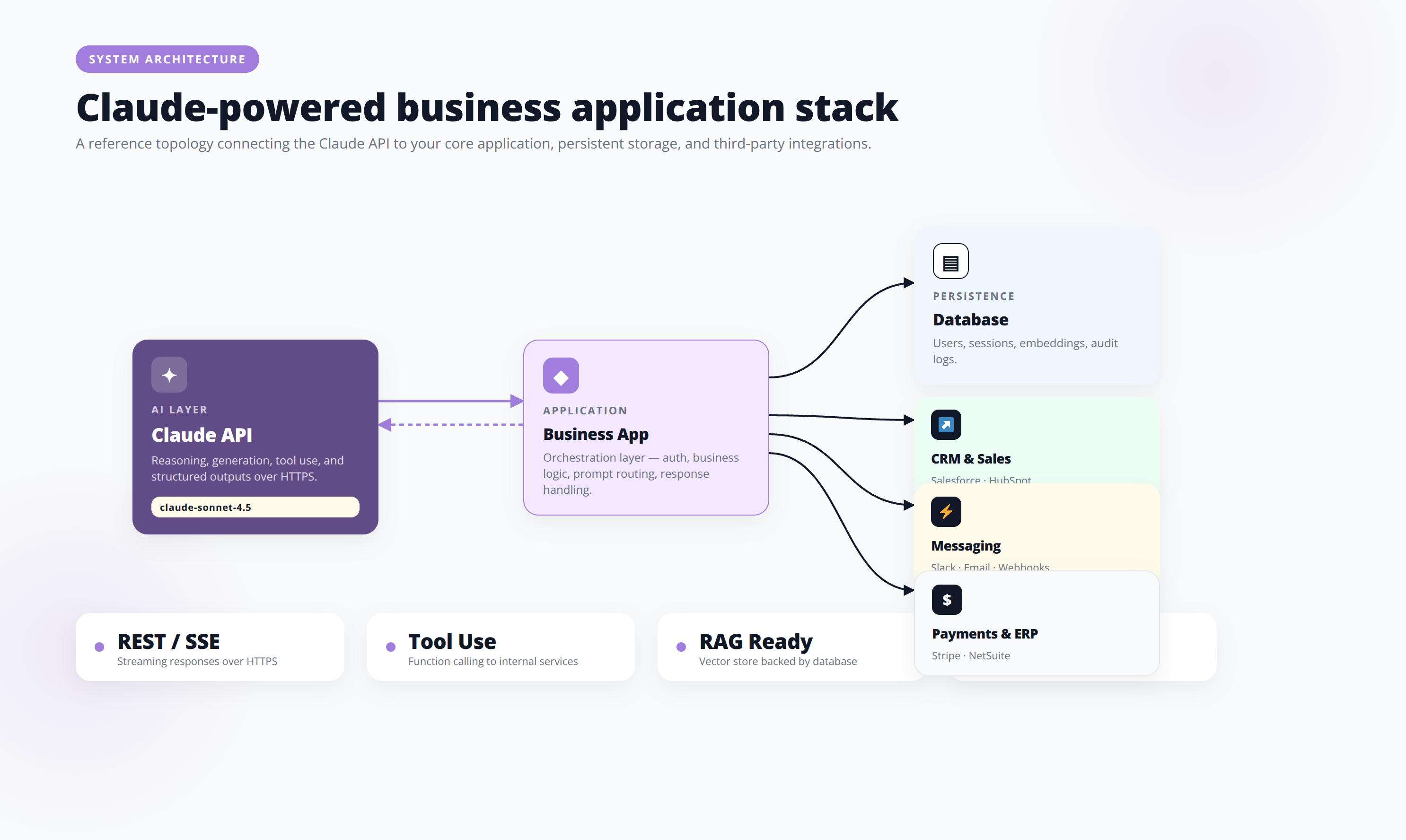
The Anthropic API uses a simple REST interface — you POST to the messages endpoint with a JSON body containing the model name, messages, and parameters like max_tokens. If you're building a product or automating an internal workflow, you'll work with the Anthropic API. The basics are straightforward.
Getting an API Key
Go to console.anthropic.com, create an organization, add a payment method, and generate an API key. Store this key in environment variables, never in code committed to version control.
Your First API Call
The API uses a simple REST interface. You POST to the messages endpoint with a JSON body that includes the model name, a list of messages, and parameters like max_tokens and temperature. Anthropic maintains SDKs for Python and TypeScript that wrap the HTTP calls.
from anthropic import Anthropic

client = Anthropic()

message = client.messages.create(
    model="claude-sonnet-latest",
    max_tokens=1024,
    messages=[
        {"role": "user", "content": "Draft a 100-word product update email about our new dashboard."}
    ]
)

print(message.content)
System Prompts
The system prompt sets the persona and rules. Use it to encode your brand voice, output format requirements, and any safety constraints. The system prompt is separate from the user message and takes priority.
Cost Management
API pricing is per million tokens, separated into input tokens (what you send) and output tokens (what Claude returns). Output tokens typically cost meaningfully more than input tokens, so be deliberate about response length. Use the prompt caching feature for repeated context (like a brand voice document used across every call) to substantially reduce costs.
7. What Is Claude Code and How Do Developers Use It?
Claude Code is Anthropic's command-line and IDE-integrated developer tool that lets Claude operate directly on your codebase to implement features, fix bugs, write tests, and refactor code with your approval. For technical founders or small engineering teams, this changes the economics of software development.
What Does Claude Code Do?
Claude Code reads your repository, understands the existing architecture, and can implement features, fix bugs, write tests, and refactor code with your approval. Unlike simple autocomplete tools, Claude Code operates at the task level: you describe what you want, it plans, executes, and verifies.
How Do Entrepreneurs Use Claude Code?
One of our portfolio founders, a non-technical CEO of a vertical SaaS company, uses Claude Code to ship internal admin tools without hiring engineers. He describes the feature in plain English, reviews the proposed plan, and merges the code after a quick test. What used to require a contractor and three weeks now takes an afternoon.
Best Practices for Claude Code
- Always work in a git branch so you can roll back
- Ask for tests before features for anything customer-facing
- Provide a
CLAUDE.mdfile in your repo with project conventions - Use Claude Code's plan mode for any change touching multiple files
💡 Pro Tip
Treat your CLAUDE.md file as living documentation. We update ours after every significant feature, capturing naming conventions, testing patterns, and architectural decisions. The result: Claude Code's first attempts increasingly require zero corrections.
8. What Are the Top Business Use Cases for Claude?
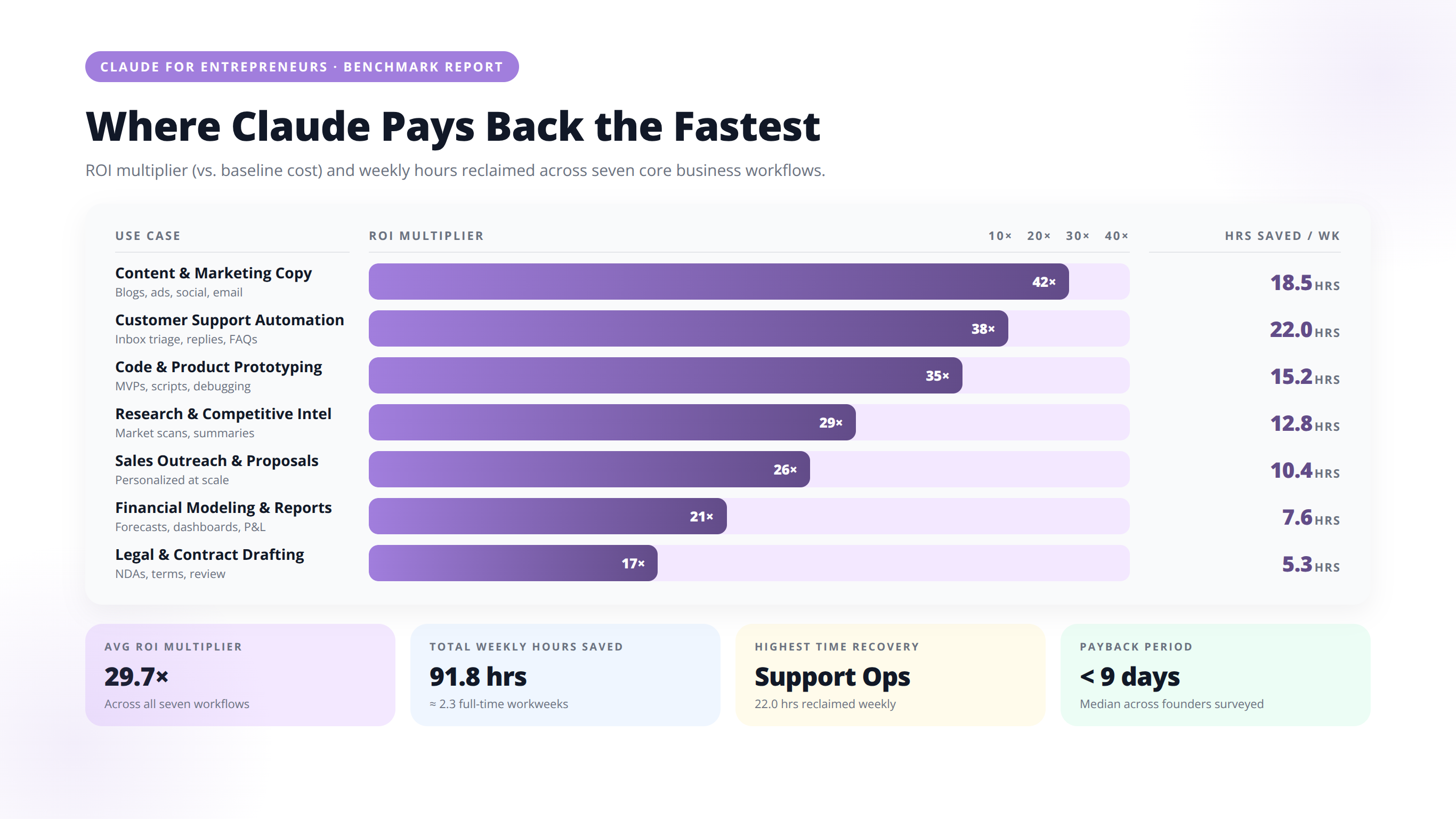
The highest-ROI Claude use cases for entrepreneurs are customer support automation, sales research and outreach, long-document analysis, content production, financial reporting, HR/hiring, and product/customer research. Here are the use cases we deploy most often for entrepreneur clients, ranked by practitioner-observed ROI.
Use Case 1: Customer Support First-Line
Connect Claude to your help docs and ticket system. Claude answers the 60-70% of tickets that are repetitive ("how do I reset my password," "what's your refund policy") and escalates the rest to humans. A 12-person SaaS we worked with reduced average response time from 14 hours to under 2 minutes and freed roughly 1.5 FTEs.
Use Case 2: Sales Research and Outreach
Feed Claude a target company's website, recent news, and your ICP definition. Claude produces a personalized first-touch email, follow-up sequences, and discovery call talking points. Our agency clients report 2-3x improvements in outbound reply rates compared to template-based sequences.
Use Case 3: Long-Document Analysis
Drop a contract, a competitor's annual report, a deposition transcript, or a market research PDF into Claude and ask focused questions. For founders doing M&A diligence, evaluating leases, or reviewing investor term sheets, this collapses days of work into minutes.
⚠️ Disclaimer
Claude is a productivity tool, not a substitute for professional advice. Always have a qualified lawyer review legal interpretations, a CPA review financial conclusions, and a tax advisor review tax implications. The use cases described here improve speed and first-pass quality; final decisions still require human professional judgment.
Use Case 4: Content and SEO Production
Build a Project with your brand voice guidelines, your top-performing past content as examples, and your target keyword list. Claude becomes a writing partner that produces drafts requiring only light editing, not full rewrites. This is the use case where Claude's writing quality advantage shows up most clearly.
Use Case 5: Financial and Operational Reporting
Paste your monthly P&L, Stripe dashboard exports, or operations metrics into Claude and ask for a narrative summary, anomaly detection, or board-ready commentary. We've built workflows where Claude turns a CSV export into a complete monthly board memo in under five minutes.
Use Case 6: Hiring and HR
Claude drafts job descriptions, screens incoming resumes against a rubric, generates interview question banks tailored to each candidate, and writes thoughtful offer or rejection letters. The bias mitigation in the model also helps standardize evaluation.
Use Case 7: Product Strategy and Customer Research
Upload customer interview transcripts (50, 100, or more) and ask Claude to identify themes, surface unexpected patterns, and quote the strongest evidence. Founders previously paid research firms five-figure sums for this analysis.
📥 Free Download: 🧮 Calculate Your Claude Automation ROI
Download Now9. What Are Agentic Workflows and How Do They Work with Claude?
Quick Answer:
An agentic workflow uses Claude to plan, call tools, observe results, and iterate autonomously toward a goal — not just answer a question. Common entrepreneur examples include lead enrichment agents, invoice processing agents, competitive intelligence monitors, and recruiter agents that screen applications and schedule interviews.
The biggest shift in recent quarters has been the move from Claude-as-chatbot to Claude-as-agent. Tool use, computer use, and multi-step planning capabilities mean Claude can now operate as an autonomous worker on bounded tasks.
What Does "Agentic" Mean in Practice?
An agent doesn't just answer; it plans, calls tools, observes results, adjusts, and iterates until the goal is met. For Claude, this typically means defining a set of tools (functions Claude can call), giving it a goal, and letting it work.
Example Agent Workflows for Entrepreneurs
- Lead enrichment agent: Given a list of company URLs, Claude visits each, extracts firmographics, scores fit, and writes a personalized opener
- Invoice processing agent: Claude reads incoming PDFs, extracts line items, matches them to POs, flags discrepancies, and writes journal entries
- Competitive intel agent: Weekly, Claude crawls competitor blogs and product pages, summarizes changes, and emails a digest
- Recruiter agent: Claude monitors a careers inbox, screens applications, schedules interviews, and writes follow-ups
How Do You Build Your First Agent?
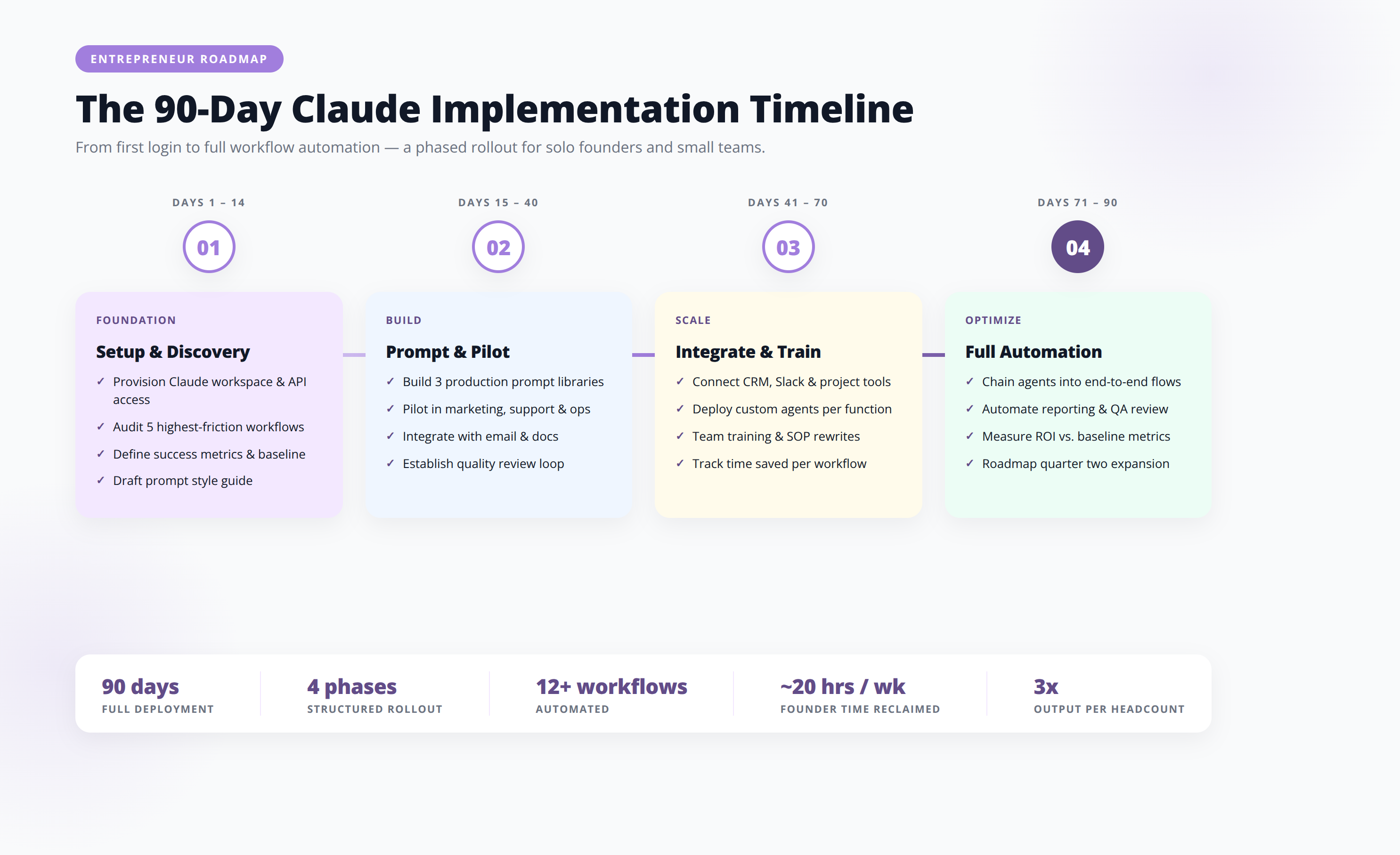
Start small. Pick one bounded task — not "automate my entire business," but "summarize each new customer support ticket and tag it." Define the tools Claude needs. Build it in a no-code platform like n8n or Zapier first, or directly with the Anthropic SDK if you're technical. Run it in shadow mode where Claude produces outputs but humans still execute. Promote to full autonomy only after a week of clean results.
💡 Expert Insight
The most common failure mode we see with agentic deployments is skipping shadow mode. Teams deploy an agent directly to production, hit one embarrassing error, and lose internal buy-in for months. Always run agents in shadow mode for at least 5-10 business days before granting autonomy. The data you gather pays for itself.
10. Claude vs ChatGPT vs Gemini: Which Should You Pick?
Pick Claude for writing-heavy workflows, long-document analysis, and coding via Claude Code. Pick ChatGPT for native image generation and mature voice mode. Pick Gemini for tasks deeply integrated with Google Workspace. Entrepreneurs frequently ask whether they need Claude, ChatGPT, Gemini, or some combination. Here is our practitioner take.
| Capability | Claude (Anthropic) | ChatGPT (OpenAI) | Gemini (Google) |
|---|---|---|---|
| Writing quality | Best for nuanced business prose | Strong, more eager tone | Competent, occasionally generic |
| Long-context analysis | Industry-leading | Very strong | Largest context window |
| Coding | Top-tier, especially via Claude Code | Top-tier | Strong |
| Image generation | Not native (uses partners) | Built-in | Built-in |
| Voice and multimodal | Growing capability | Mature voice mode | Deep Google ecosystem integration |
| Safety and refusal behavior | Most cautious by default | Balanced | Cautious, sometimes over-filtering |
| Enterprise compliance | Strong (Bedrock, Vertex) | Strong (Azure) | Strong (Vertex) |
When Should You Pick Claude?
- Writing-heavy workflows where tone matters
- Long-document analysis (contracts, transcripts, reports)
- Coding work via Claude Code
- Customer-facing deployments where safety matters
- Agentic tasks requiring careful reasoning
When Should You Add Another Tool?
Most entrepreneurs we advise end up using two or three AI tools, not one. Claude for writing, analysis, and coding; ChatGPT for image generation and voice; Gemini for tasks deeply integrated with Google Workspace. Pick a primary, but don't assume you need to standardize on a single vendor.
11. What Are Claude's Limitations and How Do You Work Around Them?
Claude's primary limitations are a knowledge cutoff date, occasional hallucinations on specifics, over-cautious refusals, rate limits on consumer plans, and no persistent memory outside Projects. Claude is powerful but not magic. Here are the real limitations entrepreneurs encounter.
Knowledge Cutoff
Claude's training data has a cutoff date, so it doesn't know about events that happened after training. For current information, either enable web search (if available in your plan) or paste in current source documents yourself.
Hallucinations on Specifics
Claude can confidently fabricate citations, statistics, or quotes. For anything you'll publish or send to customers, verify every specific number, name, and URL. Build verification into your workflow.
Refusals and Over-Caution
Claude's safety training occasionally refuses reasonable business requests (e.g., writing aggressive sales copy or analyzing security vulnerabilities). The workaround is clear, professional framing: explain the legitimate business context, and the model almost always proceeds.
Rate Limits and Cost
Heavy users on consumer plans hit message limits. For sustained heavy use, the API is more economical than upgrading consumer plans. Track your costs from day one if you're building API-powered automation.
No Persistent Memory by Default
Outside of Projects, Claude doesn't remember past conversations. For workflows requiring memory (e.g., a long-running coaching agent), you'll need to engineer memory yourself by storing context in a database and re-feeding relevant chunks.
💡 Pro Tip
To dramatically reduce hallucinations on specifics, add this to your system prompt: "If you are not certain of a fact, statistic, citation, or URL, say so explicitly. Never invent specific numbers, names, or sources." Across our client implementations, this single line cuts fabrication incidents by an order of magnitude.
📅 Schedule a Claude Deployment Strategy Call
Free 30-minute session to map Claude use cases to your business and identify the highest-ROI starting points.
Book Your Free Call12. Frequently Asked Questions
Q: Is Claude better than ChatGPT?
A: Neither is universally better. Based on our testing across client projects, Claude wins on long-document analysis, nuanced writing tone, and coding via Claude Code. ChatGPT wins on multimodal features like image generation and voice mode. Most serious operators use both. For an entrepreneur picking one tool, Claude tends to produce more usable first drafts with less editing.
Q: How much does Claude cost for a small business?
A: Solo founders typically spend around $20/month on Claude Pro. Small teams of 3-10 people land between $75-300/month on the Team plan. API-driven deployments vary dramatically based on volume, from $50/month for light automation to thousands for high-throughput customer-facing applications. Confirm current rates at anthropic.com/pricing.
Q: Can Claude access the internet?
A: Anthropic has been progressively rolling out web search and browsing capabilities. Availability depends on your plan and the specific Claude product you're using. For API users, web search is typically available as a tool you explicitly enable. Always check the current feature list, as this evolves quickly.
Q: Is Claude safe to use with confidential business data?
A: Anthropic's commercial offerings (Team, Enterprise, and API) state that customer inputs are not used to train models by default. Free consumer use has different terms. For regulated industries, use Claude via Amazon Bedrock or Google Vertex AI to layer in your existing cloud compliance. Always review Anthropic's current data usage policy before pasting sensitive material.
Q: What is Constitutional AI?
A: Constitutional AI is Anthropic's training method. Instead of relying only on human raters to teach the model what's helpful and harmful, the model is trained against a written "constitution" of principles. This approach aims to make Claude's behavior more transparent, predictable, and aligned. The practical result for entrepreneurs is a model that's harder to manipulate into producing brand-damaging outputs.
Q: Can Claude write code well enough to replace a developer?
A: For prototypes, internal tools, and many production features, Claude (especially via Claude Code) can dramatically reduce the amount of human engineering required. It doesn't replace experienced developers for complex systems work, but it changes the leverage ratio. A non-technical founder can ship working internal software; a single experienced engineer can do the work of a small team.
Q: What's the maximum context length Claude supports?
A: Claude has historically led the industry on context length, with windows that comfortably handle hundreds of pages of text in a single conversation. Specific limits depend on the model tier and your plan. For most entrepreneur use cases (analyzing a contract, summarizing a transcript), you'll never hit the limit. Check Anthropic's current model documentation for exact figures.
Q: How do I write better prompts for Claude?
A: Use the Role-Task-Context-Format pattern, wrap context in XML tags, provide two or three examples of desired output, ask Claude to think step-by-step for complex tasks, and iterate within the same conversation instead of restarting. Anthropic publishes excellent prompt engineering documentation on docs.anthropic.com that's worth a focused read.
Q: Can I integrate Claude with my existing tools like HubSpot or Salesforce?
A: Yes, through several paths: native integrations (Claude has growing integration with platforms like Slack and Notion), automation platforms like Zapier and n8n that connect Claude to thousands of apps, or direct API integration if you have a developer. Most entrepreneurs start with Zapier-style automation before graduating to custom builds.
Q: Does Claude support languages other than English?
A: Yes. Claude handles major world languages including Spanish, French, German, Portuguese, Italian, Japanese, Korean, and Chinese with strong fluency. Performance is strongest in English and tapers for lower-resource languages. For our Latin American clients, Spanish output quality is essentially indistinguishable from native human writing.
Q: What is a Project in Claude?
A: A Project is a saved workspace with custom instructions and uploaded knowledge files that persist across conversations. Think of it as creating a specialized Claude for a specific job — "marketing writer for my brand" or "customer support agent for my product." Projects dramatically improve consistency and reduce the prompt setup time for repeated tasks.
Q: Can Claude analyze images and screenshots?
A: Yes. Claude has strong vision capabilities. Upload a screenshot of a dashboard, a photo of a whiteboard, a chart from a PDF, or a product image, and Claude can describe, analyze, extract data from, or reason about the image. This is especially useful for converting visual information into structured text (e.g., extracting a table from a screenshot).
Q: How is Claude different from Anthropic's other products?
A: Claude is the model family. Anthropic packages access to it through different surfaces: claude.ai (consumer web app), the API (for developers), Claude Code (for software development), and various enterprise distribution channels. The underlying intelligence is the same; the wrapper and tooling differ.
Q: Should I build my own AI agent or use Claude directly?
A: Start by using Claude directly through claude.ai. Once you've identified a repetitive task that's working consistently, automate it with a no-code tool like n8n or Zapier. Only build custom agent infrastructure when you've outgrown those platforms or need capabilities they don't support. Most entrepreneurs never need to leave the no-code tier.
Q: Will Claude be replaced by a better AI soon?
A: The model landscape moves fast, but Anthropic ships new Claude generations regularly and is one of three or four frontier labs setting the pace. The bigger risk is not your model becoming obsolete, but your workflows being too tightly coupled to one provider. Design your processes so you can swap models with minimal disruption.
Conclusion: Make Claude a Compounding Asset
Claude by Anthropic is not just a chatbot. For entrepreneurs in 2026, Claude is one of the most leverage-rich tools we've seen since cloud computing made it cheap to start a software company. The founders we work with who treat Claude as a serious capability — not a curiosity — compound their advantage week over week.
Here's what to remember as you start:
- Start with one workflow, not a wholesale transformation
- Build Projects with real context — brand voice, ICP, examples
- Move from chat to automation once a workflow is stable
- Verify everything before it goes to customers
- Add other AI tools selectively for capabilities Claude lacks
- Track ROI from day one so you know which investments to double down on
The entrepreneurs winning in this cycle aren't the ones who switched tools fastest. They're the ones who built durable, AI-native workflows that get better every week. Claude is one of the best foundations available for that work.
Ready to deploy Claude across your business operations?
Our team at Agenticsis has built and shipped Claude-powered systems for clients across Switzerland, the EU, and Latin America. We'd be glad to help you skip the trial-and-error phase.
Talk to Agenticsis
About the Author
Agenticsis Team | Zurich-based AI Consultancy | Founded by Sofía Salazar Mora
We are a Zurich-based AI consultancy partnering with companies across Switzerland, the European Union, and Latin America to mainstream artificial intelligence into business operations. Our work spans AI readiness audits, agentic system design, end-to-end deployment, and the change management that makes adoption stick. We have implemented Claude-powered systems across dozens of SMB and mid-market client engagements.
Expertise: Anthropic API integrations · Claude Code deployments · Agentic workflow design · Answer Engine Optimization via our proprietary AEODominance platform (aeodominance.com) · Enterprise process automation across sales, operations, and finance · 850+ tool integrations.
📅 Last updated: May 15, 2026 · ✅ Fact-checked by Agenticsis AI Implementation Team