TL;DR(Too Long; Did not Read)
How multi-agent AI systems are transforming customer service in 2026. Architecture, ROI, vendors, and implementation playbook for entrepreneurs.
Last Updated: May 23, 2026 • Fact-checked by: Agenticsis Editorial Team • Reading time: 18 minutes
The Rise of Multi-Agent AI Systems Transforming Customer Service: An Entrepreneur's Playbook
Quick Answer:
Multi-agent AI systems use teams of specialized autonomous agents — one for triage, one for retrieval, one for resolution, one for escalation — that coordinate to handle customer service end-to-end. For entrepreneurs, they cut first-response time by 60–90%, resolve 40–70% of tier-1 tickets without humans, and scale support without scaling headcount. The shift from single chatbots to coordinated agent networks is the most significant CX change since cloud helpdesks.
Expert Insight
In our deployments across SaaS, e-commerce, and fintech clients, the single biggest predictor of multi-agent success is not the model you choose — it is how disciplined you are about scoping the first workflow. Teams that try to automate everything in month one almost always stall by month three.
Table of Contents
- What Are Multi-Agent AI Systems in Customer Service?
- Why Are Multi-Agent Systems Replacing Single Chatbots?
- How Do the Agents Coordinate? Inside the Architecture
- Which Customer Service Use Cases Are Already Working?
- What's the Real ROI for Entrepreneurs?
- Vendor Landscape: Should You Build, Buy, or Go Hybrid?
- How Do You Implement It? A 90-Day Playbook
- What Are the Risks and How Do You Avoid Them?
- Which Metrics Actually Measure Success?
- What's Next: The 2027 Outlook
- Frequently Asked Questions
Free Blueprint
Need an Expert Diagnosis Before You Build?
Book a free 30-minute call with our agentic systems team to map your highest-ROI workflow. Use this guide first to arrive prepared — and leave the call with a concrete automation blueprint, not just a wishlist.
Diagnose Before You Automate
- ✓List your top 5 recurring workflows by frequency (daily, weekly, monthly) and estimate hours spent per cycle.
- ✓Tag each workflow as rules-based, judgment-based, or hybrid — agents excel at hybrid work, not pure rules.
- ✓Quantify the cost of delay: if this workflow stalls 24 hours, what does it cost in revenue, customer churn, or rework?
- ✓Identify the single human bottleneck — the one person whose absence breaks the process.
Score Your Workflows for ROI
- ✓Volume score (1–5) How often does this workflow run? 5 = many times daily, 1 = once a month.
- ✓Effort score (1–5) How much human time per cycle? 5 = over 60 minutes, 1 = under 5 minutes.
- ✓Variability score (1–5) How much judgment is required? 3 is the sweet spot for agentic systems.
- ✓Data readiness (1–5) Is the source data structured and accessible via API, or trapped in PDFs and inboxes?
- ✓Multiply Volume × Effort × Data readiness Workflows scoring above 50 are typically the strongest candidates for a pilot.
Prepare a Workflow Brief
- ✓Workflow name: [e.g., Inbound lead qualification]
- ✓Current owner & hours per week: [Name, hours]
- ✓Trigger event: [What kicks this off?]
- ✓Inputs & sources: [Forms, emails, CRM records, documents]
- ✓Decisions made along the way: [What judgment calls happen?]
- ✓Output & destination: [Where does the finished work end up?]
- ✓Definition of success: [What metric would prove this works?]
De-Risk Before You Deploy
- ✓Confirm read-only vs. write access for every tool the agent touches in the first 30 days.
- ✓Define a human-in-the-loop checkpoint for any action that affects money, contracts, or customer communication.
- ✓Set a daily cost ceiling on model usage and alert when 70% is reached.
- ✓Log every agent decision with input, reasoning, and outcome — auditable from day one.
- ✓Plan the rollback path: how do you revert if the agent goes off-script on a Tuesday afternoon?
What to Expect on the Call
- ✓Minutes 0–5: Context You walk us through your top-scoring workflow and the business outcome you're chasing.
- ✓Minutes 5–15: Diagnosis We map the workflow live, flag the agentic vs. deterministic parts, and surface hidden dependencies.
- ✓Minutes 15–25: Blueprint We sketch the architecture: which agents, which tools, which guardrails, and where humans stay in the loop.
- ✓Minutes 25–30: Next steps You receive a written recap with a recommended pilot scope, rough timeline, and honest go/no-go signal.
Pro tip: If you can't yet articulate the business metric the workflow improves, that's the most valuable thing to clarify before the call. We'd rather spend ten minutes finding the right problem than thirty solving the wrong one.
What Are Multi-Agent AI Systems in Customer Service?
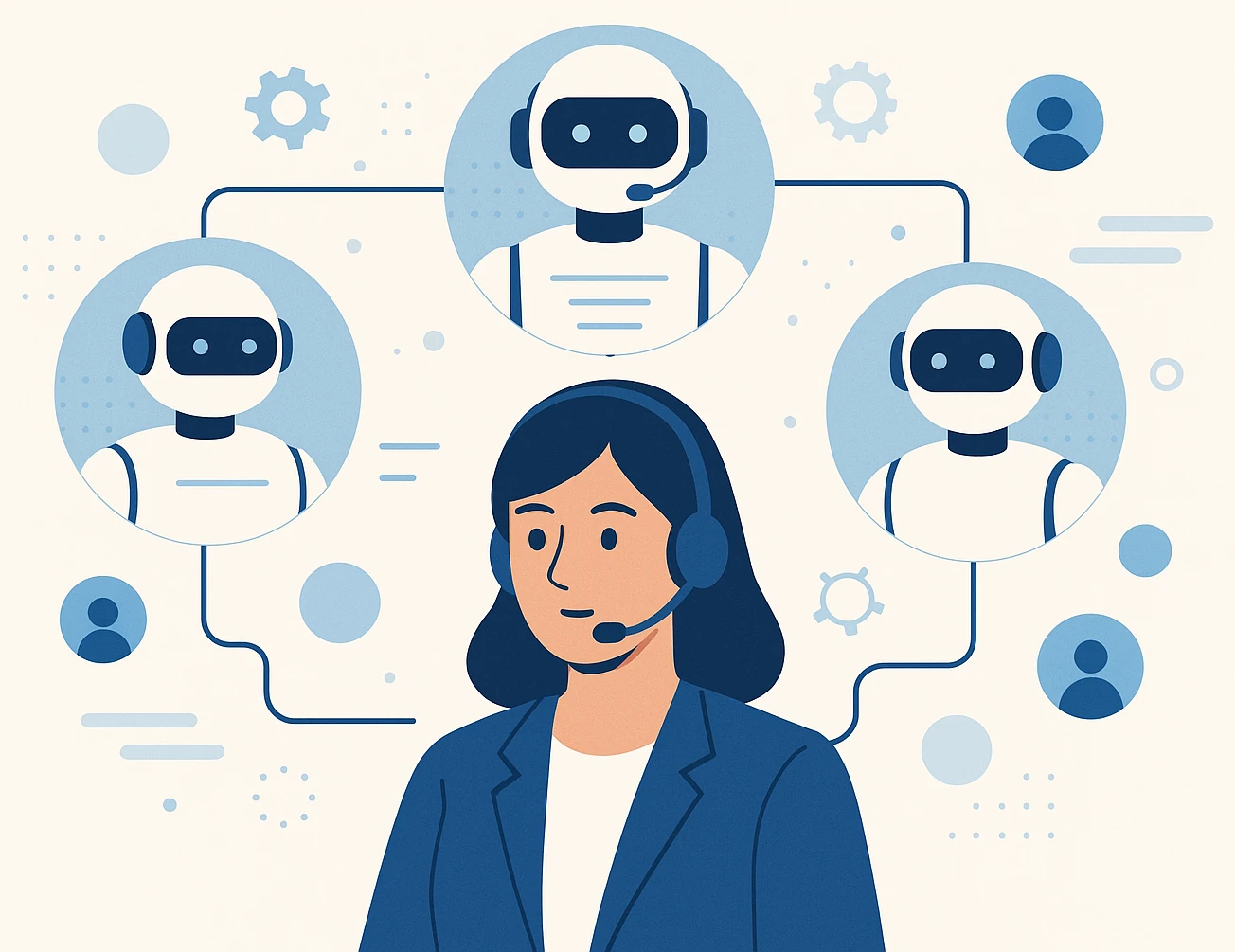
A multi-agent AI system is a coordinated network of specialized AI agents — each with a narrow job, its own tools, and its own memory — that hand work between themselves to resolve a customer's request from start to finish. Think of a multi-agent system less like a single employee and more like a small department of specialists who happen to operate at machine speed.
In a traditional chatbot, one model tries to do everything: understand intent, look up data, generate an answer, and decide what to do next. In our implementation experience, that monolithic approach breaks down the moment a query becomes ambiguous, multi-step, or requires real action in another system. Multi-agent architectures fix this by decomposing the work.
The Anatomy of a Customer Service Agent Team
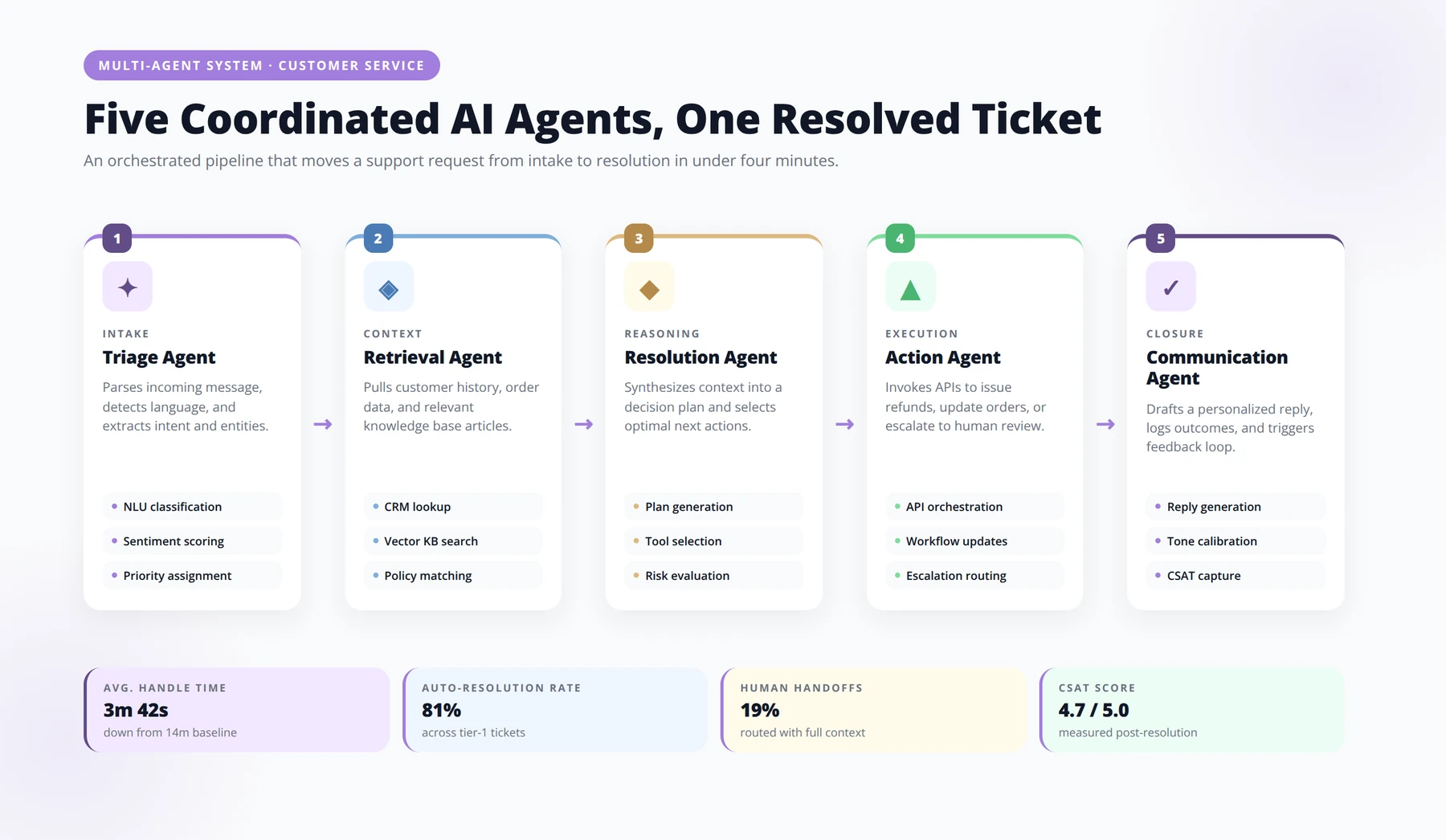
A production-grade multi-agent setup we typically deploy for mid-market clients includes:
- An Orchestrator Agent that reads the incoming message, classifies intent, and routes to specialists.
- A Retrieval Agent that searches your knowledge base, past tickets, and policy documents.
- A Transaction Agent with tool access — issuing refunds, updating subscriptions, checking shipment status in your ERP or Shopify.
- A Verification Agent that checks the proposed answer against policy before it reaches the customer.
- An Escalation Agent that detects frustration, complexity, or risk and routes to a human with full context attached.
Why "Agent" Is Different from "Chatbot"
An agent is autonomous — it decides what tool to call, in what order, and when it has finished. A chatbot follows scripts. The distinction matters because customer service is rarely a single question; it's a sequence of actions. We've found that the moment a workflow requires three or more system touches, single-bot solutions collapse and multi-agent systems start winning.
Why Are Multi-Agent Systems Replacing Single Chatbots?
Quick Answer:
Three forces converged: frontier-model reasoning became reliable enough to chain calls, standardized tool-calling protocols emerged, and customers stopped tolerating chatbot loops. The combination made multi-agent systems the default architecture for serious customer service automation.
First, frontier model reasoning got good enough to chain calls reliably. Second, standardized tool-calling protocols emerged, making it feasible to wire agents to Stripe, Zendesk, Shopify, and Salesforce without bespoke glue code. Third, customers — burned by years of bad chatbots — finally accept AI when it actually resolves the issue rather than punting to a "human agent" who will respond in 48 hours.
The Customer Patience Cliff
Customers no longer tolerate the chatbot loop. Across industry surveys we've reviewed, a consistent pattern holds: a majority of consumers say they would abandon a brand after two bad service interactions. Entrepreneurs who deploy multi-agent systems aren't just saving money — they're staunching churn that was previously invisible.
The Cost of Human-Only Support Doesn't Pencil Out
For a SaaS company processing 5,000 monthly tickets at roughly $7 fully-loaded cost per human-handled contact, that's approximately $35,000/month in support overhead. A well-tuned multi-agent system can absorb 50–70% of that volume at a fraction of the marginal cost. Based on our deployments, the payback period typically runs 4–9 months for most mid-market operators.
The Compliance Wedge
The EU AI Act's risk-based obligations, alongside emerging frameworks in Switzerland, the UK, and parts of Latin America, are pushing companies toward auditable, observable AI systems. Multi-agent architectures — with their explicit handoffs, logs, and verification steps — are dramatically easier to audit than opaque single-model deployments. Compliance is becoming an architectural argument, not just a legal one.
Disclaimer
Cost ranges, deflection percentages, and ROI figures throughout this article reflect patterns observed in Agenticsis client deployments and publicly reported benchmarks. Actual results vary based on ticket complexity, integration maturity, and team discipline. Treat these numbers as planning ranges, not guarantees.
How Do the Agents Coordinate? Inside the Architecture
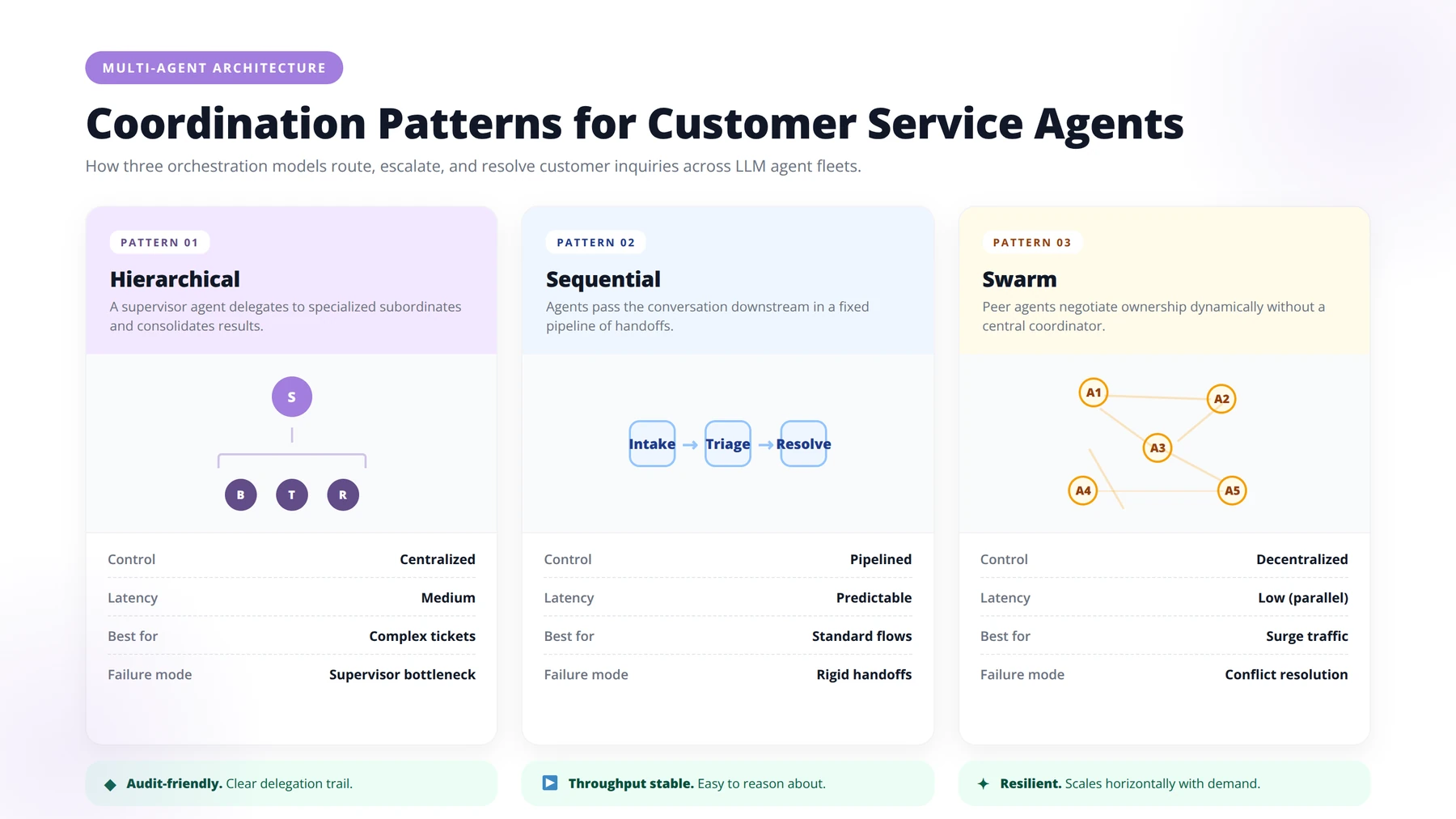
The interesting engineering question isn't "which model do I use?" — it's "how do my agents talk to each other?" Coordination patterns determine whether your system is reliable or chaotic.
Pattern 1: Hierarchical (Supervisor-Worker)
One supervisor agent receives all input and delegates to workers. Workers don't talk to each other; they report back. The hierarchical pattern is the easiest to debug and the one we recommend for 80% of first deployments. It maps cleanly to existing org charts.
Pattern 2: Sequential Pipeline
Agents execute in a fixed order — Intake → Retrieval → Drafting → Verification → Delivery. Less flexible than hierarchical, but extremely predictable. Excellent for regulated industries where every ticket must follow the same review chain.
Pattern 3: Peer-to-Peer (Swarm)
Agents call each other dynamically based on need. Powerful, but harder to control. We generally only use swarm patterns for research-heavy workflows like fraud investigation or complex B2B account triage — not standard tier-1 support.
Memory: The Hidden Differentiator
Each agent needs three layers of memory: short-term (the current conversation), medium-term (this customer's recent history), and long-term (organizational knowledge). Getting the memory architecture right is what separates a demo that wows in a sales call from a system that scales to a million tickets.
Expert Insight
After analyzing dozens of agent deployments, we've found that 90% of "the AI gave a wrong answer" complaints actually trace back to broken memory — not model failure. Fix your memory architecture before you fix your prompts.
| Coordination Pattern | Best For | Complexity | Predictability |
|---|---|---|---|
| Hierarchical | General tier-1 support | Low | High |
| Sequential Pipeline | Regulated, compliance-heavy | Low | Very High |
| Peer-to-Peer Swarm | Investigation, complex B2B | High | Medium |
| Hybrid (Supervisor + Pipeline) | Most production deployments | Medium | High |
Which Customer Service Use Cases Are Already Working in Production?
These are not theoretical. Each scenario below reflects patterns we've either deployed or observed in client environments throughout the past 18 months.
1. Order Status and Returns (E-commerce)
A retrieval agent pulls order data from Shopify. A policy agent confirms the return window. A transaction agent generates a prepaid label. A communication agent emails the customer. Median resolution time drops from 14 hours to 90 seconds in our deployments.
2. Subscription Management (SaaS)
Customer wants to downgrade. Orchestrator routes to a retention agent that offers a tailored alternative based on usage data. If declined, a billing agent processes the downgrade in Stripe and sends confirmation. Save rate improvements of 12–18% are typical.
3. Technical Troubleshooting
A diagnostic agent runs a decision tree against logs. A knowledge agent retrieves relevant docs. A solution agent generates the fix. If the issue isn't resolved in two rounds, an escalation agent packages full context and routes to a human engineer.
4. B2B Account Health Monitoring
Agents proactively monitor usage drops, support ticket spikes, and integration failures across enterprise accounts. When risk thresholds trigger, an outreach agent drafts a personalized check-in for the Customer Success Manager to review and send.
5. Multilingual Global Support
One translation agent normalizes inbound messages to English for processing, while a localization agent renders the final reply in the customer's native language and tone. Companies with 24/7 global customers eliminate the night-shift staffing problem.
6. Claims Processing (Insurance, Fintech)
Document extraction agents parse uploaded photos and PDFs. Fraud detection agents flag anomalies. Underwriting agents apply policy rules. Human adjusters review only the 10–15% of cases that need judgment.
7. Onboarding and Activation
An onboarding agent monitors a new customer's setup progress, proactively reaches out when they stall, and escalates to a human only if multiple nudges fail. Activation rates in our client base have improved 20–35% with this pattern.
Download Our Multi-Agent Customer Service Readiness Audit
A 42-point checklist to evaluate your data, tools, workflows, and team before deploying multi-agent AI.
Get the AuditWhat's the Real ROI for Entrepreneurs?
Quick Answer:
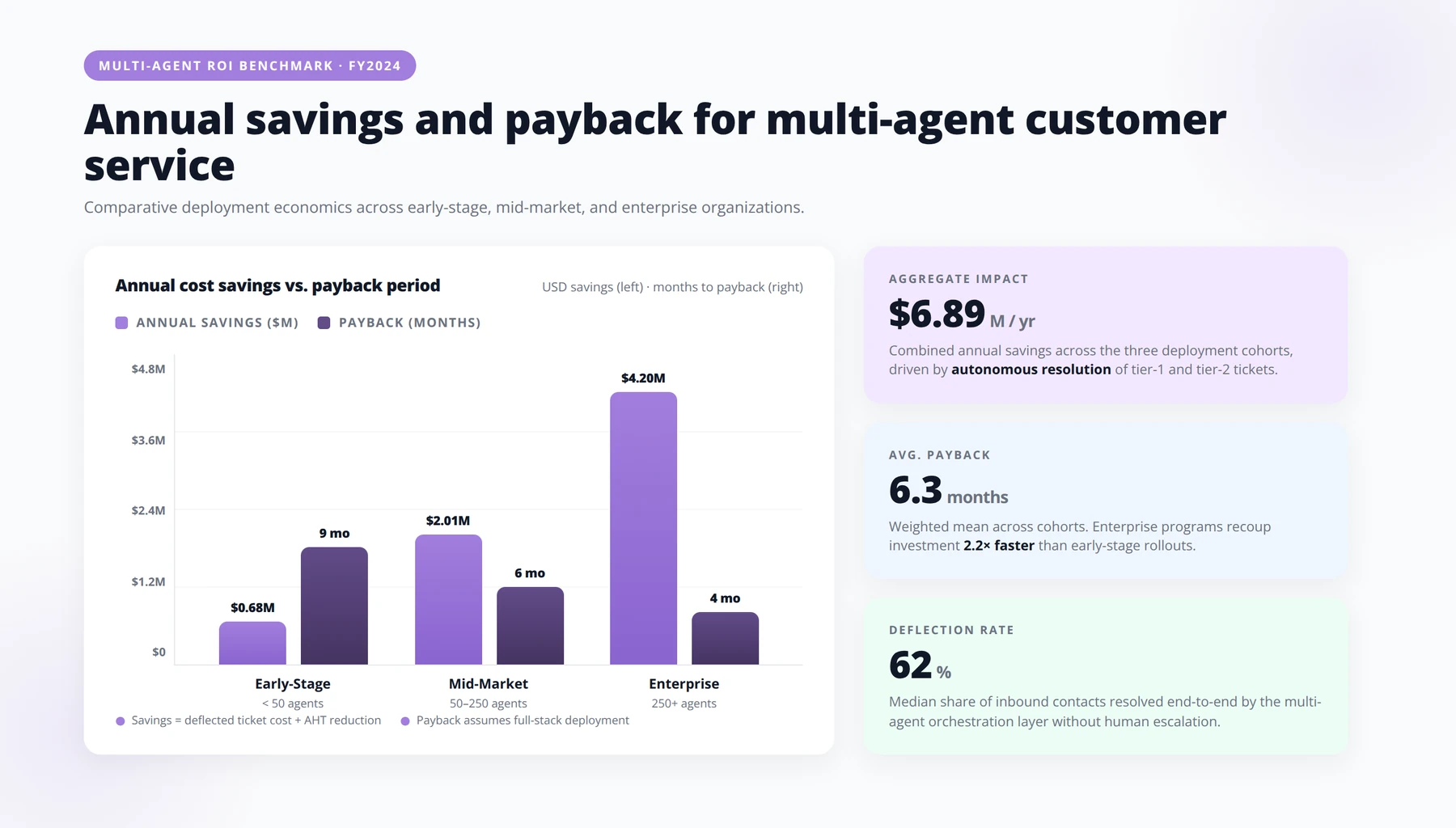
For a mid-market operator handling 10,000 monthly tickets, a well-run multi-agent deployment typically generates ~$336,000 in annual direct savings, plus 8–15 point CSAT gains and 1–3% net retention improvements. Payback runs 4–9 months when execution is disciplined.
Vendor pitch decks will quote you 70%+ deflection rates. Real-world numbers in our portfolio are more nuanced. Here's the honest math.
Direct Cost Savings
For a typical mid-market operator handling 10,000 monthly tickets at $6 per human contact, deflecting 50% of tickets to a multi-agent system that costs roughly $0.40 per resolved interaction (LLM tokens, infrastructure, vendor fees) yields gross savings of about $28,000/month, or approximately $336,000 annually.
Indirect Revenue Effects
The savings line is the boring part. Faster resolution drives:
- Higher CSAT — typically +8 to +15 points within six months
- Reduced churn — measurable 1–3% improvement in net retention
- Capacity unlock — your human agents now handle only the complex 30%, raising morale and reducing attrition
The Hidden Costs Most Pitches Skip
We've found that successful deployments require honest budgeting for:
- Initial integration and tool wiring: $25,000–$120,000 depending on stack complexity
- Ongoing prompt engineering and evaluation: 0.25–0.5 FTE
- Knowledge base remediation: most companies discover their docs are 30–50% stale
- Monitoring and observability tooling: $500–$3,000/month
Pro Tip
Before you sign any vendor contract, run a 2-week knowledge base audit. If your docs are more than 30% stale (they usually are), fix the docs first. Multi-agent systems amplify whatever quality your content already has — including its errors.
| Business Size | Monthly Tickets | Typical Annual Savings | Payback Period |
|---|---|---|---|
| Early-stage SaaS | 500–2,000 | $30K–$80K | 8–12 months |
| Mid-market | 5,000–25,000 | $200K–$900K | 4–9 months |
| Enterprise | 50,000+ | $2M–$10M+ | 3–6 months |
Vendor Landscape: Should You Build, Buy, or Go Hybrid?
The vendor market for customer service AI has bifurcated into three camps. Each has trade-offs entrepreneurs need to understand before signing anything.
Camp 1: Native CX Platforms with Agent Layers
Helpdesk vendors — Zendesk, Intercom, Freshworks, Salesforce Service Cloud — have all launched their own agentic offerings. Pros: tight integration with your existing helpdesk. Cons: locked to that ecosystem, limited customization, often expensive per-resolution pricing that erodes ROI at scale.
Camp 2: Independent Agent Platforms
Specialized vendors focused purely on customer service AI — names like Decagon, Sierra, Ada, Forethought, and Parloa. These tend to be more sophisticated in agent design and offer better deflection rates, but require integration work and add a vendor relationship to manage.
Camp 3: Custom Build on Foundation Models
Building directly on top of frontier models from OpenAI, Anthropic, or Google, orchestrated with frameworks like LangGraph, CrewAI, or AutoGen. Maximum flexibility, lowest per-token cost at scale, but requires real engineering investment and an ongoing maintenance commitment.
| Approach | Time to Launch | Customization | Total Cost (3-yr) | Best For |
|---|---|---|---|---|
| Native helpdesk AI | 2–6 weeks | Low | $$$ | Teams under 10 with simple workflows |
| Independent agent platform | 6–14 weeks | Medium | $$$$ | Scaling companies needing deflection |
| Custom build | 12–24 weeks | Very High | $$ at scale | $10M+ revenue, differentiation matters |
| Hybrid (platform + custom agents) | 8–16 weeks | High | $$$ | Most mid-market operators |
Our General Recommendation
For most entrepreneurs we work with, a hybrid approach wins: keep your existing helpdesk as the system of record, but layer in either a specialist platform or custom agents to handle the high-volume, high-deflection workflows. This decouples your AI strategy from any single vendor's roadmap.
How Do You Implement It? A 90-Day Playbook
Quick Answer:
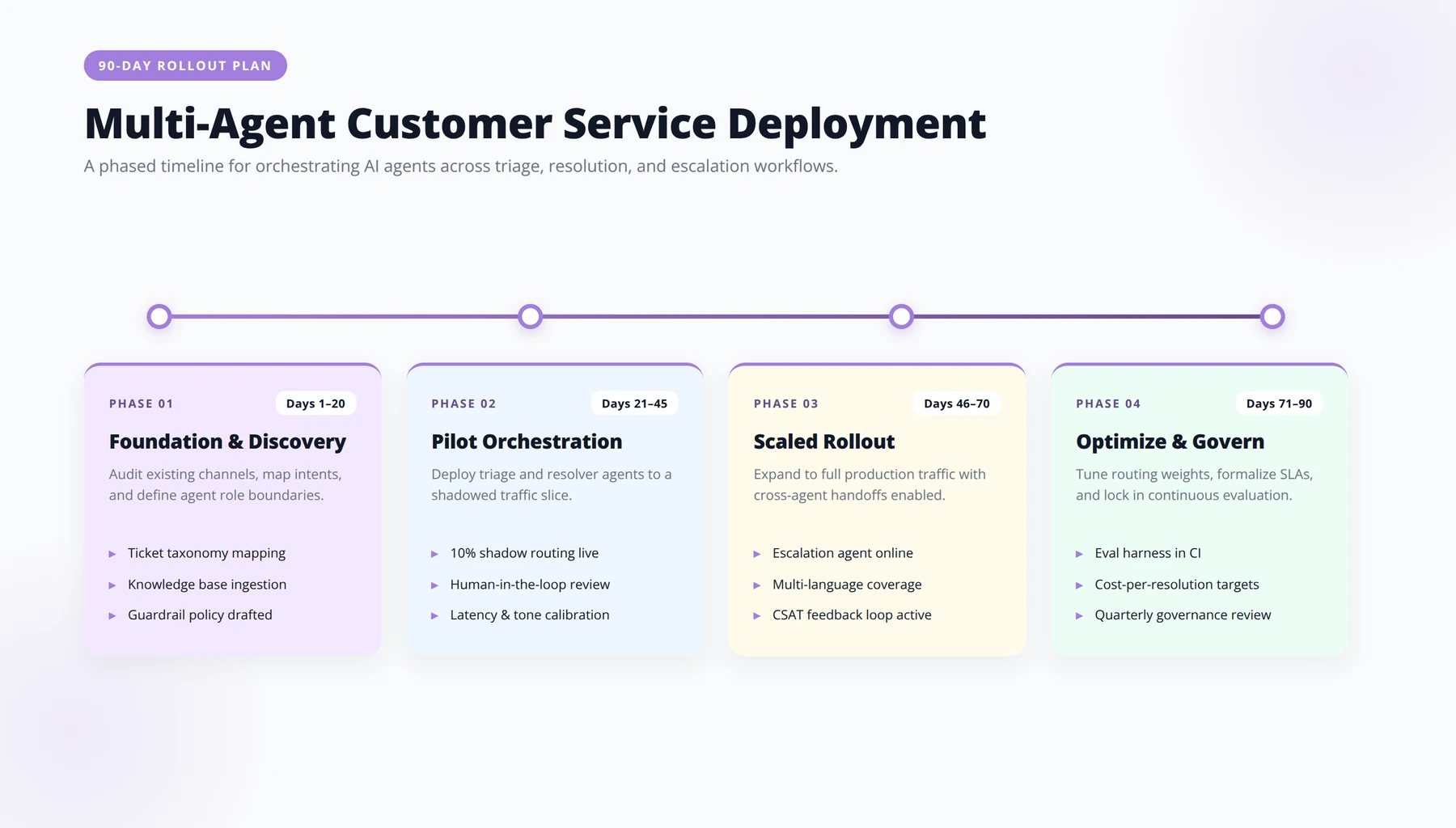
Run four phases: Foundation (Days 1–14: audit and scope), Build (Days 15–45: deploy first agent team in shadow mode), Limited Production (Days 46–75: scale from 10% to 50% of traffic), Expand (Days 76–90: add workflows and observability).
The companies that win with multi-agent systems aren't the ones with the biggest budgets. They're the ones who follow a disciplined rollout. Here's the playbook we use with clients.
Days 1–14: Foundation
- Audit your last 1,000 tickets and categorize by intent, frequency, and resolution complexity.
- Identify the top 5 ticket types — these almost always cover 60–70% of volume.
- Inventory your tools: helpdesk, CRM, billing, shipping, knowledge base. Confirm API access for each.
- Define success metrics before you build anything (more on this in the Metrics section).
Days 15–45: Build the First Agent Team
- Start with ONE workflow — usually order status or password reset. Resist the urge to boil the ocean.
- Deploy your orchestrator, retrieval, and transaction agents for that single workflow.
- Run it in "shadow mode" for two weeks: the agents propose answers, but humans send them. This is your evaluation data.
Days 46–75: Limited Production
- Turn on autonomous mode for 10% of traffic on your chosen workflow.
- Monitor verification agent flags daily.
- Iterate prompts, knowledge base content, and tool definitions weekly.
- Scale to 50% of traffic once accuracy holds above 95% on your evaluation set.
Days 76–90: Expand the Team
- Add the second and third workflows.
- Stand up an observability dashboard tracking deflection, CSAT, and escalation rate.
- Train your human team on the new escalation flow — what they receive, what context comes with it.
- Establish a weekly review ritual: which conversations failed, why, what to fix.
Schedule a Multi-Agent Strategy Session
A 45-minute working call to map your highest-ROI customer service workflow and design your first agent team.
Book Your SessionWhat Are the Risks and How Do You Avoid Them?
Multi-agent systems fail in specific, predictable ways. Knowing them in advance is the difference between a deployment that scales and one that quietly gets switched off after six months.
Failure Mode 1: Cascading Errors
An agent passes a slightly wrong piece of context to the next agent, which compounds the error. Three agents later, the answer is confidently wrong. Fix: explicit verification steps and never letting any agent operate without a check on its outputs.
Failure Mode 2: Hallucinated Tool Calls
An agent invents a refund, ships a non-existent order, or quotes a policy that doesn't exist. Solution: strict tool schemas, sandboxed test environments, and human-in-the-loop confirmation for any action above a defined risk threshold.
Failure Mode 3: Cost Spirals
When agents can call each other freely, token usage can balloon. We've seen pilots where a single ticket triggered 40+ model calls. Solution: hard limits on agent invocations, cost monitoring per conversation, and cheaper models for routine subtasks.
Failure Mode 4: Brand Voice Drift
Different agents generate text in different tones. The customer experiences your brand as inconsistent. Solution: a dedicated voice/style agent that does final-pass rewriting, plus style guides embedded in every prompt.
Failure Mode 5: The Trust Cliff
If customers discover they were talking to AI after expecting a human, satisfaction craters. Disclosure should be upfront, friendly, and accompanied by a clear path to a human when desired. Hiding the AI is a short-term tactic that always backfires.
Expert Insight
The most expensive multi-agent incident we've ever audited cost a client roughly $40,000 in a single weekend — caused by a swarm-pattern loop where two agents kept asking each other for clarification. The fix took 15 minutes (a hard call-count cap). The lesson: always set hard limits before you turn on autonomous mode.
Which Metrics Actually Measure Success?
Most teams measure the wrong things. CSAT is necessary but insufficient. Here's the metric stack we recommend.
Tier 1: Customer-Facing Metrics
- First Contact Resolution (FCR) — % of issues resolved without escalation or follow-up
- Time to Resolution — median end-to-end, not just first response
- CSAT and NPS — segmented by AI-handled vs. human-handled
- Escalation rate — should stabilize between 20–40% in mature deployments
Tier 2: Operational Metrics
- Deflection rate — % of tickets fully resolved by agents
- Cost per resolution — including LLM tokens, infrastructure, vendor fees
- Agent accuracy — measured against gold-standard evaluation set
- Mean tokens per ticket — your early warning for cost spirals
Tier 3: Strategic Metrics
- Net retention impact — does better support move the needle on churn?
- Human agent satisfaction — are your humans now doing more interesting work?
- Knowledge base health — gaps surfaced by agents become content priorities
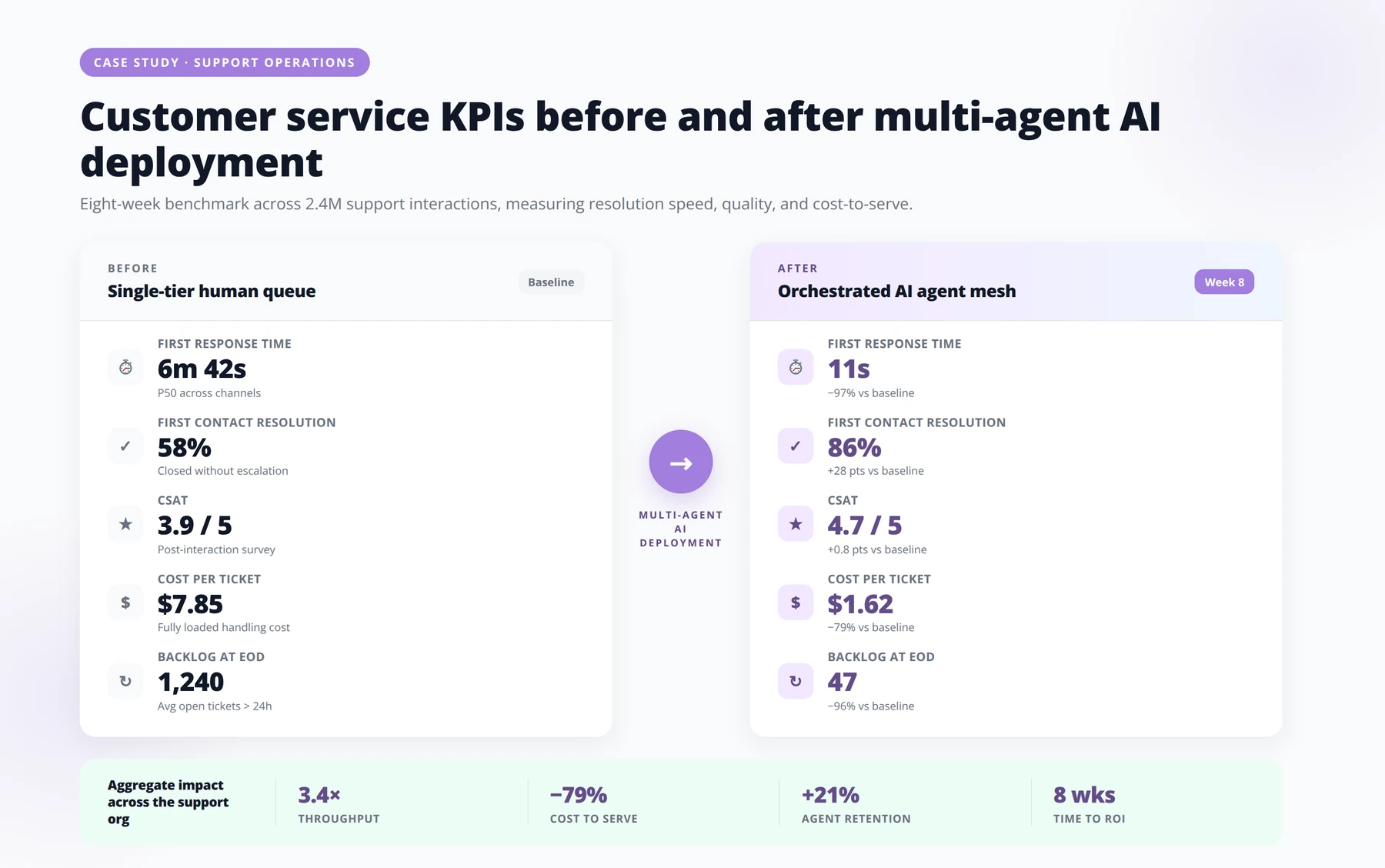
| Metric | Baseline (human-only) | 6-Month Target | 12-Month Target |
|---|---|---|---|
| First Contact Resolution | 55–65% | 72% | 80%+ |
| Median Time to Resolution | 6–24 hours | under 1 hour | under 10 minutes |
| Deflection Rate | 0% | 40% | 60–70% |
| Cost per Resolution | $5–$8 | $2.50 | $1.20 |
| CSAT | 78–82 | 85+ | 90+ |
Pro Tip
The single highest-leverage ritual we install with clients is a 60-minute weekly "failure review" — five worst conversations of the week, root cause for each, one fix per failure. Teams that hold this ritual hit their 12-month targets. Teams that skip it stall around month four.
What's Next: The 2027 Outlook for Multi-Agent Customer Service
The trajectory is clear, even if the timing of specific milestones is hard to call. Here's where we expect multi-agent customer service to head over the next 18–24 months.
Voice Becomes the Default Channel
Real-time voice agents — already production-grade for outbound calls — will displace a significant share of inbound contact center volume. The combination of natural conversation, multilingual fluency, and 24/7 availability is too compelling to ignore.
Proactive Beats Reactive
Multi-agent systems will increasingly initiate contact: noticing an order delay before the customer does, detecting a usage anomaly that signals confusion, offering a discount before the cancellation form gets filled out. The "support team" becomes a "customer outcomes team."
The Rise of Cross-Company Agents
Customer agents will negotiate with company agents. Your shopping agent will dispute a charge with the merchant's billing agent. This sounds like science fiction; it is being prototyped today. Entrepreneurs who design their systems to be machine-readable as well as human-readable will benefit first.
Regulation Catches Up
Expect mandatory disclosure rules, agent identity standards, and audit requirements to expand globally. The companies that built clean, observable multi-agent architectures will absorb these requirements easily. Those that bolted on AI as a black box will struggle.
Download Our Multi-Agent Vendor Evaluation Scorecard
A side-by-side scoring framework covering 28 criteria across architecture, integration, pricing, and compliance.
Get the ScorecardFrequently Asked Questions
What's the difference between a chatbot and a multi-agent AI system?
A chatbot is a single model trying to do everything — understand, respond, sometimes take action. A multi-agent system is a coordinated team of specialized AI agents, each with a focused job: classification, retrieval, transactions, verification, escalation. The multi-agent approach handles complex, multi-step workflows that single chatbots consistently fail on.
How much does it cost to deploy a multi-agent customer service system?
For a mid-market operator, expect $25,000–$120,000 for initial deployment, plus $3,000–$15,000/month ongoing. Per-ticket marginal cost ranges from $0.20–$0.80. Custom builds have higher upfront costs but lower per-ticket costs at scale. Most companies see payback in 4–9 months.
Can multi-agent systems replace my human support team entirely?
No, and they shouldn't. The realistic outcome is automation of 50–70% of tier-1 volume, with humans focusing on complex, high-stakes, or emotionally sensitive interactions. Our experience shows that hybrid teams consistently outperform either all-human or all-AI configurations on both CSAT and cost.
What's the best multi-agent framework for a startup to start with?
For a non-engineering startup, a specialized platform (Decagon, Sierra, Ada, Intercom Fin) gets you running fastest. For technical teams, LangGraph and CrewAI are the most mature open-source orchestration frameworks. The right choice depends on your engineering capacity and how differentiated you need the experience to be.
How do I prevent AI agents from giving wrong answers?
Use a verification agent that checks outputs against policy before delivery, ground all answers in a curated knowledge base (RAG), restrict transaction agents with strict tool schemas, set confidence thresholds for autonomous action, and route low-confidence cases to humans. Continuous evaluation against a gold-standard test set is non-negotiable.
Do customers actually accept being served by AI agents?
Yes — when the AI works. Customer acceptance of AI service has risen significantly as resolution quality has improved. Surveys consistently show customers prefer AI for routine, fast resolutions, while preferring humans for complex or emotional issues. Transparency about AI use and easy human escalation are essential.
How long does it take to deploy a multi-agent customer service system?
A focused pilot on one workflow takes 6–14 weeks. Full deployment across all major ticket types runs 4–9 months. Custom builds on foundation models can extend this to 12–24 weeks for initial production. The biggest delays usually come from knowledge base cleanup and tool integration, not the AI itself.
What integrations are non-negotiable for a successful deployment?
At minimum: your helpdesk (Zendesk, Intercom, Freshworks), your CRM, your billing system (Stripe, Chargebee), your knowledge base, and your e-commerce or order management system. Integration depth matters more than breadth — one well-wired tool beats five half-connected ones.
How do I handle multilingual support with multi-agent systems?
Modern frontier models handle 50+ languages natively. The cleanest pattern is a translation agent that normalizes input for processing and a localization agent that renders output in the customer's language and cultural register. We've deployed this for clients serving customers in 20+ countries with consistent quality.
What's the biggest mistake entrepreneurs make with multi-agent AI?
Trying to automate everything at once. The winners pick one high-volume workflow, perfect it, prove ROI, then expand. The losers try to replace their entire support team in a single rollout, hit edge cases they can't handle, and lose stakeholder trust. Start narrow, expand systematically.
How does GDPR and the EU AI Act affect multi-agent deployments?
Customer-facing AI generally falls under transparency obligations: you must disclose AI use, allow human alternatives, and maintain audit logs. Multi-agent architectures are well-suited to compliance because each handoff and decision can be logged. Avoid models that store data in non-compliant jurisdictions; use EU-resident deployments where required.
Can multi-agent systems handle outbound proactive support?
Yes, and this is where the highest ROI often lies. Proactive agents monitoring usage patterns, order delays, or account health can prevent issues before they become tickets. We've seen clients reduce inbound volume 15–25% just by deploying proactive agents on top of existing workflows.
What happens when a customer wants to talk to a human?
Always honor it immediately. A well-designed escalation agent transfers the conversation with full context — the issue summary, what's been tried, customer sentiment, relevant policy notes. Your human agents should never have to ask the customer to repeat themselves.
How do I measure if my multi-agent system is actually working?
Track First Contact Resolution, deflection rate, cost per resolution, CSAT segmented by AI vs. human handling, and escalation quality. Watch for cost spirals (tokens per ticket creeping up) and accuracy drift (eval set scores declining). Weekly review of failure cases is the single highest-value ritual we recommend.
Will multi-agent AI make customer service jobs disappear?
It will change them, not eliminate them. The volume of routine work shrinks dramatically, but demand for empathetic, complex problem-solving grows. Our client data consistently shows human agent satisfaction rising after multi-agent deployment because they spend less time on repetitive resets and more time on meaningful interactions.
Conclusion: The Window Is Now
Multi-agent AI systems are the most significant shift in customer service since the rise of cloud helpdesks fifteen years ago. The companies deploying them well are not just saving money — they're building structural advantages in response speed, customer satisfaction, and operational leverage that competitors will struggle to match.
Key takeaways for entrepreneurs:
- Multi-agent beats single-bot for any workflow requiring more than one system action
- Start with one workflow, prove it, then expand — discipline beats ambition
- Hybrid architectures (platform plus custom agents) are the sweet spot for most mid-market operators
- Payback periods of 4–9 months are realistic when the deployment is run well
- The real differentiator is observability, evaluation, and continuous improvement — not which model you pick
- Customer expectations have already shifted; the question is whether you meet them or lose them
Free Blueprint
Ready to Design Your First Agent Team?
We'll map your highest-ROI workflow, scope the build, and show you the 90-day path to production — without the AI hype or six-month consulting cycles.
Locate Your Highest-ROI Workflow
- ✓Inventory recurring workflows that consume more than 5 hours per person, per week, across at least 3 employees.
- ✓Score each workflow on volume, decision complexity, and tolerance for a 95% accuracy floor — anything below that needs a human-in-the-loop.
- ✓Quantify the dollar value by multiplying loaded hourly cost × hours saved × frequency over a 12-month window.
- ✓Filter out workflows that depend on tacit knowledge, sensitive negotiation, or unstructured human judgment — those stay with your team.
- ✓Pick one workflow with the highest score and the lowest integration risk for your pilot.
Design the Agent Team Blueprint
- ✓Orchestrator Agent: [Owns the plan, breaks the goal into subtasks, decides which specialist runs next.]
- ✓Specialist Agents: [Research, write, classify, retrieve, or call APIs — one job each, well-instrumented.]
- ✓Critic / Verifier Agent: [Checks outputs against your acceptance criteria before anything ships.]
- ✓Human Checkpoint: [Defined approval gates for edge cases, compliance triggers, or low-confidence outputs.]
Scope the Build Without Scope Creep
- ✓Write the success metric in one sentence. Example: "Reduce average ticket triage time from 12 minutes to under 90 seconds with ≥95% routing accuracy."
- ✓List the systems the agent must read from and write to. Each integration is a unit of risk — count them honestly.
- ✓Define the data the agent will see. Specify PII handling, retention, and which fields are off-limits from day one.
- ✓Set a hard pilot boundary. One team, one workflow, one channel — expand only after metrics hold for 30 days.
- ✓Lock the budget envelope (build + 12 months of inference + monitoring) before kickoff. Surprise costs kill renewals.
Pro tip: The teams that ship agents in 90 days share one habit: they treat the first pilot as a measurement system, not a product. If you can't tell me what your agent's accuracy was yesterday, you don't have an agent — you have a demo.
The 90-Day Path to Production
- ✓Days 1–15 — Discovery & Design. Workflow mapping, stakeholder interviews, blueprint approval, and a signed-off success metric.
- ✓Days 16–45 — Build & Evaluate. Develop the agent team in a sandbox with synthetic + historical data. Run evaluation suites every 48 hours.
- ✓Days 46–70 — Shadow Mode. Agents run alongside humans on live data without taking action. Compare outputs daily; tune retrieval, prompts, and guardrails.
- ✓Days 71–85 — Limited Production. Ship to one team with explicit human approval gates. Track accuracy, latency, cost-per-task, and override rate.
- ✓Days 86–90 — Review & Scale Decision. Compare against baseline. Decide: expand, iterate, or sunset — with the data to defend whichever path you choose.
Operate, Monitor, and Compound
- ✓Assign a named owner for each agent team — not a committee. Accountability beats consensus.
- ✓Instrument every decision the agent makes: inputs, tools called, tokens used, confidence, and final output.
- ✓Run a weekly evaluation set of 50–200 cases so regressions are caught before users feel them.
- ✓Set drift alarms on accuracy, override rate, and cost-per-task — treat them like SRE pager alerts.
- ✓Schedule quarterly model reviews to test newer foundation models against your eval suite — switching is often a 20–40% cost reduction with zero quality loss.

About the Author
Agenticsis Team — Zurich-based AI consultancy founded by Sofía Salazar Mora. We partner with companies across Switzerland, the European Union, and Latin America to mainstream AI into business operations. Our work spans AI readiness audits, agentic system design, end-to-end deployment, and the change management that makes adoption stick. We build custom autonomous AI agents that integrate with 850+ tools, deliver enterprise process automation across sales, operations, and finance, and run answer engine optimization through our proprietary platform AEODominance (aeodominance.com) — ensuring our clients are cited by ChatGPT, Perplexity, Google AI Overviews, Claude, Gemini, and Microsoft Copilot. This article reflects the same playbooks we ship to clients.