TL;DR(Too Long; Did not Read)
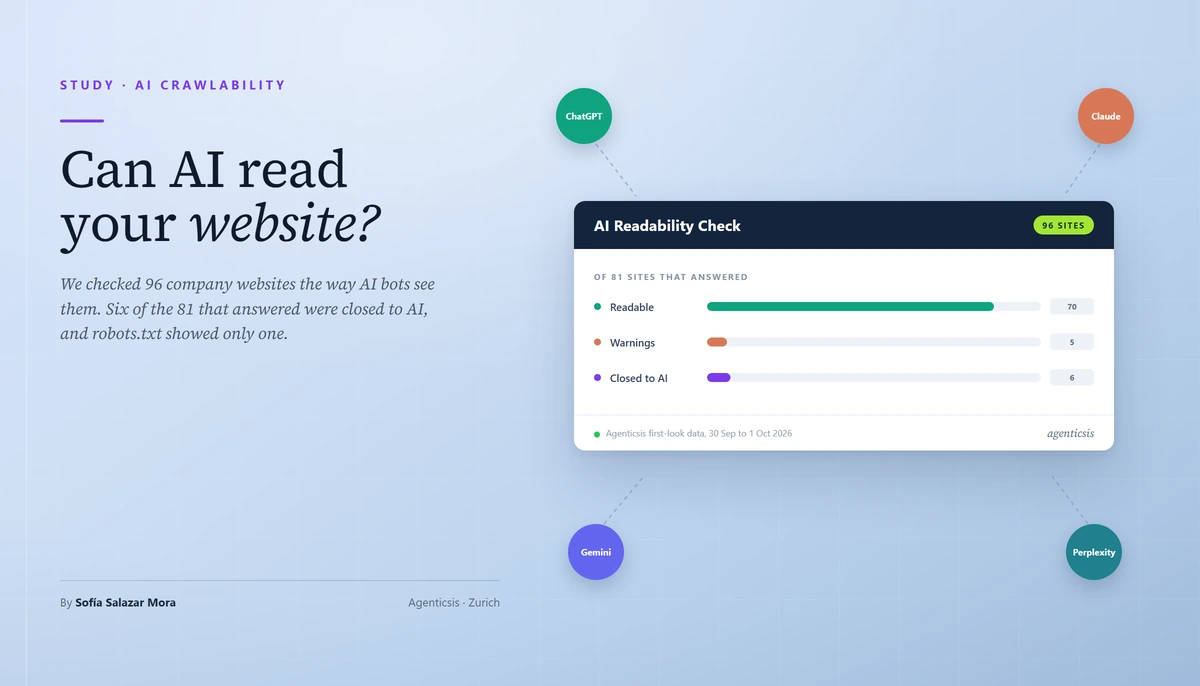
We checked 96 company websites the way AI bots see them. 6 of the 81 reachable sites were closed to AI, and robots.txt showed only 1.
Can AI Read Your Website? What We Found Checking 96 Company Sites (2026)
Published 1 October 2026 · Agenticsis, Zurich
Quick Answer:
Whether AI can read your website depends on six things, and robots.txt is only one of them. We checked 96 company websites on 30 September and 1 October 2026: 15 did not answer, and of the 81 that did, 6 were closed to ChatGPT, Claude and Perplexity. Robots.txt revealed 1 of those 6; the other 5 were homepages that hand a bot no text until JavaScript runs.
Table of Contents
- Why "can AI read my website?" is not the same question as "can Google?"
- The six reasons an AI assistant cannot read a website
- Which AI bots visit your site, and which ones decide whether you are cited
- What we found: 96 company websites, 81 reachable, 6 closed to AI
- Why robots.txt showed only 1 of the 6 closed sites
- JavaScript-only homepages: the 0-word problem
- When the server says no and robots.txt says yes
- Quieter problems: canonicals, thin pages, missing links and silent sites
- How to check whether AI can read your website in ten minutes
- How to fix what you find
- Frequently asked questions
- Conclusion
Why "can AI read my website?" is not the same question as "can Google?"
Can AI read my website? For most owners the honest answer is "I do not know", because the usual tools answer a different question. Google has crawled and rendered pages for years, so a page that ranks there feels visible everywhere. AI assistants work differently, and the difference decides whether they can quote you at all.
ChatGPT, Claude and Perplexity send their own bots to fetch pages. The most-cited measurement of those bots, published by Vercel in December 2024, found that none of the major AI crawlers it examined rendered JavaScript [Source: vercel.com]. Google's Gemini is the exception, because it uses Googlebot's infrastructure. A homepage assembled in the visitor's browser can therefore rank in Google, look perfect to every person, and hand an AI bot almost no text.
That is one failure, and there are five more. A server can answer a browser with a page and a bot with an error. A robots.txt file can close the door on the assistants that fetch pages to answer questions. A canonical tag can tell search engines the page belongs to another site. This article reports what happened when we tested 96 real company websites against all six conditions, explains why robots.txt, the file many free checkers read, showed only a small part of it, and walks through checking and fixing your own site in about ten minutes.
Check your own site in about ten seconds
The free Agenticsis checker reads your homepage as a browser and under the names of five AI bots, one at a time, and tells you what it found, why it matters and how to fix it. No signup, no email.
Check my site freeWhy ranking and being readable by AI are not the same thing
Search engines and AI assistants both start with a fetch, but they diverge afterwards. A search engine builds an index it can revisit and render. An assistant that answers a question needs text it can quote now, from a page it can retrieve now. If the text only exists after a script runs, or the server refuses the bot, the page is unlikely to reach the answer, whatever its Google position. Our earlier guides on being found by Perplexity, ChatGPT and Claude all assume this first step works. This study is about the sites where it does not.
The six reasons an AI assistant cannot read a website
Six conditions decide whether an AI assistant can read a website. The Agenticsis checker tests each one by requesting the homepage, robots.txt and sitemap exactly as a crawler would, with no JavaScript executed.
Why we ask under the bots' names
Many servers and firewalls decide partly by user-agent name. A site can answer a browser with a full page and a bot with a refusal, so the checker requests the homepage once as a browser and then under the name of five bots: OAI-SearchBot, Claude-SearchBot, PerplexityBot, GPTBot and ClaudeBot. It asks one bot at a time with a pause between requests. In our first test run, four requests sent at once made one online shop's rate limiter answer 429 to every bot, while the same site answered 200 when the requests were spaced out. Spacing them is the difference between measuring a site and tripping it.
What the check does not do
It does not run JavaScript, render the page, judge the quality of the content or read pages beyond the homepage, robots.txt and sitemap. It measures what a crawler receives, which is the part owners can rarely see for themselves.
Expert Insight
Most failures in this list are invisible from inside the business. The owner sees the finished page in a browser, the CDN dashboard shows traffic that looks healthy, and Google Search Console reports no problem. Each of those views is correct and none of them is the bot's view. That is why the check asks the server directly instead of inferring the answer from settings.
Which AI bots visit your site, and which ones decide whether you are cited
The big AI operators run several bots each, for different jobs, and they document the settings as independent. OpenAI states that a webmaster can allow OAI-SearchBot to appear in search results while disallowing GPTBot [Source: developers.openai.com]. That independence is the key fact: blocking the bot that trains models is a different decision from blocking the bot that lets an assistant cite you.
What each bot does and what blocking it means
| Bot | Run by | What the operator says it does | If you block it |
|---|---|---|---|
| OAI-SearchBot | OpenAI | Surfaces websites in ChatGPT's search features | Not shown in ChatGPT search answers, though it can still appear as a navigational link |
| ChatGPT-User | OpenAI | Used for certain user actions in ChatGPT and Custom GPTs | Consequence not stated on the page we read |
| GPTBot | OpenAI | Makes OpenAI's generative AI foundation models more useful and safe | A training decision, independent of OAI-SearchBot |
| Claude-SearchBot | Anthropic | Improves the quality of search results | May reduce your visibility and accuracy in user search results |
| Claude-User | Anthropic | Fetches a page when a Claude user asks a question | May reduce your visibility for user-directed web search |
| ClaudeBot | Anthropic | Collects web content that could contribute to training | Signals that future material should be excluded from training datasets |
| PerplexityBot | Perplexity | Surfaces and links websites in Perplexity search results; not used for foundation models | Perplexity recommends allowing it so your site appears in search results |
| Perplexity-User | Perplexity | Visits a page when a user asks a question | Perplexity says it generally ignores robots.txt rules, because a user requested the fetch |
| Google-Extended | A product token for Gemini training and grounding | Does not affect inclusion in Google Search or ranking |
Sources: OpenAI [Source: developers.openai.com], Anthropic [Source: support.claude.com], Perplexity [Source: docs.perplexity.ai] and Google [Source: developers.google.com].
Answer bots versus training bots
For visibility, the answer bots matter most. They are the ones that fetch a page when an assistant needs a source. The training bots collect text for future models, and blocking them is often a deliberate publishing choice. The wider web is moving in that direction: Hostinger's analysis of 66.7 billion bot requests across 5 million websites, published on 20 January 2026, found GPTBot's coverage falling from 84% to 12% in its data, while OpenAI's search bot averaged 55.67% coverage [Source: hostinger.com].
Pro Tip
Treat the two groups differently in your own audit. A blocked training bot is a note to confirm you meant it. A blocked answer bot, or a server that refuses one, is a failure: it removes the page from the assistant's reach. Our checker applies exactly this rule, which is why a deliberate training block never turns a site red.
What we found: 96 company websites, 81 reachable, 6 closed to AI
How we ran the check
The data comes from the free first look of the Agenticsis Visibility Program, where a company enters its website and receives an AI visibility report. Since 30 September 2026 the first step of that report has been this readability check. The sample is the 96 websites people had submitted by then, with our own domains and a demo account excluded. Every figure marked with first-look data is a stored result, not an estimate. Each site was checked once, between 30 September and 1 October 2026, with the six checks described above. A site counts as readable when no check fails or warns. A deliberately blocked training bot is a note and does not change that verdict [Source: Agenticsis first-look data, 30 September to 1 October 2026].
The results
Of the 96 websites, 15 did not answer at all: 9 gave no answer, 2 refused the connection, 2 returned an HTTP error, one showed a maintenance page and one a hosting default page. Of the 81 that answered, 70 (86%) were readable, 5 (6%) had warnings and 6 (7%) were closed to AI assistants.
| Finding | Sites | Share of 81 | Would a robots.txt-only checker show it? |
|---|---|---|---|
| Closed to AI assistants (a check failed) | 6 | 7% | 1 of 6 |
| Server turns away GPTBot or ClaudeBot | 13 | 16% | No |
| No internal links in the raw HTML | 11 | 14% | No |
| JavaScript-only homepage (0 words) | 5 | 6% | No |
| robots.txt closes the door on a bot | 5 | 6% | Yes |
| Thin text (under 100 words) | 2 | 2% | No |
| Canonical points at another site | 1 | 1% | No |
| A bot received no answer | 1 | 1% | No |
The findings overlap, because one site can show several. Counting every site with at least one finding in robots.txt, server response, rendering, indexing or discovery, 25 of the 81 sites (31%) had something to look at [Source: Agenticsis first-look data, 30 September to 1 October 2026].
Why this differs from our earlier figure
Our LinkedIn post of 30 September used an earlier, broader count: 14 of 87 sites. That run included our own websites and test accounts, and it counted maintenance pages, hosting default pages and error pages as blockers. This article excludes our own domains and reports unreachable sites separately. The numbers here replace the earlier ones.
Method and limits
This is a convenience sample of businesses curious enough about AI visibility to submit their website, many of them small sites on website builders. It is not a prevalence estimate for the web. Each site was checked once, from our own IP address, on its homepage, robots.txt and sitemap only. A firewall that verifies bots by IP address may treat a real bot differently from our request under its name.
Want to see what a bot receives from your homepage?
Run the same six checks on your own address. If something fails and you would rather not fix it yourself, we do that too: write to info@agenticsis.ch.
Run the free checkWhy robots.txt showed only 1 of the 6 closed sites
Robots.txt is the first thing most people check, and for good reason: it is the file that says which crawlers may fetch what. In our sample it explained very little of what went wrong. Of the 6 sites closed to AI assistants, 5 had a homepage that contained no text before JavaScript ran, and their robots.txt did not block any bot. Only 1 had a robots.txt that closed the door, with a rule telling every crawler to stay out.
Widen the view to all 25 sites with any finding and the picture is the same: a tool that reads only robots.txt could see 5 of them, one in five. The other 20 looked clean to it [Source: Agenticsis first-look data, 30 September to 1 October 2026].
What a robots.txt check does tell you
It tells you whether the file permits a crawler to fetch a path, and that is worth knowing. It cannot tell you what the server does when the crawler arrives, whether the page contains text before JavaScript, or where the canonical tag points. Treat a robots.txt result as one row of six, not as the verdict.
How robots.txt rules are actually resolved
The standard, RFC 9309, is more precise than most guides. When several groups match the same crawler, their rules are combined. The most specific matching rule wins, meaning the one that matches the most characters of the path, and if an allow and a disallow rule are equivalent, the allow rule is used [Source: rfc-editor.org]. Two details catch real sites. A robots.txt that is unavailable because of a 4xx status lets a crawler access anything, but one that is unreachable because of a server or network error must be treated as a complete disallow [Source: rfc-editor.org]. A failing server can therefore close a site to bots without anyone writing a rule.
JavaScript-only homepages: the 0-word problem
Five of the 81 reachable sites (6%) returned 0 words of text to an AI bot. All five contained scripts that would build the page in a browser, and none contained the text itself. That is the single most common reason a site was closed to AI assistants in this study.
Example: the empty app shell
Four of the five JavaScript-only homepages were built with a Vite-style bundler and served an empty application root element and script bundles; the fifth was an Angular application with an empty root component. Two of the five carried the fingerprints of AI website builders, Bolt and Hostinger Horizons. That is a small observation from five sites, not a trend, but it fits a pattern worth checking if your site was generated by a tool: many are built to render in the visitor's browser.
What the research says
Vercel's December 2024 analysis found that none of the major AI crawlers rendered JavaScript, naming OpenAI's OAI-SearchBot, ChatGPT-User and GPTBot, Anthropic's ClaudeBot and Perplexity's PerplexityBot. It also found that Google's Gemini uses Googlebot's infrastructure, which renders JavaScript, and that AppleBot renders it too [Source: vercel.com]. We found no newer measurement published by the crawler operators themselves, so treat the finding as a 2024 result and confirm it on your own site. The practical test does not depend on it: if your raw HTML contains no text, there is nothing for a bot to read whether or not it could run a script.
Our own sites failed the same test
We run the check on our own properties. On 1 October 2026 the marketing site for our AEODominance product, aeodominance.com, returned 4 words to a request made under an AI bot's name ("Skip to main content"), and school.agenticsis.ch returned none. Both are JavaScript applications. We have not fixed them yet, and we are saying so because the check would be worthless if it exempted its authors.
Expert Insight
The fix for a JavaScript-only site is to put the text into the HTML the server sends, either by rendering pages on the server, generating them at build time, or prerendering them. Whatever the method, the test is the same: view the page source and find your headline. Serving a different page to bots than to people is a separate and riskier practice and not what this fix means.
When the server says no and robots.txt says yes
The most surprising result sat in the server response. Thirteen of the 81 reachable sites (16%) refused GPTBot or ClaudeBot while serving the answer bots, and the website owner's robots.txt had not asked for it: 11 of the 13 had a robots.txt that allows these bots and 2 had no robots.txt at all [Source: Agenticsis first-look data, 30 September to 1 October 2026].
Example: a 429 for GPTBot alone
Nine sites answered GPTBot with 429, "too many requests", while answering ClaudeBot, PerplexityBot and the search bots with a normal page. When we looked on 29 September, five of the nine sent the server header hcdn and four sent LiteSpeed. From outside we cannot tell whether the cause is a host default, a plugin or a rule, and in all nine the owner's robots.txt did not ask for it.
Example: a 403 for GPTBot and ClaudeBot
Three sites answered both GPTBot and ClaudeBot with 403, "forbidden", while serving PerplexityBot, OAI-SearchBot and Claude-SearchBot. All three sit behind Cloudflare. A fourth site, on an Apache server, refused ClaudeBot alone. Cloudflare announced on 1 July 2025 that it was changing its default to block AI crawlers unless they pay creators [Source: blog.cloudflare.com], so if your site is behind Cloudflare it is worth opening its AI-crawler settings and confirming what they are set to.
What this finding does not prove
We asked from our own IP address under each bot's name. OpenAI, Anthropic and Perplexity publish the address ranges their real bots use, so a firewall that verifies bots by address may refuse our request and still serve the real one. Treat a refusal as a prompt to test, not as proof that ChatGPT cannot read you. The reverse also applies: Perplexity advises that a Web Application Firewall may need to explicitly allow its bots [Source: docs.perplexity.ai].
What a server answer usually means
| What the bot receives | Usual meaning | First thing to check |
|---|---|---|
| 200 with the full text | The server served the page | Nothing, if the text is in the HTML |
| 403, while a browser gets 200 | A firewall or CDN rule refuses this bot name | The AI-crawler or bot-protection setting in your CDN or host |
| 429 for one bot only | Bot protection or a rate limit reacts to that bot name | Your host's bot-protection settings; compare with a second bot |
| 429 for every bot | A general rate limit, possibly set off by the request burst | Retry slowly; check whether real crawlers could hit the same limit |
| A page titled "Just a moment" or similar | A challenge a bot cannot pass | Allow verified bots by address range |
| Timeout or no answer for bots only | A firewall silently dropping bot requests, or a slow line | Repeat later; check the firewall log |
| robots.txt answers 5xx | Crawlers must assume complete disallow (RFC 9309) | Fix the server error on /robots.txt first |
| robots.txt answers 404 | Crawlers may access anything (RFC 9309) | Add a robots.txt if you want rules |
Quieter problems: canonicals, thin pages, missing links and silent sites
Example: sites that did not answer
Fifteen of the 96 websites (16%) did not answer. Nine gave no answer at all, which usually means a domain that does not resolve or a server that is down. One showed a maintenance page and one a hosting provider's default page, both of which can return a normal status code while saying nothing. We cannot tell from outside why each one is down. Whatever the reason, a bot that cannot get a page cannot cite one.
Example: a canonical tag naming another site
One site's canonical tag named a different, misspelled domain. A canonical tag tells search engines which address is the original of a page, so a canonical that names another host tells them the page belongs elsewhere. It is a single line in the page head and easy to miss, and the checker reports it as a failure because it tells search engines to treat another address as the original.
Example: pages with very little text
Two sites served text, but little of it: 29 words on a site built with Webflow, and 62 words on a site built with a Hostinger builder, mostly menu labels. A bot that receives a menu and a footer has little to quote. The checker reports under 100 words as a warning.
Example: no links to follow
Eleven of the 81 reachable sites (14%) had no internal links in the raw HTML, and three of those also had no sitemap. A crawler that reads only raw HTML can follow only the links that exist there, so on such a site it never discovers the other pages. When the navigation is built by script, this is the same JavaScript problem showing up one level deeper.
How to check whether AI can read your website in ten minutes
You can run every one of the six checks by hand. It takes about ten minutes the first time and needs only a browser and a terminal.
Step 1: look at the page source, not the page
Open your homepage, right-click and choose "View page source" (not "Inspect"). Search for a sentence you can read on screen. If it is there, the text is in the HTML. If it is not, your homepage is built by JavaScript and a bot sees an empty shell.
Step 2: read your robots.txt
Open yourdomain.com/robots.txt. Look for groups that name OAI-SearchBot, Claude-SearchBot, PerplexityBot, GPTBot and ClaudeBot, and for a User-agent: * group with a Disallow: / line. Confirm the answer bots are allowed. Remember that a training-bot block is your decision, not a defect.
Step 3: ask your server under each bot's name
Compare the status code a browser gets with the one each bot name gets. The user-agent strings below are the ones OpenAI and Perplexity publish; replace the domain with yours.
curl -s -o /dev/null -w "%{http_code}\n" https://yourdomain.com/

curl -s -o /dev/null -w "%{http_code}\n" \
  -A "Mozilla/5.0 AppleWebKit/537.36 (KHTML, like Gecko); compatible; GPTBot/1.1; +https://openai.com/gptbot" \
  https://yourdomain.com/

curl -s -o /dev/null -w "%{http_code}\n" \
  -A "Mozilla/5.0 AppleWebKit/537.36 (KHTML, like Gecko; compatible; PerplexityBot/1.0; +https://perplexity.ai/perplexitybot)" \
  https://yourdomain.com/
Anything other than 200 for the bot while the first command returns 200 deserves a look in your CDN or host settings. Remember that a firewall verifying by address may answer the real bot differently.
Step 4: look for noindex and the canonical
In the page source, search for "noindex" and "canonical". The canonical should name your own address. Also check the response headers for an X-Robots-Tag line.
Step 5: let the checker do all six
The Agenticsis checker runs the six checks in about ten seconds and writes each finding in plain language, with the measured number, the reason it matters and the fix. A link such as visibility.agenticsis.ch/?check=yourdomain.com runs a check directly.
Step 6: run the passage test
Take one distinctive sentence from your homepage and ask ChatGPT, Perplexity and Claude: "Which page contains this exact passage? Give me the URL." The checker picks the sentence and offers one-click links. A pass means the assistant can retrieve you. A fail shows a gap but not its cause, because the page may simply not be in the index yet.
We ran it on our own site on 30 September 2026. Perplexity and Claude found the sentence; ChatGPT did not, although all six checks passed. Readable is not the same as found, and the test told us exactly where to work.
Pro Tip
Re-run the check after every change of host, CDN, website platform or robots.txt. For OpenAI, a robots.txt update can take about 24 hours to take effect for search results [Source: developers.openai.com], so wait a day before judging a change.
How to fix what you find
If the text is missing from the HTML
Move the text into the HTML the server sends. Render pages on the server, generate them at build time, or prerender them. Then repeat Step 1. Do not rely on the bots running your scripts.
If robots.txt closes the door on an answer bot
Allow the answer bots explicitly, and decide the training bots separately. A minimal example that allows the search and answer bots and, as an optional choice, blocks the two training bots:
User-agent: OAI-SearchBot
Allow: /

User-agent: Claude-SearchBot
Allow: /

User-agent: PerplexityBot
Allow: /

# Optional, your decision: stop model training only
User-agent: GPTBot
Disallow: /

User-agent: ClaudeBot
Disallow: /

Sitemap: https://yourdomain.com/sitemap.xml
If the server refuses a bot
Open the bot-protection or AI-crawler setting in your CDN or host and allow verified bots by their published address ranges. Then repeat Step 3. If you use a plugin that rate-limits by user agent, check its list.
If a tag points the wrong way
Make the canonical on each page name that page's own address, and remove noindex from pages you want cited. Add internal links as ordinary anchor elements that exist in the HTML, and list your sitemap in robots.txt.
After the site is readable
Readable is the floor. Next come structure and measurement: schema markup that states what a page is, content that answers questions in self-contained passages, and a regular check of whether the assistants name you. Our guides on technical SEO for AI search, optimizing content for AI citations and measuring share of voice across four assistants cover those steps, and the story of our own recovery is in The Invisible Consultancy.
For teams that want the schema work automated, AEODominance (aeodominance.com) connects to a site's GitHub repository and injects six structured-data components, FAQ, HowTo, quick answer, summary, service and breadcrumb, through a reviewed pull request. Schema only helps if bots can read the page in the first place, which is why this check comes first.
Rather have us fix it?
If the check finds a problem and you prefer not to fix it yourself, Agenticsis does that. Tell us your address and what the check reported, and we will come back with a plan. Email info@agenticsis.ch or book a call.
Talk to AgenticsisFrequently asked questions
Q: What is an AI crawler?
A: An AI crawler is an automated program, run by an AI company, that fetches web pages. Some collect text to train models, such as GPTBot and ClaudeBot. Others fetch pages to answer a question or to build a search index, such as OAI-SearchBot, Claude-SearchBot and PerplexityBot. Each announces itself with a user-agent name, which your robots.txt and your firewall can match.
Q: What is the difference between GPTBot and OAI-SearchBot?
A: OpenAI documents them as separate bots with independent robots.txt settings. GPTBot is used to make OpenAI's generative AI foundation models more useful and safe. OAI-SearchBot surfaces websites in ChatGPT's search features. A site can allow OAI-SearchBot and disallow GPTBot. Sites opted out of OAI-SearchBot will not be shown in ChatGPT search answers, though they can still appear as navigational links [Source: developers.openai.com].
Q: If I block GPTBot, will ChatGPT stop citing my site?
A: Not through that rule alone, according to OpenAI's documentation. GPTBot is a training setting and OAI-SearchBot is the search setting, and they are independent. What to verify is that OAI-SearchBot is allowed in robots.txt and that your server does not refuse it. OpenAI notes that a robots.txt change can take about 24 hours to take effect for search results [Source: developers.openai.com].
Q: What do ClaudeBot, Claude-SearchBot and Claude-User do?
A: Anthropic describes three bots. ClaudeBot collects web content that could contribute to model training. Claude-SearchBot navigates the web to improve search result quality. Claude-User fetches a page when a Claude user asks a question. Anthropic says disabling Claude-SearchBot or Claude-User may reduce your site's visibility in search or user-directed web search [Source: support.claude.com].
Q: Does PerplexityBot train AI models?
A: Perplexity says no. PerplexityBot is designed to surface and link websites in Perplexity search results and is not used to crawl content for AI foundation models. Perplexity-User is a separate fetcher that visits a page when a user asks a question, and because a user requested the fetch it generally ignores robots.txt rules [Source: docs.perplexity.ai].
Q: Do AI crawlers run JavaScript?
A: In the most-cited measurement, published by Vercel in December 2024, none of the major AI crawlers rendered JavaScript. That included OpenAI's OAI-SearchBot, ChatGPT-User and GPTBot, Anthropic's ClaudeBot and Perplexity's PerplexityBot. Google's Gemini used Googlebot's infrastructure and could render, and AppleBot rendered too [Source: vercel.com]. It is a 2024 measurement, so test your own site instead of relying on it.
Q: Does blocking Google-Extended remove my site from Google Search?
A: No. Google states that Google-Extended does not impact a site's inclusion in Google Search and is not used as a ranking signal. It is a standalone product token that lets publishers manage whether crawled content may be used for training and grounding of Gemini models [Source: developers.google.com].
Q: How do I know whether my homepage is JavaScript-only?
A: Open your homepage, view the page source (not Inspect Element), and search for a sentence you can read on screen. If it is missing, the text is added by JavaScript after the page loads. Our checker counts the visible words in the raw HTML. Under 20 words with scripts present is reported as JavaScript-only, and under 100 words as thin.
Q: What does it mean when a bot gets a 403 or a 429?
A: A 403 means the server refused the request. A 429 means it told the client it was sending too many requests. In our sample, 9 sites answered 429 to GPTBot alone while serving every other bot, and 4 answered 403 to ClaudeBot, 3 of them to GPTBot as well. The cause can be a deliberate rule, a host default or bot protection. Test with curl and check your host or CDN settings.
Q: What happens if my robots.txt returns an error?
A: RFC 9309 treats the two kinds of error differently. If the server status shows robots.txt is unavailable, the crawler may access any resources on the server. If robots.txt is unreachable because of server or network errors, the crawler must assume complete disallow. A failing server can therefore lock bots out without anyone writing a rule [Source: rfc-editor.org].
Q: Which robots.txt rule wins when two rules conflict?
A: RFC 9309 says the most specific match must be used, meaning the match with the most octets. If an allow rule and a disallow rule are equivalent, the allow rule should be used. When several groups match the same crawler, their rules are combined into one group. This is the precedence our checker applies [Source: rfc-editor.org].
Q: Should I block AI training bots?
A: That is a business decision, not a defect, and many sites make it. In our sample, 4 of 81 sites block training bots in robots.txt, and the checker records this as a note, not a failure. Hostinger's analysis of 66.7 billion bot requests across 5 million websites found GPTBot's coverage falling from 84% to 12%, while OpenAI's search bot averaged 55.67% [Source: hostinger.com]. The decision to review is whether answer bots are allowed.
Q: Can a firewall block AI bots even if robots.txt allows them?
A: Yes, and it is common in our data: 13 of 81 reachable sites refused GPTBot or ClaudeBot at the server while robots.txt allowed them or did not exist. Perplexity notes that a Web Application Firewall may need to explicitly allow its bots [Source: docs.perplexity.ai], and Cloudflare announced in July 2025 that it was changing its default to block AI crawlers [Source: blog.cloudflare.com].
Q: What is the passage test?
A: Pick one distinctive sentence from your homepage and ask ChatGPT, Perplexity or Claude: which page contains this exact passage, and what is its URL? If the assistant names your page, it can retrieve you. If it does not, the cause is either that it cannot read the page or that the page is not yet in its index, so the test shows a gap but does not say which. The Agenticsis checker picks the sentence and gives you one-click links.
Q: Is the Agenticsis checker free, and what does it store?
A: It is free, with no signup and no email. It reads your homepage as a browser and under five AI bot names, one at a time, plus your robots.txt and sitemap. We keep the result for 24 hours so a repeat check is instant, and we keep a keyed hash of the visitor's IP address to enforce rate limits, not the address itself.
Q: Is readable by AI the same as being cited by AI?
A: No. Readable is the floor. On 30 September 2026 we ran the passage test on agenticsis.ch: Perplexity and Claude found the sentence and ChatGPT did not, although all six checks passed. Whether an assistant chooses to cite you also depends on whether it has indexed the page and on how often other trusted sites mention you.
Conclusion
Whether AI can read your website is a factual question with a factual answer, and in our sample the answer was often hiding where owners do not look. Of 81 reachable sites, 6 were closed to AI assistants, 13 refused at least one bot at the server, and robots.txt showed 1 of the 6 closed ones.
- Check six things, not one: reachability, robots.txt, the server's answer per bot, text before JavaScript, indexing tags, and discoverability.
- Separate answer bots from training bots. Blocking the first removes you from answers; blocking the second is your publishing choice.
- Look at the raw HTML, not the rendered page. If your headline is not in the page source, a bot cannot read it.
- Test the server under each bot's name, and remember that a firewall verifying by address may treat the real bot differently.
- Re-check after every change of host, CDN, platform or robots.txt, and use the passage test to see whether readable became found.
Find out what a bot receives from your homepage
Free, in about ten seconds, with no signup and no email.
Check my site free
About the Author
Sofía Salazar Mora. Founder and AI Systems Strategist at Agenticsis in Zurich. Engineer (MBA) and automation builder who designs and deploys autonomous AI agents for companies in Switzerland, the wider EU and Latin America. Agenticsis is also the company behind AEODominance.