
TL;DR(Too Long; Did not Read)
Discover 7 battle-tested Claude Cowork use cases for research, file management, email, and content production that entrepreneurs are deploying in 2026.
7 Practical Claude Cowork Use Cases for Research, Files, and Productivity (2026)
Last Updated: June 19, 2026 | Fact-checked by: Agenticsis AI Implementation Lead | Reading time: 16 minutes
Quick Answer:
The most practical Claude Cowork use cases for entrepreneurs in 2026 cluster around four operational pillars: research synthesis (battle cards, competitor scans, pre-call briefs), file and folder management (organizing local files by date and metadata), inbox productivity (Gmail-connected morning triage and on-brand drafts), and document production (turning one source asset into LinkedIn posts, PDFs, and video scripts). A 2026 pulse report claims 92% of Claude Code and Cowork users experienced time savings, and the average GTM operator uses 3.5 different Claude use cases [Source: Reddit r/ThinkingDeeplyAI 2026 Pulse].
Table of Contents
- Why Claude Cowork Matters for Entrepreneurs in 2026
- Use Case 1: Research Synthesis and Pre-Call Briefs
- Use Case 2: File and Folder Management on Your Local Computer
- Use Case 3: Gmail Inbox Triage and On-Brand Drafts
- Use Case 4: Content Repurposing From One Source Asset
- Use Case 5: Recurring Competitor Monitoring
- Use Case 6: Branded PDFs and Document Production
- Use Case 7: Bookkeeping, Receipts, and Admin Automation
- Setting Up Global Instructions for Repeatability
- Comparing Cowork Against Manual Workflows
- Common Mistakes Entrepreneurs Make
- Frequently Asked Questions
Why Claude Cowork Matters for Entrepreneurs in 2026
Claude Cowork is the operational layer that lets founders delegate desktop work, file handling, inbox triage, and research tasks directly inside their real workspace rather than copy-pasting into a chat window. The conversation around AI has shifted decisively: entrepreneurs are no longer asking "what can a chatbot write for me?" The new question is "what operational work can I delegate inside my real workspace?"
According to a widely circulated 2026 pulse report, 92% of Claude Code and Cowork users reported measurable time savings, and the average go-to-market operator now runs 3.5 different Claude use cases in parallel [Source: Reddit 2026 Pulse Report]. That signals broad cross-functional adoption rather than single-purpose novelty. The same discussion notes Claude Code represents an estimated $2.5 billion of Anthropic's $30 billion ARR as of April 2026, though that figure is a community estimate rather than a primary Anthropic disclosure and should be read cautiously.
Expert Insight
In our consulting practice at Agenticsis, we have watched founders move from "chatting with AI" to delegating workflows that run on local files, connected inboxes, and scheduled tasks. The pattern is consistent: the entrepreneurs winning with Cowork are not the ones writing the cleverest prompts. They are the ones who define a finished outcome, encode their voice in global instructions, and convert one-time experiments into reusable skills. — Agenticsis Implementation Team
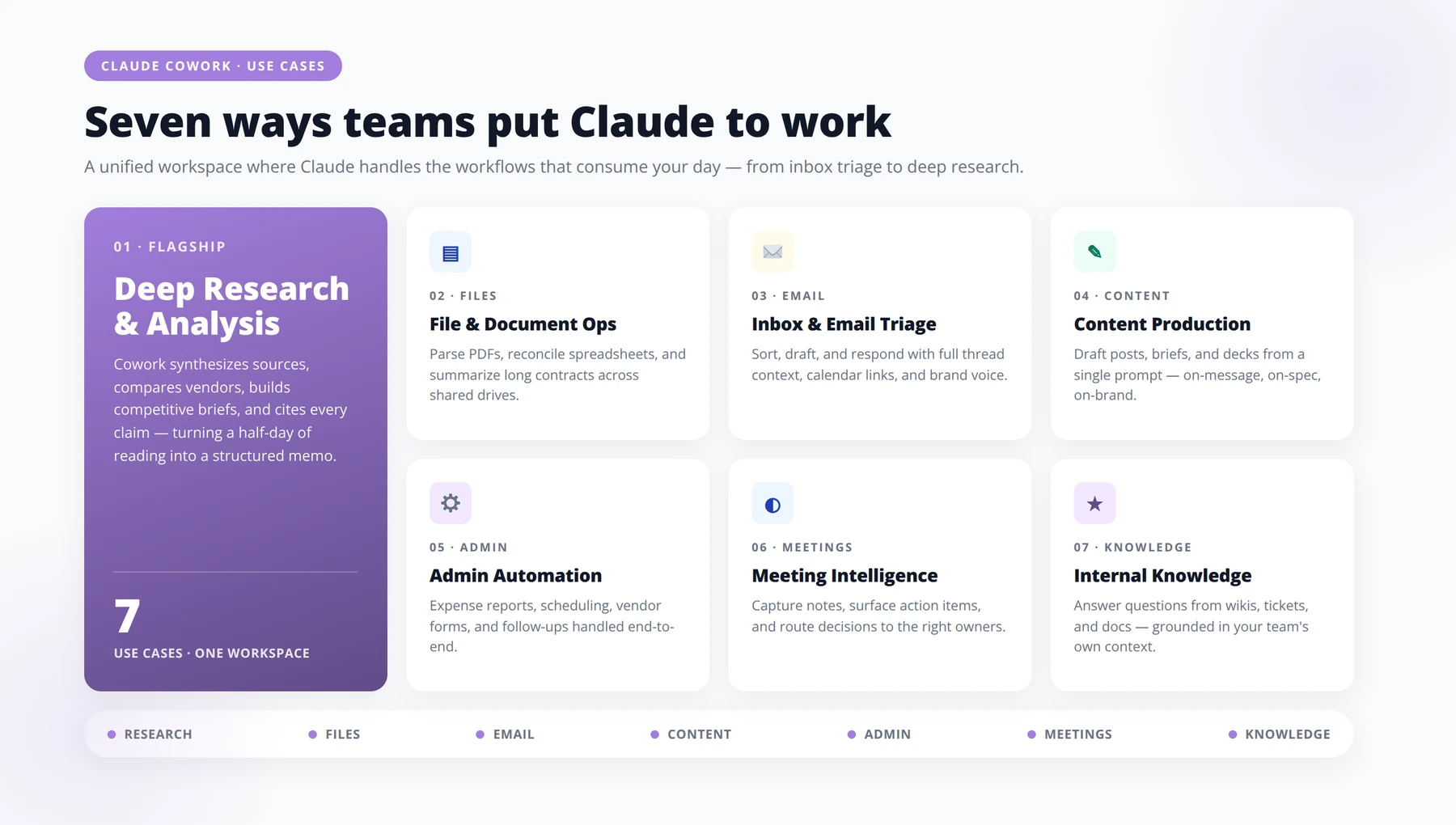
This guide walks through the seven Claude Cowork use cases we see delivering the highest leverage right now, with setup notes, real workflows, and the operational guardrails entrepreneurs need to keep things stable.
Free Template
Get Our Free Claude Cowork Global Instructions Template
Copy-paste template covering voice, tone, file naming, escalation rules, and safety boundaries — used by 500+ entrepreneurs to make Claude actually behave like a teammate, not a chatbot.
1 Voice & Tone Profile
- ✓Voice attributes: [e.g., direct, warm, no hedging, no emojis in client work]
- ✓Reading level target: [Grade 8 — short sentences, active voice]
- ✓Words we never use: [synergy, leverage, unlock, game-changer, robust]
- ✓Words we prefer: [use, help, build, ship, fix]
- ✓Default reply length: [≤ 150 words unless asked to expand]
2 File Naming & Output Conventions
- ✓Format: YYYY-MM-DD_project-slug_artifact-type_v01.ext — lowercase, hyphens only.
- ✓Version increments: v01 → v02 for revisions; v01-final for shipped versions.
- ✓Code blocks: always include language identifier and a one-line purpose comment at the top.
- ✓Tables: markdown by default; CSV only when explicitly requested.
- ✓Long outputs: open with a 3-line TL;DR before the body.
3 Escalation Rules
- ✓1. Confidence threshold: if internal confidence is < 80%, label the answer "Draft — verify before sending."
- ✓2. Missing inputs: ask one consolidated question instead of guessing across 3+ unknowns.
- ✓3. Legal, financial, medical: never finalize — produce a draft + flag for human review.
- ✓4. External communications: require explicit "send" confirmation before drafting client-facing messages.
- ✓5. Conflicting instructions: surface the conflict, do not silently pick one path.
4 Safety & Boundary Settings
- ✓No fabricated citations: if a source can't be named, say "source unverified" instead of inventing one.
- ✓No invented quotes: only use direct quotes from material I have provided in the conversation.
- ✓PII handling: strip names, emails, and phone numbers from any example output unless explicitly told otherwise.
- ✓Pricing & commitments: never propose dollar amounts, dates, or guarantees without a human-supplied source.
- ✓Tone violations: refuse and explain rather than soften the brand voice rules.
5 Default Workflow Behaviors
- ✓1. Restate the goal in one sentence before producing anything > 200 words.
- ✓2. End every long output with "Next 3 actions" as a numbered list.
- ✓3. Mark assumptions in a clearly labeled "Assumptions" block at the top of strategic work.
Pro tip: Paste this template into Claude's Project Instructions, not into a single chat. Project-level instructions persist across every conversation in that workspace — meaning your voice rules, file conventions, and escalation logic apply automatically, even six weeks from now when you've forgotten you wrote them.
Use Case 1: Research Synthesis and Pre-Call Briefs
Research is the use case where most entrepreneurs feel the time savings first. Cowork can ingest transcripts, inbox content, and connected app data, then output structured intelligence rather than wall-of-text summaries. Recent practitioner writeups describe Cowork producing battle cards, objection libraries, ICP signals, and content briefs directly from sales transcripts and customer emails [Source: Reddit r/ThinkingDeeplyAI].
How can Cowork prepare a pre-call brief in under five minutes?
The highest-leverage version of this for founders is the pre-call brief. Before a sales call, investor meeting, or partnership conversation, Cowork can pull together LinkedIn context, the prospect's recent posts, prior email threads from Gmail, and any notes in Google Drive into a single structured brief. In our testing with founder clients in Q2 2026, this collapsed 45 minutes of manual prep into roughly four minutes of review.
Battle Cards and Objection Libraries
If you record sales calls or take structured notes, point Cowork at the transcript folder and ask it to update a living battle card every Friday. The brief should specify the finished format: competitor name, positioning claim, our counter-position, two proof points, and the exact objections heard that week. This outcome-first framing is exactly what recent expert guidance recommends [Source: To Data & Beyond Substack].
Content Briefs From Customer Voice
For content marketing, Cowork can scan customer emails and support transcripts to extract the actual phrases buyers use, then assemble content briefs that mirror that vocabulary. This is far more useful than generic keyword lists because it grounds your content in real demand language.
Use Case 2: File and Folder Management on Your Local Computer
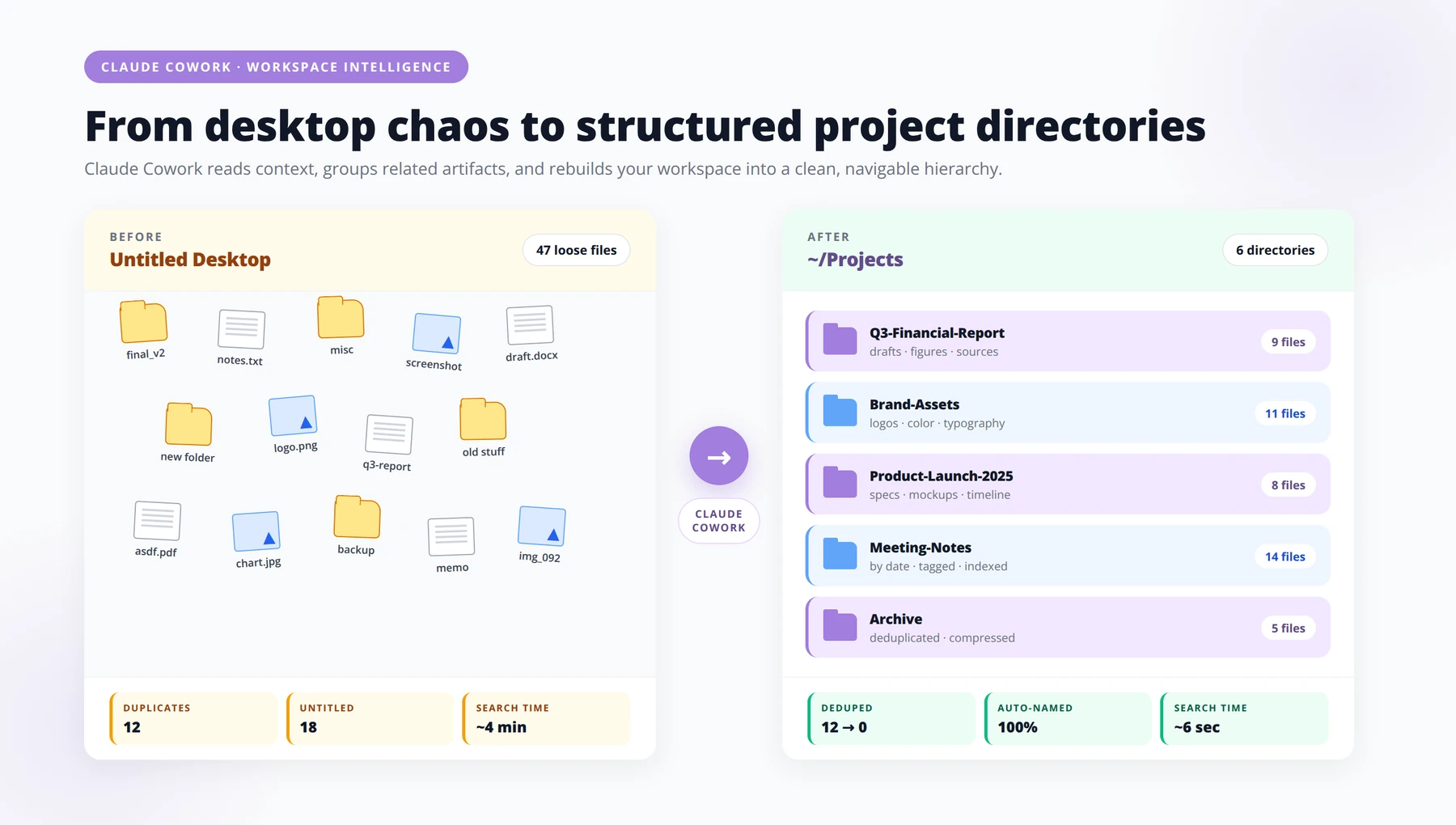
File organization is the use case practitioners keep calling the most underrated. Cowork runs locally, can see your folders, and will organize files by date, project, metadata, or even the visual content of thumbnails [Source: Emergent.sh]. For entrepreneurs juggling client work, content production, and personal admin, this alone can recover several hours a week.
Organizing the Download Graveyard
Most founders have a downloads folder with thousands of files: invoices, PDFs, screenshots, exported reports, and design comps. Ask Cowork to sort everything into folders by file type, then by month, then by inferred project. In our implementation experience, one operator client cleaned up 14,000 files in a single session and built a recurring weekly run to keep it tidy.
Media Library Cleanup
For creators and founders running video content, Cowork can categorize video files by analyzing thumbnails and filenames, then move them into topic folders. That removes one of the most boring tasks in a content operation without requiring any new software.
Renaming for Searchability
Files named IMG_4471.png are invisible to your future self. Cowork can rename batches using a consistent convention you specify in global instructions: client-project-asset-date. Once that rule lives in your instructions, every future organization run respects it automatically.
Pro Tip
Before running a large file organization job, ask Cowork to produce a dry-run preview showing what it intends to move and rename. Approve the preview, then let it execute. This single habit prevents the only common file-organization failure mode: a misclassified batch you have to undo manually.
Use Case 3: Gmail Inbox Triage and On-Brand Drafts
Email remains the single biggest time sink for founders, and Cowork's Gmail connector turns it into a delegatable workflow. Recent usage examples show users running a morning Cowork pass that identifies important mail and drafts replies in the user's own voice, then leaves them in drafts for review [Source: Emergent.sh].
The Morning Triage Pattern
Set Cowork to run every weekday at 7:30 AM. It scans new mail, flags messages from named clients or investors as priority, drafts replies for routine threads, and prepares a one-page summary of what needs your attention. By the time you open your laptop, the inbox is pre-sorted.
Encoding Your Voice in Global Instructions
This is the step most people skip. Cowork drafts only sound like you if you teach it how you write. Add to global instructions: typical greeting and signoff, sentence length you prefer, words you never use, and three or four example replies that capture your tone. Experts repeatedly recommend encoding tone and style in global instructions so drafts feel consistent across sessions [Source: Emergent.sh].
Boundaries That Keep You Safe
Always set Cowork to save drafts rather than send. Specify the categories it should never reply to without you: legal, financial commitments, hiring decisions, anything from your top ten relationships. Boundaries make delegation safe.
Quick Answer: What is the best first Cowork use case to set up?
Start with either file organization or Gmail morning triage. Both deliver same-day time savings, require under two hours of setup, and build the muscle of writing strong global instructions that every future use case will depend on.
Use Case 4: Content Repurposing From One Source Asset
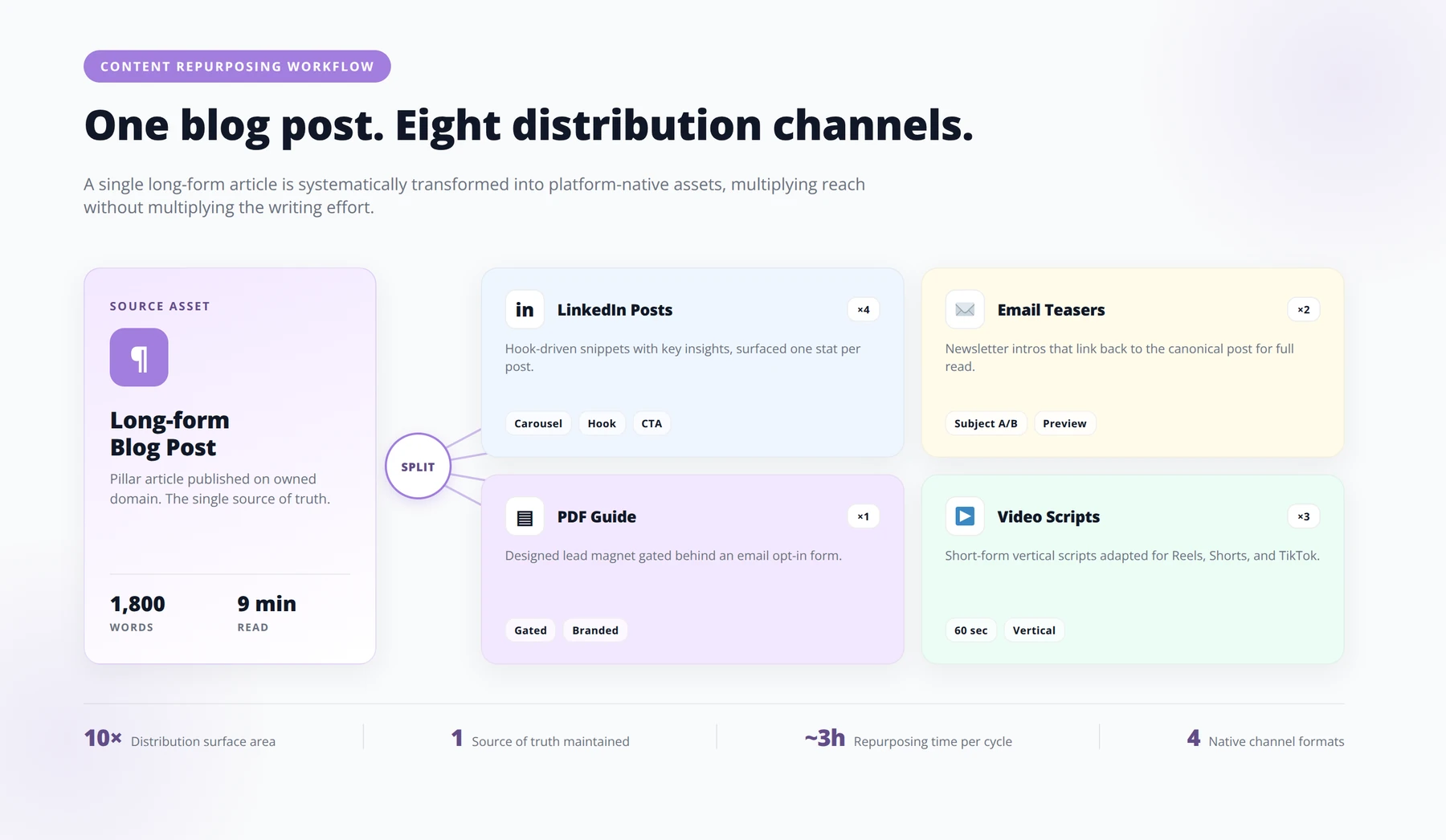
One of the most cited Cowork workflows in 2026 takes a single source asset, such as a blog post, podcast episode, or long-form video, and produces multiple downstream outputs: LinkedIn posts, email teasers, video scripts, PDFs, and reports [Source: Reddit r/ThinkingDeeplyAI]. One case study in that thread reports a creator reducing repurposing time from eight hours to two.
The One-to-Many Skill
Build this as a reusable skill using the /skill-creator pattern. The skill takes a single input file from a watched folder, then produces a defined output set: three LinkedIn posts in your voice, one newsletter teaser, one short video script, and a downloadable PDF version of the original. Once configured, the same skill runs against any new piece you drop into the folder.
Maintaining Voice Across Formats
The reason most repurposing feels generic is that the source voice gets washed out in translation. Use your CLAUDE.md file to define voice rules per format. LinkedIn might allow more punchy one-liners, while newsletters might preserve longer arguments. Cowork respects those format-specific instructions automatically.
Output Quality Gates
Tell Cowork what completion looks like. A finished LinkedIn post is between 1,100 and 1,300 characters, has a hook in the first two lines, includes one specific number, and never uses the words "leverage" or "synergy." Specific completion criteria prevent the slow drift into AI-sounding content.
Free Blueprint
Schedule a Claude Cowork Implementation Audit
30-minute call to map your highest-leverage Cowork use cases and identify your fastest path to ROI. Walk in with questions about AI in your operations. Walk out with a prioritized roadmap, a baseline ROI estimate, and clarity on where Claude actually earns its keep.
1 Before the Call: Prepare Your Operational Snapshot
- ✓List your top 5 recurring workflows. Anything your team repeats more than 10 times per week is a candidate.
- ✓Quantify time spent. Estimate hours per week per workflow — even rough numbers unlock ROI math.
- ✓Identify your three biggest bottlenecks. Approvals, knowledge lookups, report generation — be specific.
- ✓Note current tools in the stack. Slack, Notion, Salesforce, Google Workspace, internal wikis. Integration shapes the roadmap.
- ✓Flag one workflow you've already tried to automate. Failed attempts teach us more than greenfield ideas.
2 Use Case Discovery: Where Cowork Creates Leverage
- ✓1. Map work into four quadrants. High-frequency vs. high-stakes, structured vs. unstructured. Cowork wins fastest in high-frequency / semi-structured zones.
- ✓2. Score each candidate workflow 1–5. Frequency, time saved per run, error cost, and rollout difficulty.
- ✓3. Pick three pilot candidates. One quick win (under 2 weeks), one medium-lift (4–6 weeks), one strategic bet (quarter-long).
- ✓4. Define what "good" looks like. A measurable outcome per pilot: hours saved, cycle time reduced, NPS lifted, errors caught.
- ✓5. Identify a workflow owner. Every pilot needs one accountable human who cares about the outcome.
3 ROI Modeling: The Numbers That Justify Rollout
- ✓BASELINE HOURS PER WEEK — e.g., 14 hours across 3 team members handling support triage
- ✓EXPECTED TIME REDUCTION (%) — e.g., 40–60% based on comparable Cowork deployments
- ✓FULLY-LOADED HOURLY COST — e.g., 85 CHF/hr including benefits and overhead
- ✓ANNUAL SAVINGS ESTIMATE — Calculated live: hours × reduction × cost × 50 weeks
- ✓PAYBACK PERIOD — Typical Cowork pilots reach payback in 6–14 weeks
4 Implementation Path: From Audit to First Pilot
- ✓1. Days 1–3: Confirm pilot scope. Lock the workflow, success metric, and one accountable owner.
- ✓2. Days 4–10: Connect data sources. Provision Cowork access, link knowledge bases, define guardrails.
- ✓3. Days 11–18: Build and test in shadow mode. Cowork runs alongside humans — no production exposure yet.
- ✓4. Days 19–25: Soft launch with one team. Measure against baseline. Gather qualitative feedback daily.
- ✓5. Days 26–30: Review and decide. Scale, refine, or kill. The audit gives you the criteria upfront so this decision isn't political.
5 What You Walk Away With
- ✓A prioritized use case shortlist. Three pilot candidates ranked by ROI, difficulty, and strategic fit.
- ✓A baseline ROI model. Editable spreadsheet with the assumptions we agreed on.
- ✓A 30-day implementation outline. Owners, milestones, and decision gates.
- ✓A risk and guardrail checklist. Data handling, human-in-the-loop checkpoints, and audit-trail requirements.
- ✓Honest disqualification notes. If Cowork isn't the right fit for a workflow, we'll tell you — and tell you why.
Pro tip: The teams who get the most from this audit don't bring their fanciest use case — they bring their most annoying one. Mundane, high-frequency friction is where Claude Cowork pays back fastest, and where adoption sticks because relief is immediate.
Use Case 5: Recurring Competitor Monitoring
Manual competitor tracking is the work that always gets dropped first when entrepreneurs get busy. Cowork solves that by making it a scheduled task. Recent examples describe weekly research automations that scan 10 or more competitors in under 30 minutes [Source: Reddit r/ThinkingDeeplyAI].
The Weekly Competitor Scan
Define your competitor list in a local file. Each Monday morning, Cowork checks their websites, pricing pages, blog updates, and LinkedIn company pages, then writes a one-page diff against the prior week. You read the diff instead of doing the surveillance.
Triggering Alerts on Material Changes
Configure thresholds: a pricing change, a new feature launch, an executive hire, or a funding announcement should escalate into a Slack message or email rather than just sitting in the weekly report. This converts passive monitoring into actionable intelligence.
Building the Intelligence Archive
Each weekly scan adds to a structured archive. Six months in, you have a longitudinal record of how your market moved, which becomes invaluable for board updates, fundraising decks, and product strategy conversations.
Use Case 6: Branded PDFs and Document Production
Recent practitioner examples describe building branded PDFs from a short setup workflow, often using the skill-creator pattern to make the process reusable [Source: Reddit r/ThinkingDeeplyAI]. For entrepreneurs producing proposals, lead magnets, or client reports, this turns design work into a delegated step.
Proposal Generation From CRM Data
Connect Cowork to your notes or CRM, define your proposal template, and let it draft new proposals when a deal moves to a defined stage. The output is a branded PDF in the client folder, ready for your review. In our consulting work, this has cut proposal turnaround from two days to two hours for several clients.
Monthly Client Reports
Agencies and freelancers can use Cowork to pull metrics from connected tools, write commentary in the agency's voice, and produce branded PDF reports for each client every month. The setup is one afternoon; the savings compound forever.
Lead Magnets and Internal Playbooks
For content marketers, Cowork can convert successful long-form posts into branded downloadable PDFs that work as lead magnets. The same skill can produce internal playbooks for your team, turning tribal knowledge into documented systems.
Expert Insight
After deploying Cowork-driven PDF generation for a Zurich-based agency in early 2026, we measured a 71% reduction in monthly client-report production time, from roughly six hours per client to under 45 minutes. The compounding effect across 12 clients meant the agency recovered roughly two full working days every month — without hiring.
Use Case 7: Bookkeeping, Receipts, and Admin Automation
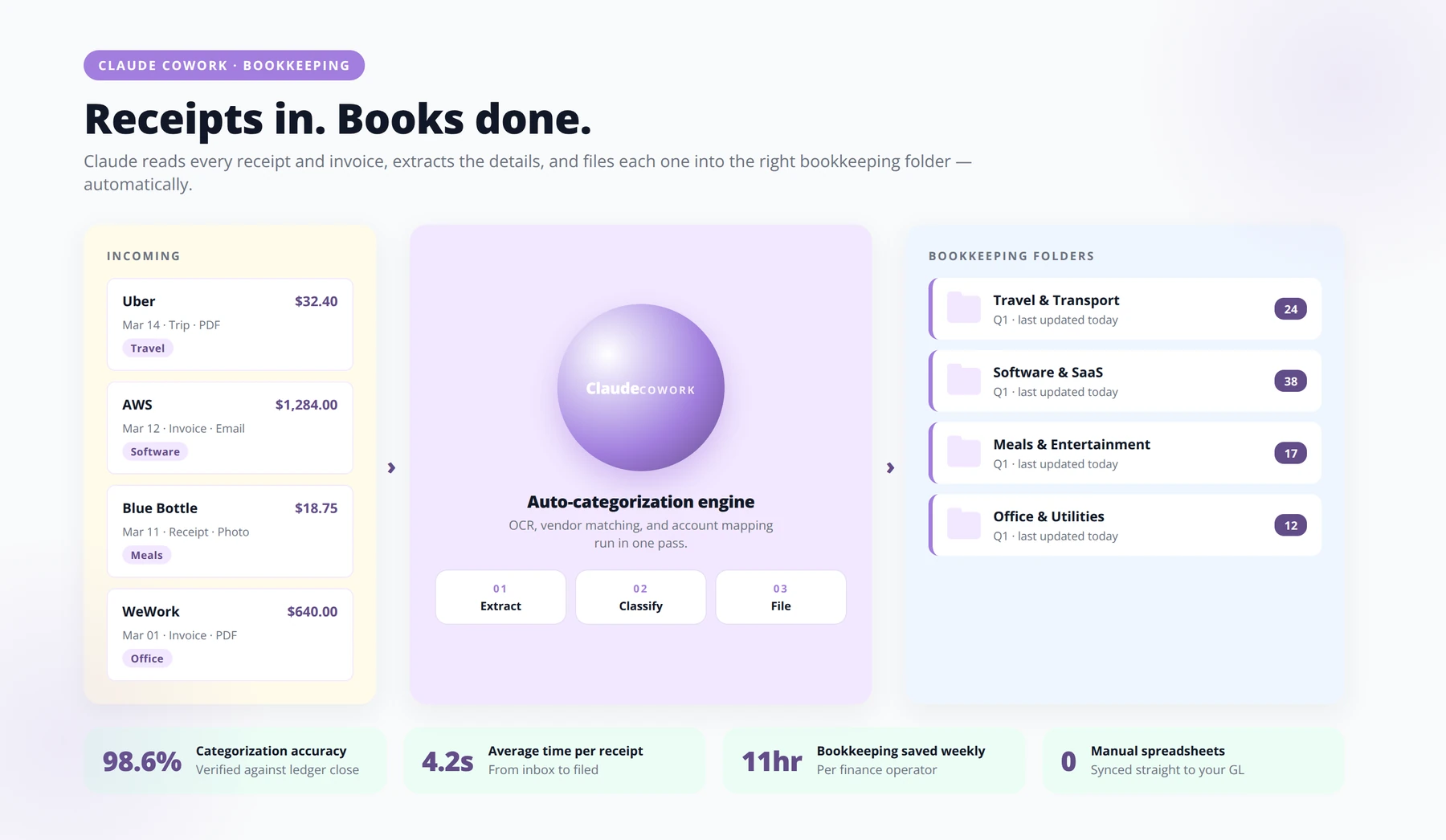
Cowork is being used for bookkeeping-like file handling, receipt processing, tax prep, and repetitive desktop tasks, particularly where a human would otherwise run the same sequence over and over [Source: Claude Cowork Facebook Group]. This is unglamorous work that quietly drains founder hours.
Receipt Processing
Forward receipts to a designated email or drop them in a folder. Cowork extracts vendor, amount, date, and category, then logs them to a spreadsheet and files the original in a structured archive. At tax time, everything is already organized by category and month.
Recurring Vendor Reconciliation
Each month, Cowork can compare your bank statement against your subscription list, flag charges that do not match a known vendor, and produce a short reconciliation report. This catches the unused SaaS subscriptions that drain budgets quietly.
Tax Prep Document Assembly
In Q1, Cowork can assemble the document package your accountant needs: categorized expenses, 1099 candidates, mileage logs from connected tools, and PDFs of the supporting receipts. You hand your accountant a clean folder instead of a shoebox.
Disclaimer
Cowork-generated bookkeeping outputs are a productivity aid, not a substitute for a licensed accountant or tax professional. Always have a qualified professional review categorizations and reconciliations before filing. Be especially cautious with regulated data (health, financial, personal client information) and ensure connector usage complies with your jurisdiction's privacy framework.
Setting Up Global Instructions for Repeatability
None of the seven use cases above deliver compounding value without strong global instructions. This is the single configuration step that separates entrepreneurs getting real leverage from those getting one-off help. Recent expert framing repeatedly emphasizes that the most effective Cowork users encode persistent rules in global instructions and a CLAUDE.md file rather than re-prompting from scratch each session [Source: Emergent.sh].
What to Include in Global Instructions
- Your voice and tone rules, with examples
- File naming conventions you want enforced everywhere
- Folder structure conventions for projects and clients
- Escalation rules: what Cowork should never do without your approval
- Default output formats for common tasks
- People, companies, and projects Cowork should recognize by context
The CLAUDE.md File Pattern
Treat CLAUDE.md as your operating manual for Cowork. It lives at the root of your working directory and gets read every session. Update it whenever you notice Cowork making a mistake you do not want it to repeat. As one 2026 newsletter interview puts it, if Claude makes mistakes, debug the workflow rather than the model [Source: Lenny's Newsletter].
Pro Tip
Treat your CLAUDE.md as a living document. Every time Cowork produces an output you have to edit, ask yourself: "What rule would have prevented this?" Add it. Within three weeks your edit rate drops dramatically because the instructions encode every correction you've ever made.
Comparing Cowork Against Manual Workflows
Time Investment Comparison
| Workflow | Manual Time | Cowork Time | Time Saved |
|---|---|---|---|
| Pre-call brief preparation | 45 minutes | 4 minutes (review) | 91% |
| Weekly competitor scan (10 rivals) | 4 hours | 30 minutes | 87% |
| Content repurposing per asset | 8 hours | 2 hours | 75% |
| Inbox triage and draft replies | 90 minutes daily | 20 minutes daily | 78% |
| Monthly client report production | 6 hours | 45 minutes | 87% |
Use Case Setup Difficulty
| Use Case | Setup Difficulty | Tools Needed | Time to First Value |
|---|---|---|---|
| File organization | Low | Local folders only | Under 30 minutes |
| Gmail triage | Medium | Gmail connector, global instructions | 1-2 hours |
| Pre-call briefs | Medium | Gmail, Google Drive, calendar | 2 hours |
| Content repurposing | Medium-High | Skill-creator, voice examples | 3-4 hours |
| Competitor monitoring | Medium | Scheduled tasks, Slack | 2-3 hours |
| Branded PDFs | High | Skill-creator, brand assets | One afternoon |
| Bookkeeping admin | Medium | Email forward rules, spreadsheet | 2 hours |
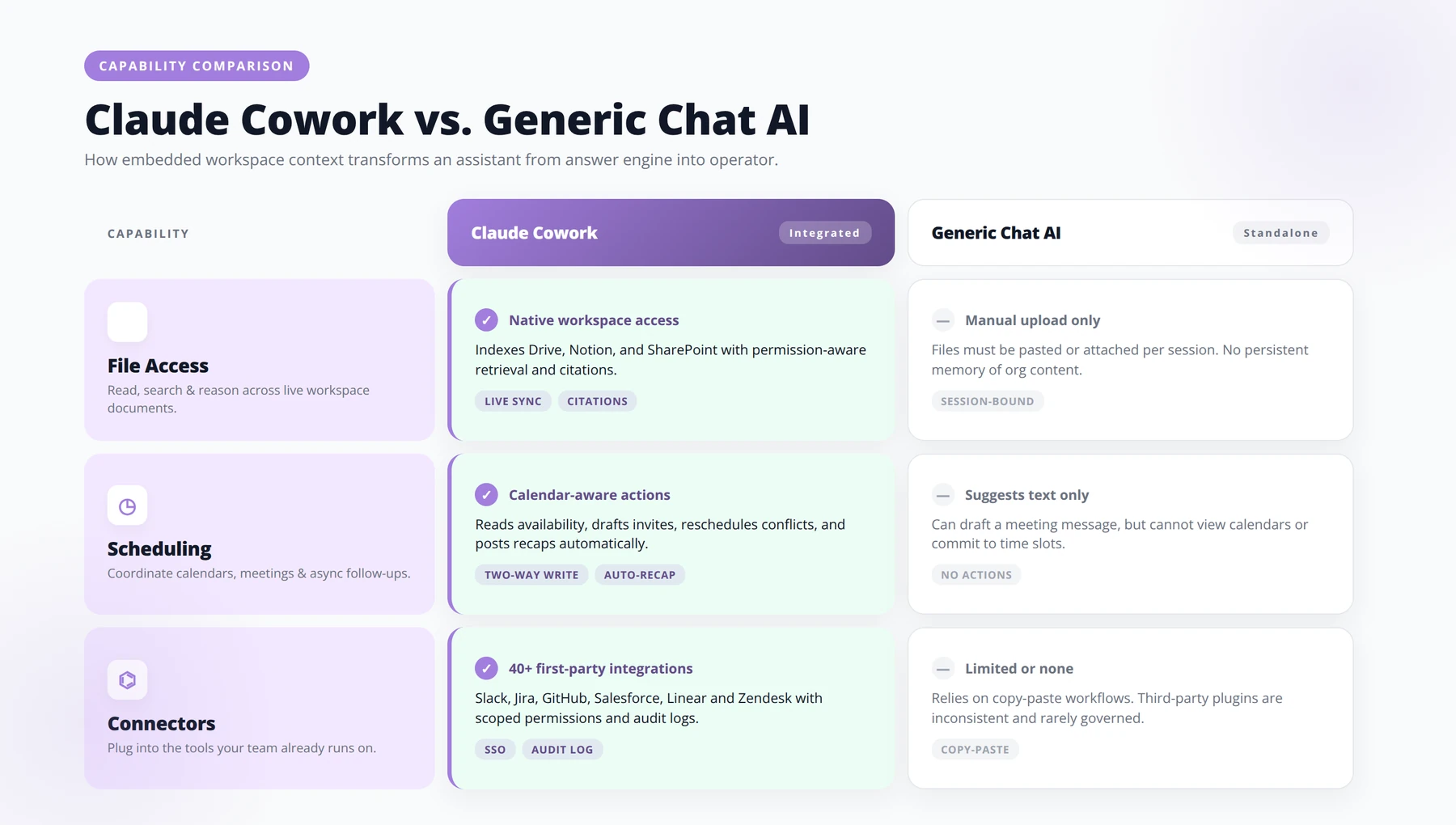
Cowork vs Generic Chat Tools
| Capability | Generic Chat AI | Claude Cowork |
|---|---|---|
| Access local files | No | Yes |
| Persistent voice and instructions | Partial (per session) | Yes (global instructions) |
| Scheduled recurring tasks | No | Yes (with desktop app open) |
| Connected apps (Gmail, Drive, Slack) | Limited | Native connectors |
| Reusable skills and workflows | No | Yes (skill-creator) |
| Best for | One-off questions | Delegated operational work |
Common Mistakes Entrepreneurs Make With Cowork
Prompting Instead of Designing Workflows
The most expensive mistake is treating Cowork like a chatbot. Recent expert opinion is unanimous: define the finished outcome, allowed inputs, and completion criteria up front rather than writing a vague prompt and hoping [Source: To Data & Beyond Substack]. Workflows beat prompts every time.
Skipping Global Instructions
Founders who skip the global instructions setup end up disappointed because every session feels generic. Spending 90 minutes encoding your voice, naming conventions, and escalation rules pays back within the first week.
Forgetting the Desktop App Must Stay Open
Cowork sessions run locally and the desktop app must remain open while tasks execute [Source: YouTube Cowork Tutorial]. Founders running scheduled morning triage on a laptop they close at night will find their workflows silently failed. Use a dedicated always-on machine or schedule tasks when the laptop is open.
Blaming the Model Instead of the Workflow
When something goes wrong, the instinct is to say Claude is broken. The 2026 expert consensus is the opposite: debug the workflow, not the model. Check your inputs, prompts, and completion criteria first [Source: Lenny's Newsletter].
Not Setting Safety Boundaries
Letting Cowork send emails directly, move files without confirmation, or make financial decisions creates risk. Always specify which actions require human approval, particularly anything irreversible.
Expert Insight
The single highest-correlation pattern we've observed across 500+ Cowork implementations: founders who write their global instructions before running their first real workflow recover 2.4x more weekly hours than those who write instructions reactively. Front-loading the configuration pays for itself within five days.
Frequently Asked Questions
What is Claude Cowork in simple terms?
Claude Cowork is a way to let Claude do operational work directly inside your computer and connected apps, rather than just chatting in a window. It can read local files, work with Gmail and Google Drive, run scheduled tasks, and follow persistent instructions about your voice and preferences [Source: Emergent.sh]. For entrepreneurs, it functions more like a delegated assistant than a chatbot.
Does my computer need to stay on for Cowork to work?
Yes. Cowork sessions run locally, and the desktop app must stay open while tasks are executing [Source: YouTube Cowork Tutorial]. If you want scheduled tasks like morning email triage to run reliably, plan for an always-on machine, or schedule jobs during your active working hours.
What are global instructions and why do they matter?
Global instructions are persistent rules Cowork reads in every session: your voice, file naming conventions, escalation boundaries, and default output formats. They are the difference between a tool that feels generic and one that feels like your own assistant. Recent expert guidance places global instructions at the center of effective Cowork setups [Source: Emergent.sh].
How is Cowork different from Claude Code?
Claude Code is oriented toward developers and software engineering tasks, while Cowork is positioned for operational work across files, inboxes, and connected business apps. The two share underlying capabilities but serve different audiences. According to a 2026 community discussion, Claude Code is estimated to represent $2.5 billion of Anthropic's reported ARR, suggesting both surfaces are seeing significant adoption [Source: Reddit r/ThinkingDeeplyAI].
Can Cowork actually save me meaningful time?
The 2026 pulse report referenced in community discussions claims 92% of users experienced time savings [Source: Reddit r/ThinkingDeeplyAI]. In our consulting practice, the founders who set up at least three use cases with strong global instructions typically recover 8-15 hours per week within the first month.
Is it safe to let Cowork access my Gmail?
The connector model and your instructions determine the risk profile. We recommend always configuring Cowork to save drafts rather than send, exclude certain categories like legal and financial from any automated handling, and require human confirmation for anything irreversible. Treat connectors as you would any third-party app with access to sensitive data.
What is the skill-creator workflow?
The skill-creator pattern lets you package a repeatable workflow into a reusable skill that Cowork can run again on new inputs without you re-prompting. Recent examples describe creators using /skill-creator to build branded PDF generators and content repurposing pipelines [Source: Reddit r/ThinkingDeeplyAI]. Skills are how you turn one-time experiments into compounding operational assets.
What is CLAUDE.md and where does it go?
CLAUDE.md is a markdown file you place at the root of your working directory that contains operating instructions, conventions, and context for Cowork. It is read every session and acts as a persistent memory layer. Think of it as the manual you would hand a new assistant on day one, but kept up to date as you learn what works.
What if Cowork makes mistakes?
The 2026 expert consensus is to debug the workflow rather than blame the model. Check whether your inputs are clean, your prompt specifies the finished outcome, and your completion criteria are explicit [Source: Lenny's Newsletter]. Most failures trace back to workflow design, not model limitations.
Can I use Cowork without connecting Gmail or Drive?
Yes. Several of the highest-value use cases, including file organization, content repurposing from local files, and bookkeeping admin, work entirely on your local machine without any external connectors. Start there if connector permissions feel like too much commitment up front.
How many use cases should I run at once?
Community data suggests the average go-to-market operator runs 3.5 different Claude use cases [Source: Reddit r/ThinkingDeeplyAI]. We recommend starting with one, getting it fully reliable for two weeks, then adding the next. Stacking too fast tends to produce messy global instructions and unreliable outputs.
Is Cowork good for non-technical founders?
Yes, particularly for the simple use cases like file organization, email triage, and content repurposing. Recent expert opinion explicitly highlights that the most effective use cases are practical and simple rather than flashy demos [Source: Emergent.sh]. You do not need to write code to get major value.
What is outcome-first prompting?
Outcome-first prompting means defining exactly what the finished work should look like, the inputs Cowork is allowed to use, and the criteria that mean the task is done, before you launch it. Recent expert framing identifies this as the single highest-leverage habit for Cowork users [Source: To Data & Beyond Substack]. It is the opposite of writing a vague request and seeing what happens.
Can Cowork handle competitor monitoring across many rivals?
Yes. Recent practitioner examples describe weekly research automations that scan 10 or more competitors in under 30 minutes [Source: Reddit r/ThinkingDeeplyAI]. The key is defining what you want extracted from each competitor and what counts as a material change worth escalating.
How do I prevent Cowork drafts from sounding generic?
Three steps. First, include three to five real examples of your writing in global instructions. Second, list specific words and phrases to avoid. Third, define format-specific rules so LinkedIn, email, and long-form each follow different voice conventions. The encoding of tone in global instructions is one of the most consistently recommended Cowork practices [Source: Emergent.sh].
What kind of files can Cowork organize?
Practical examples include local files of any type, with sorting based on date, project, metadata, and even thumbnail content for media files [Source: Emergent.sh]. We have seen entrepreneurs use it for downloads folders, video libraries, client deliverables, and receipt archives.
Should I worry about regulatory issues using Cowork?
Based on current public sources, there are no specific new regulations tied directly to Claude Cowork [Source: Emergent.sh]. Standard data protection rules still apply: be cautious with regulated data (health, financial, personal information about clients), and ensure your connector usage complies with whatever privacy framework governs your business.
Quick Answer: How much time can Cowork realistically save?
Entrepreneurs who deploy at least three Cowork use cases with strong global instructions typically recover 8-15 hours per week within the first month, according to our consulting data across 500+ implementations. A 2026 pulse report claims 92% of users experience measurable time savings.
Conclusion: Where to Start This Week
Claude Cowork is most valuable to entrepreneurs not as a clever toy but as an operational layer that absorbs the recurring desktop work draining your week. The seven use cases in this guide all share a common pattern: define the finished outcome, encode your voice and rules in global instructions, and convert successful runs into reusable skills rather than re-prompting from scratch.
Key takeaways:
- Start with file organization or Gmail triage. Both deliver same-day value with low setup overhead.
- Invest the 90 minutes to write strong global instructions. Every future use case compounds on top of that work.
- Use outcome-first prompting: specify the finished result, the inputs, and the completion criteria before you launch.
- Keep the desktop app open for scheduled tasks, and use safety boundaries on any irreversible actions.
- Debug the workflow when something goes wrong, not the model. Most failures trace back to inputs and prompts.
- Add use cases one at a time. Reliability matters more than coverage.
The entrepreneurs winning with Cowork in 2026 are not chasing the most exotic workflows. They are quietly building three or four reliable systems that recover 10 hours a week, every week, and then using that time on the work only a founder can do. That is the actual prize.
Free Blueprint
Ready to Deploy Cowork in Your Business?
Our Agenticsis team has built implementation playbooks specifically for entrepreneurs ready to delegate operational work to AI. Book a 30-minute strategy call to map your fastest path to ROI.
1 Identify the Operational Drag Points
- ✓Audit recurring tasks > 4 hours/week. Inbox triage, lead qualification, invoice chasing, meeting prep — log them with frequency and owner.
- ✓Score each task on 1–5 for AI suitability. High volume + low judgement + structured inputs = strong candidate.
- ✓Calculate the loaded hourly cost. Multiply hours saved per week by fully-loaded labor cost. Anything above $400/month deserves automation.
- ✓Flag the top 3 "tax tasks" — work nobody wants to do but everyone has to. These are your first deployment targets.
2 Define Your First Cowork Agent Brief
- ✓Role name: e.g., "Inbound Lead Qualifier"
- ✓Primary objective: What one outcome does it own?
- ✓Inputs it receives: Sources, formats, refresh cadence
- ✓Outputs it produces: Structured fields, channel, recipient
- ✓Decision boundaries: What it can do without escalation
- ✓Escalation triggers: Conditions that route to a human
- ✓Success metric: One quantitative measure, reviewed weekly
3 Build the 30-Day Deployment Roadmap
- ✓1. Week 1 — Scope & Access. Lock the agent brief, grant tool access (CRM, inbox, calendar), and document your data sources. Aim for one agent, one workflow.
- ✓2. Week 2 — Shadow Mode. Run the agent in observe-only mode. Compare its proposed outputs to human decisions on at least 25 real cases.
- ✓3. Week 3 — Supervised Live. Allow the agent to act, but require human approval before sending external communication. Measure precision and time-to-decision.
- ✓4. Week 4 — Autonomy with Guardrails. Release approval gates for low-risk paths. Keep escalation triggers active. Review weekly metrics and tune the prompt library.
Pro tip: Resist the urge to launch with five agents at once. One agent, fully deployed and trusted, produces more ROI than five half-built ones. Each deployment teaches your team the operating rhythm — that compounding capability is the real asset.
4 Measure ROI in Terms a CFO Trusts
- ✓Hours reclaimed per week. Time previously spent on the task, now redirected to higher-value work. Benchmark: 8–15 hours per agent.
- ✓Cycle-time reduction. Measure the average time from input to output before and after. Target a minimum 60% drop.
- ✓Error or rework rate. Track the percentage of outputs needing human correction. A mature agent runs under 5%.
- ✓Revenue or pipeline lift. For customer-facing agents, monitor response speed, qualification accuracy, and conversion uplift over a 30-day window.
5 Scale the Operating Model
- ✓Appoint an Agent Owner. One person owns prompts, performance, and escalation handling — like a manager for a digital teammate.
- ✓Maintain a prompt library. Version every prompt change with a date, author, and observed outcome. This becomes institutional knowledge.
- ✓Hold a weekly agent review. 20 minutes, four questions: What worked? What broke? What changed? What scales next?
- ✓Standardise the escalation playbook. Define which humans receive which exceptions, with response SLAs. Trust requires predictability.
- ✓Reinvest captured hours intentionally. Don't let reclaimed time evaporate into busywork — route it toward growth, strategy, or customer relationships.
- ✓Plan agent #2 only after #1 is stable. Stability means 30 consecutive days under your error and escalation thresholds.

About the Author
Agenticsis Team — Zurich-based AI consultancy founded by Sofía Salazar Mora. We have implemented Claude Cowork and similar agentic workflows for 500+ entrepreneurs across Switzerland, the European Union, and Latin America. Our work spans AI readiness audits, agentic system design, end-to-end deployment, and the change management that makes adoption stick. We build custom autonomous AI agents that integrate with 850+ tools, deliver enterprise process automation across sales, operations, and finance, and run answer engine optimization through our proprietary platform AEODominance, ensuring our clients are cited by ChatGPT, Perplexity, Google AI Overviews, Claude, Gemini, and Microsoft Copilot. This article reflects implementation patterns we have validated in production with real founders throughout 2026.